
GameDeck: Game Log & Tier List
Non revendiquéeGameDeck is a simple, good-looking way to keep track of the games you've played, are…
Par Takahiro Kimura · JeuxPourquoi nous l'attendons : A clear, feature-rich game tracker with a fun tier list and no social pressure, well suited to gamers.



En bref
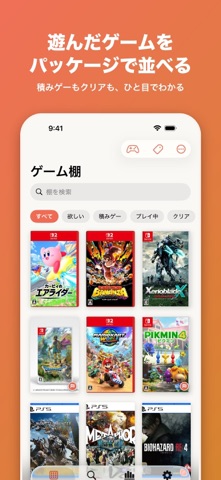
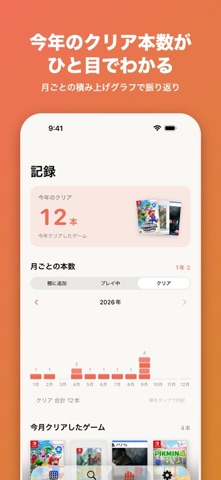
GameDeck: Game Log & Tier List is a games tracker for keeping a shelf of played, playing, backlogged and wishlisted titles, with box art and details filled in by title search. It suits gamers who want a private, no-account log, and it stands out for its tier list feature that ranks shelf games into S to D tiers and exports them as an image.
Résumé par Debuts, d'après la fiche de l'App Store.À propos
GameDeck is a simple, good-looking way to keep track of the games you've played, are playing, and have piled up in your backlog. No accounts, no social feed — just your own game shelf that's fun to look at.
■ ADD GAMES IN SECONDS ・Search by title to fill in box art, platform, publisher, release date and genre automatically ・Filter by platform: Switch 2, Switch, PS5, PS4, Xbox, PC and more ・Add digital-only, mobile or retro games by hand
■ MADE FOR GAMERS ・Six statuses: Wishlist, Backlog, Playing, Beaten, Completed (100%) and On Hold ・Total play time, start date and finish date ・Physical, digital, subscription or sold — track how you own each game ・Mark a game as Beaten to get a "CLEAR" stamp on its box art
■ TIER LISTS (NEW) ・Rank games from your shelf into S / A / B / C / D tiers ・Create one in a tap from a tag, genre, platform or series — e.g. "RPG" or "Open World" ・Rename tiers, change colors, add or remove tiers freely ・8 themes, portrait or square covers ・Drag and drop, or tap a game and then tap a tier ・Export the whole tier list as one image to save or share
■ A SHELF YOU'LL ENJOY BROWSING ・Box-art grid or detailed list ・Filter by status, platform or tag; sort by release date, play time, rating and more ・Group games by series ・Adjust how each cover is framed
■ LOOK BACK ON YOUR YEAR ・Games beaten this year and a month-by-month chart ・Total play time, favorite platforms, publishers and tags ・Pinned notes and memories in one place
■ ALSO INCLUDED ・Ratings (5 stars, 1–5 or 1–10 — your choice), reviews and multiple notes ・Tags, with popular ones ready to use (Open World, RPG, Masterpiece…) ・14 theme colors, with a matching Home Screen icon ・Widgets for the game you're playing and this year's beaten count ・Backup and restore
■ PREMIUM (OPTIONAL) ・Remove ads ・Remove the logo from exported tier list images ・CSV export Choose monthly, yearly (with a 7-day free trial) or a one-time purchase. All core features are free.
Game data is provided by RAWG (rawg.io). Your records are stored only on your iPhone and are never made public.
■ TERMS & PRIVACY Terms of Use (EULA): https://www.apple.com/legal/internet-services/itunes/dev/stdeula/ App Terms: https://taka3267-collab.github.io/tkApps/gamedeck/terms-en.html Privacy Policy: https://taka3267-collab.github.io/tkApps/gamedeck/privacy-policy-en.html
Les notes des utilisateurs
Connecte-toi pour noter cette appli. Ce qui compte, c'est d'être honnête.
Pas encore de notes. Tu l'as essayée ? Sois le premier à la noter.
Plus d'apps Jeux
Les meilleures nouvelles apps Jeux de la semaine Connect 2: Card Game 2 ConnectConnect 2 is the conversation card game that makes people honest on purpose
 Ballpoint ArmyRemember drawing army men in the back of your school book?
 Chess Master vs AIPlay chess against a strong computer opponent, completely offline, in a sleek neon design
 ClayChonkMash soft clay with your fingers
 Sudoku by IbexoI just want to play sudoku
 SnookScoreVoice-controlled snooker scorekeeper - say the ball and it tracks the frame