
GOAT Cam: Webcam for PC
Non revendiquéeGOAT Cam turns your iPhone into a webcam for your Windows 11 PC
Par Chin Leung · Photo et vidéo



En bref
GOAT Cam turns an iPhone into a webcam for a Windows 11 PC, connecting by USB cable or over Wi-Fi so video apps can select the phone's camera. It suits people who want better video on their PC than a built-in webcam gives, and it runs without an account, ads, or tracking. Video goes straight from the iPhone to the PC, and the app includes a free preview of about five minutes of video before a subscription is needed.
Résumé par Debuts, d'après la fiche de l'App Store.À propos
GOAT Cam turns your iPhone into a webcam for your Windows 11 PC.
Connect with a USB cable or over your Wi-Fi. Your iPhone's camera then appears on the PC as a camera your video apps can select.
SEE IT WORK FIRST If you have never subscribed, the first time you install GOAT Cam, your first 18,000 frames of video to the PC are free: about 5 minutes at 60 frames per second. Once your PC connects, the full app opens, Settings included. Only frames your iPhone sends to a connected PC count, so time connected without video costs nothing. When the preview is used up, your iPhone stops sending video until you subscribe, and the app shows the plans. To see them sooner, tap See plans on the first screen or in Settings. If you have subscribed before, there is no free preview and the app shows the plans straight away.
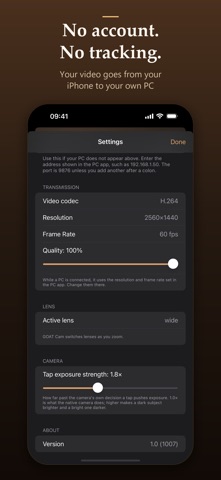
WHAT YOU GET WITH GOAT CAM PRO • Up to 1080p at 120 fps, or 1440p at 60 fps, depending on your iPhone's camera (1080p at 60 fps is recommended) • USB or Wi-Fi • Front or back camera, zoom, focus and exposure control from your PC • Tap to focus and expose on your iPhone's live preview
WHAT YOU NEED • A Windows 11 PC (64-bit; ARM-based PCs are not supported yet) running the free GOAT Cam PC app, WebCam Pro GOAT: https://goatcam.dagoat.io/download/ • For USB: Apple's free Apple Devices app from the Microsoft Store, or iTunes. Wi-Fi does not need it. • For Wi-Fi: your iPhone and your PC on the same network.
PRIVATE BY DESIGN No account, no sign-in, no ads, no analytics, no tracking. Your video goes from your iPhone to your own PC, over your cable or your own network, and never reaches us.
SUBSCRIPTION GOAT Cam Pro is an auto-renewable subscription with two plans. U.S. prices: • Basic: $1.99 a month. Introductory price, if your Apple Account is eligible: $1.49 a month for the first 3 months. • Annual: $14.99 a year. Introductory price, if your Apple Account is eligible: $11.99 for the first year. The app shows the price in your own currency before you buy, and shows an introductory price only when your Apple Account can get it. • Payment is charged to your Apple Account when you confirm the purchase. • The subscription renews automatically unless it is turned off at least 24 hours before the end of the current period, and the renewal is charged within the 24 hours before the period ends. • Manage or cancel it any time in your Apple Account settings, or from Settings inside the app.
Terms of Use (Apple's Standard EULA): https://www.apple.com/legal/internet-services/itunes/dev/stdeula/ Privacy Policy: https://goatcam.dagoat.io/privacy/ Support: https://goatcam.dagoat.io/support/ or support@dagoat.io
Les notes des utilisateurs
Connecte-toi pour noter cette appli. Ce qui compte, c'est d'être honnête.
Pas encore de notes. Tu l'as essayée ? Sois le premier à la noter.
Plus d'apps Photo et vidéo
Les meilleures nouvelles apps Photo et vidéo de la semaine Zoetrope ViewerWatch your zoetrope records and slipmats animate through your camera, or live on your…
 Migumento · QR photo albumOne album for every guest
 SwipeshineSwipeshine turns photo cleanup into one gesture
 Pocket Film: Vintage CameraPocket Film turns your phone into the back of a real film camera
 PlanIt Earth: VR Photo PlannerFor landscape, travel, nature, cityscape, night, time-lapse, star-trail, Milky Way and…
 TonalierYour photos now have an editor