
Lina Edit:AI Text Video Editor
Non revendiquéeEdit interviews and lectures by reading the words
Par CommonSource · Photo et vidéo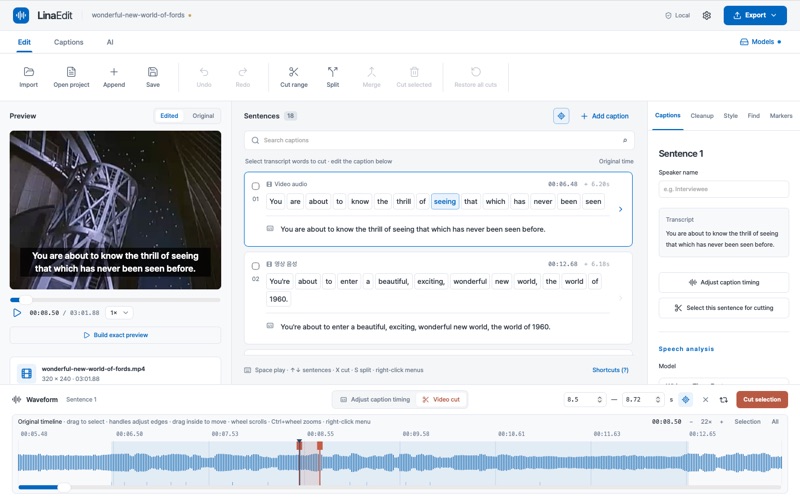





En bref
Lina Edit:AI Text Video Editor is a Mac app for editing interviews and lectures through their transcript. It runs speech recognition locally with Whisper, then lets users cut video and audio by selecting sentences or words, and export MP4 with burned-in subtitles or SRT/VTT files. It stands out for removing pauses and filler words such as "um" and "uh" as candidates that the user can review before applying.
Résumé par Debuts, d'après la fiche de l'App Store.À propos
Edit interviews and lectures by reading the words. Lina Edit turns speech into sentence and word captions on your Mac, then lets you cut the matching video and audio by selecting what you want to remove.
Import a spoken video and run local speech recognition. The transcript stays linked to the video and waveform. Cut by sentence or word, correct displayed captions separately, and adjust video cuts and subtitle timing in their own modes. Keep a shot while changing when its caption appears. Then export an MP4 with burned-in subtitles or separate SRT/VTT files.
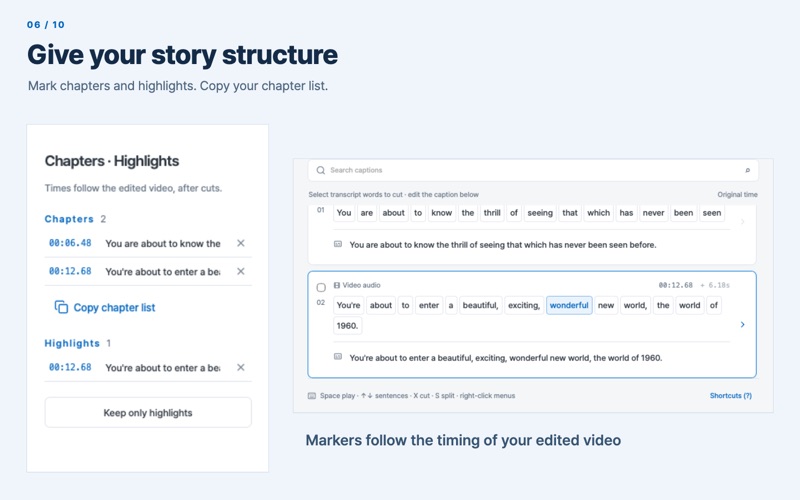
EDIT VIDEO LIKE A DOCUMENT • Cut by sentence or by word, split and merge captions, find and replace, and revert to the original transcript. • Mark chapters and highlights; copy a chapter list in YouTube timestamp format. • Undo and redo edits. • Keyboard shortcuts and right-click menus for key actions.
SPEECH TO TEXT ON YOUR MAC • Install Whisper Tiny, Base, Small or Large v3 Turbo once, then transcribe in nine languages or let the app detect the language. • On supported Apple silicon, Metal speeds up speech recognition and local AI; the app retries on the CPU if GPU processing fails. • Check and adjust word boundaries against the waveform before cutting. • No account, no upload, no subscription for transcription.
WAVEFORM PRECISION • A caption-timing mode and a video-cut mode. • Edge handles, selection move and zoom for frame-accurate ranges.
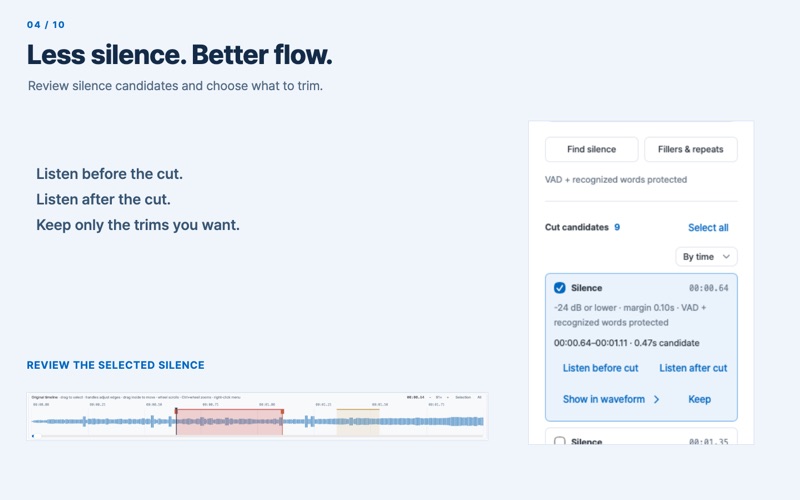
REMOVE SILENCE AND FILLER WORDS • Pauses and fillers such as "um" and "uh" are proposed as candidates. • Listen before and after each cut and apply only the ones you choose. • Restore everything in one step. • Use silence presets and see candidates on the waveform.
SUBTITLES AND EXPORT • Font size, color and background for burned-in subtitles. • 16:9, 9:16 and 1:1 aspect ratios for YouTube, Shorts, Reels and more. • Loudness normalization. • Hardware H.264 encoding with Apple VideoToolbox. • Import SRT captions; export SRT and VTT subtitles. • Choose output resolution and keep the original frame rate; export edited audio as M4A or WAV.
LOCAL AI ASSISTANTS • Translate speech to English with Whisper. • Proofreading, chapter and highlight suggestions from a local Qwen model — compare first, apply only what you accept.
NOTHING IS LOST • Your original files are never modified. • Autosave, recovery history, backups of previous saves and relinking of moved media. • Save As, recent projects, and preservation of manually corrected captions when you reanalyze.
MADE FOR THE MAC • Native Apple silicon app for macOS 12 or later. • Runs in the App Sandbox and opens only the files you choose. • Korean and English interface, light and dark themes. • Public-domain demo videos to practice with before using your own footage.
PRIVACY Lina Edit collects no usage data. There is no cloud processing, sign-in, advertising or analytics. The app connects to the internet only when you press a download button for an AI model or a demo video in Settings. Your videos, captions and projects stay on your Mac.
GOOD TO KNOW • Accuracy depends on model size, recording quality and background sound. Clean recordings transcribe well with the smaller models; choose Small for noisy audio. • Speech recognition requires a model. Download or import one in Settings; analysis and editing then run locally. • 8 GB of memory is recommended when using the Small model.
Les notes des utilisateurs
Connecte-toi pour noter cette appli. Ce qui compte, c'est d'être honnête.
Pas encore de notes. Tu l'as essayée ? Sois le premier à la noter.
Plus d'apps Photo et vidéo
Les meilleures nouvelles apps Photo et vidéo de la semaine Zoetrope ViewerWatch your zoetrope records and slipmats animate through your camera, or live on your…
 Migumento · QR photo albumOne album for every guest
- ScreenLux: Live Wallpapers 4KLive wallpapers for iPhone and 4K video wallpapers for Android
 IROZOUIROZOU is a color workspace made for designers: fashion, textile, graphic and product…
 SwipeshineSwipeshine turns photo cleanup into one gesture
 Pocket Film: Vintage CameraPocket Film turns your phone into the back of a real film camera