
My Bus Stop – Arrivals
Non revendiquéeMy Bus Stop turns your iPhone, iPad, Mac or Apple TV into a live arrivals board for the…
Par amir hayek · VoyagePourquoi nous l'attendons : A clear, well-described idea with strong multi-device support, though it still needs ratings and wider city coverage.



En bref
My Bus Stop, Arrivals shows live bus arrival times for a chosen stop on iPhone, iPad, Mac and Apple TV, including minutes to the next two buses and each bus's position on its route. It suits commuters and households who want a bus board for a hallway or front door, with a Wall Mode that keeps a spare device on display. One notable feature is that no sign-up or account is needed, and stops sync through the user's own iCloud.
Résumé par Debuts, d'après la fiche de l'App Store.À propos
My Bus Stop turns your iPhone, iPad, Mac or Apple TV into a live arrivals board for the stop you use every day.
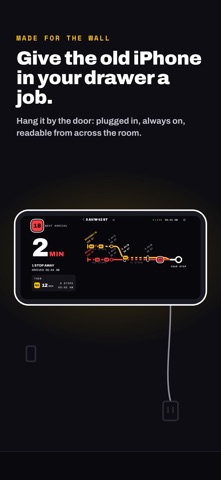
Pick your stop and up to three lines. The board shows how many minutes until the next bus, the one after it, and where each bus is on its route right now, in big type you can read from across the room.
LIVE ARRIVALS • Minutes to the next bus, and the one after it • How many stops away each bus still is • A route map for every line you watch, with the buses moving along it • Clear LIVE and SCHEDULED labels, and a warning when the data is out of date
WALL MODE Turn a spare iPad, iPhone or Mac into an always-on bus board for your hallway or front door. The screen stays awake on the days and hours you choose, stays dark, dims at night and shifts slightly to protect the display. If the connection drops, the board recovers by itself.
WIDGETS AND APPLE WATCH • Next-bus widgets for the Home Screen, Lock Screen, StandBy and the Mac desktop • An Apple Watch app and complications that show the next bus at your saved stops
APPLE TV • The stops you save on your iPhone, iPad or Mac are already there, through iCloud • One click opens a stop's board; left and right switch between your stops • With My Bus Stop in the top row, the Top Shelf shows each stop's next buses
QUICK TO SET UP • Lists the stops near you, or search by stop name, stop code, street or line number • Move the map anywhere and search that area • Every stop you set up is saved, so home, work and school are one tap apart
WHERE IT WORKS Israel and Norway, plus Turku, Tampere, Lisbon, Rennes, Poznań, Gdańsk, London, Vienna, Linz, Boston, New York City, Seattle, Minneapolis–St Paul, Hong Kong and Tokyo, with more cities on the way. The app picks your region from your location, so there is nothing to set up.
PRIVATE BY DESIGN No sign-up and no account. Your stops sync between your devices through your own iCloud, never through us, and your location is used only while the app is open.
My Bus Stop is an independent app. It is not made or endorsed by any transit agency or bus operator; arrival times come from the open real-time data that agencies publish.
Les notes des utilisateurs
Connecte-toi pour noter cette appli. Ce qui compte, c'est d'être honnête.
Pas encore de notes. Tu l'as essayée ? Sois le premier à la noter.
Plus d'apps Voyage
Les meilleures nouvelles apps Voyage de la semaine ItineroKeep your itinerary and travel details together before, during and after your trip
 HissiFür alle, die auf Aufzüge angewiesen sind: Rollstuhlfahrer:innen, Eltern mit…
 LoungeIQ: Airport LoungesLoungeIQ tells you which airport lounges you can actually get into
 FjellFjell answers one question: how long would it take to walk there?
 Leave the ResortLeave the Resort is the travel app that stops you getting ripped off
 Schengen Days: 90/180 PlannerJust enter your entry and exit dates