
Pragmatic Audio PEQ
Non revendiquéePragmatic EQ is a system-wide parametric equaliser for iPhone
Par KONECKTA LIMITED · Musique et audioPourquoi nous l'attendons : A thoughtful, privacy-first system-wide equaliser with clear features and well-documented headphone correction.



En bref
Pragmatic Audio PEQ is a system-wide parametric equaliser for iPhone that processes everything played through it, from any music app, before it reaches headphones or speakers. It is aimed at listeners who want to correct headphones using measurement databases or imported filter files, with crossfeed and live spectrum views. It stands out for keeping no account, showing no ads, and never using the microphone.
Résumé par Debuts, d'après la fiche de l'App Store.À propos
Pragmatic EQ is a system-wide parametric equaliser for iPhone. Choose it as your audio output in Control Center and everything you play, from any music app, passes through your EQ before it reaches your headphones or speakers.
CORRECT YOUR HEADPHONES - Browse measurement databases and load the correction for your headphones or in-ear monitors. - Import standard parametric EQ filter files (Filters.txt format) or edit the bands yourself. - Optional: turn on the built-in OPRA browser for thousands of community presets. - Automatic preamp headroom, so the EQ does not clip.
HEAR THE DIFFERENCE - Switch between No PEQ and PEQ while the music plays. - Optional volume-matched A/B comparison.
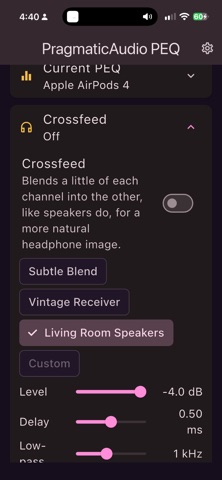
CROSSFEED - Soften the exaggerated stereo separation of headphones with an adjustable crossfeed: level, delay and low-pass, plus three presets.
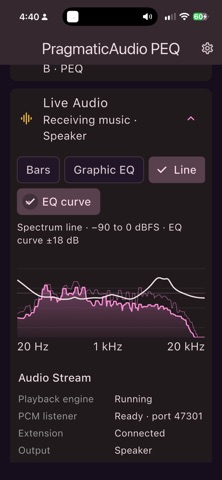
SEE WHAT YOU HEAR - Live views of the audio after processing: spectrum bars, a graphic equaliser, a smooth line, a spectrogram or level meters with a clipping warning, with your EQ curve drawn over the top. - The live views only use power while they are open.
MADE TO BE EASY ON THE BATTERY - When nothing is playing, the app goes quiet and does almost no work.
PRIVATE BY DESIGN - No account, no ads, no tracking. Your audio never leaves your phone. - The microphone is never used.
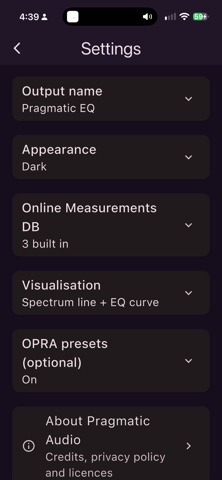
SETTINGS - Rename the output, choose light, dark or system appearance, choose the live view, manage measurement database URLs and choose how much headroom the crossfeed reserves.
REQUIREMENTS - iOS 27 or later. Open the app once after restarting your phone, then choose Pragmatic EQ as the output in Control Center. - Some video apps make iOS refuse a custom output. That is an iOS decision, not something the app can change.
Pragmatic EQ builds on open source work, including EffectDeck and EffeTune (MIT licence) and the OPRA preset database (CC BY-SA). See About in the app for credits and licences.
Les notes des utilisateurs
Connecte-toi pour noter cette appli. Ce qui compte, c'est d'être honnête.
Pas encore de notes. Tu l'as essayée ? Sois le premier à la noter.
Plus d'apps Musique et audio
Les meilleures nouvelles apps Musique et audio de la semaine KlingKlang – Control de AudioKlingKlang reúne todas las salas de tu sistema Sonos en una sola pantalla
 Yul — Gugak Tuner & JangdanA tuner and rhythm trainer built for Korean traditional instruments
 MusiquitosMusiquitos es una app de música para niños con treinta canciones para cantar, bailar y…
 Harmonious: Microtonal musicHarmonious is a microtonal ambient instrument
 RitLoop: Slow Downer & LoopsStudy, practice and transcribe music by ear
 PULGARPULGAR is a pocket synthesizer: the whole screen is the instrument