
QUE Stage
Non revendiquéeQUE Stage turns Philips Hue lights into a stage lighting rig you can run a show with
Par AZIZ OKAN TEMIZARABACI · JeuxPourquoi nous l'attendons : The description is clear and well organised, and it fills a genuinely useful niche for theatre lighting designers.




En bref
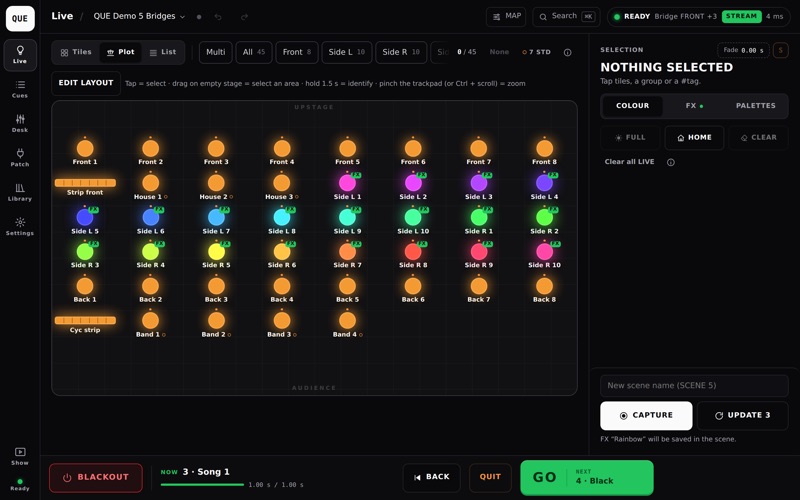
QUE Stage turns Philips Hue lights into a stage lighting rig, letting users capture scenes, run cues with one GO, and control colour, intensity and effects live. It is aimed at people running shows, with a SHOW mode, a DESK for group faders, and MIDI and OSC support. It works on a local network with no account or cloud, and a built-in demo offers five virtual Bridges.
Résumé par Debuts, d'après la fiche de l'App Store.À propos
QUE Stage turns Philips Hue lights into a stage lighting rig you can run a show with.
Design complicated. Operate simple.
SCENES AND CUES • Capture the whole stage as a scene, then run your show with one big GO. • Fade times, HOLD or FOLLOW, notes and triggers for every cue. • SHOW mode: what is on stage now, what comes next, BACK, QUIT and BLACKOUT. Nothing else. • BLIND: edit a scene without touching the lights, preview it on stage only while you hold the button. • Script view: pin cues to lines of your play text.
LIVE CONTROL • Tiles, a stage plot you arrange yourself, or a list. Select by group or #tag. • Colour, white temperature and intensity, typed or dragged. • Palettes, including colours picked from your own image. • DESK: group faders, a Grand Master and buttons for scenes and FX. Busk a show live. • Fade times for scenes and for live colour and intensity changes, from the screen, MIDI or OSC.
FX • 38 ready-made effects: strobe, chase, breathe, fireplace, thunderstorm, aurora, fireworks and more. • FX BUILDER: layer brightness, colour and white, draw your own curves, spread across the stage as a wave. • Tap tempo, speed and colour adjusted live; effects saved into scenes.
MIDI AND OSC • MIDI MAP: click any fader, button, lamp, group or scene, press LEARN and touch your MIDI controller. Momentary or toggle buttons, ranges and invert per control. • OSC MAP: every control has a ready OSC address. Drive QUE from Resolume, QLab or TouchOSC without any setup. • Send OSC or MIDI on every GO to trigger video and sound. • External control works only while ARMED, so nothing fires by accident.
MADE FOR THE STAGE • BLACKOUT always works, even in the middle of an effect. RELEASE brings the stage back. • Hue Entertainment streaming: every light in your Entertainment area moves together, frame by frame. Use several Bridges as one stage. • Move the whole show (scene, running FX and all) between your Mac, iPad and iPhone without the lights changing. • Export a show package and import it on another computer with everything in it. • A running show is never locked. The subscription is only checked when QUE opens. • Works on your local network. No account, no cloud, no tracking.
WHAT YOU NEED • A Philips Hue Bridge and colour lights on your local network • A Mac with macOS 13 or later (Apple silicon) • No Bridge with you? Open the built-in demo with 5 virtual Bridges. • Also on iPad and iPhone. One subscription works on all of them.
SUBSCRIPTION QUE Stage is free to download. Full use needs a subscription (monthly or yearly), with a 7-day free trial for new subscribers. Payment is charged to your Apple Account and renews automatically unless cancelled at least 24 hours before the end of the period. Manage or cancel it in your App Store account settings. Terms of Use: https://www.apple.com/legal/internet-services/itunes/dev/stdeula/ Privacy Policy: https://questageapp.com/privacy.html
QUE Stage is an independent app and is not affiliated with Signify or Philips. Philips Hue is a trademark of Signify.
Les notes des utilisateurs
Connecte-toi pour noter cette appli. Ce qui compte, c'est d'être honnête.
Pas encore de notes. Tu l'as essayée ? Sois le premier à la noter.
Plus d'apps Jeux
Les meilleures nouvelles apps Jeux de la semaine Connect 2: Card Game 2 ConnectConnect 2 is the conversation card game that makes people honest on purpose
 Ballpoint ArmyRemember drawing army men in the back of your school book?
 Chess Master vs AIPlay chess against a strong computer opponent, completely offline, in a sleek neon design
 ClayChonkMash soft clay with your fingers
 Sudoku by IbexoI just want to play sudoku
 SnookScoreVoice-controlled snooker scorekeeper - say the ball and it tracks the frame