
Pastense
Non rivendicataPastense keeps everything you copy and pastes it back with a single shortcut
Di Daechul Kong · ProduttivitàPerché ce lo aspettiamo: Pastense offers a clear, useful clipboard history with privacy-first local storage, solid features, and multilingual support for Mac users.



In breve
Pastense is a macOS clipboard manager that keeps up to 100 recent clips, including text, links, images and files, and lets you open the history with ⇧⌘V and paste with the number keys. It stores everything locally with no analytics or accounts, and its optional Direct paste setting is the only feature that asks for Accessibility permission.
Riepilogo di Debuts, basato sulla scheda dell'App Store.Informazioni
Pastense keeps everything you copy and pastes it back with a single shortcut.
Press ⇧⌘V anywhere and a panel shows your recent clips. Tap 1–0 to paste one instantly, or use the arrow keys and Return. Hover a clip to preview it before you commit.
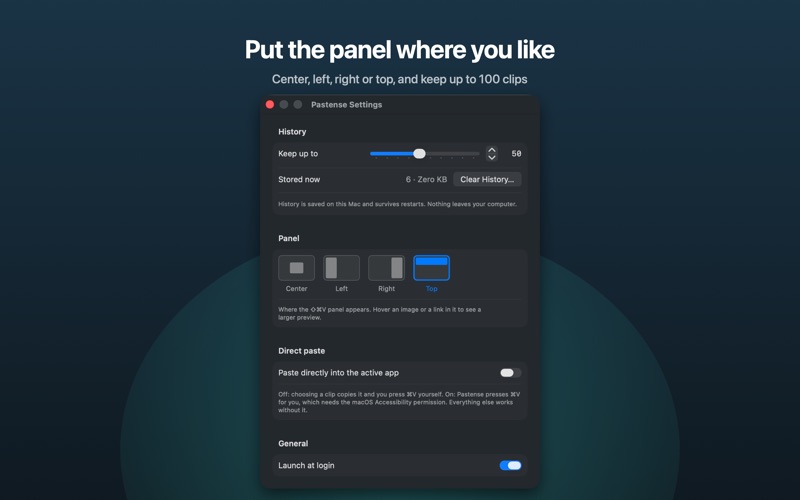
Features • One shortcut — ⇧⌘V opens the history over whatever you're working in; number keys paste right away. • Text, links, images and files — long text, web links and pictures get a large preview; files copied in Finder are remembered by reference and paste as files. • Links and formatting survive — text copied from a browser keeps its hyperlinks and styling when pasted into apps that support them. • Your layout — dock the panel in the center, on the left or right edge, or as a strip along the top. • Keep up to 100 clips — history persists across restarts. Delete one with ⌫ or clear everything from Settings. • Launch at login, English, Korean and Japanese.
Privacy Your clipboard history is stored only on your Mac, inside the app's sandbox. Pastense has no analytics and no accounts and never uploads your clips. Items marked as concealed by password managers are skipped. When a clip is a web link, the preview is fetched from that site directly.
Direct paste (optional) By default, choosing a clip copies it to the clipboard and you press ⌘V yourself; Pastense asks for no permissions. If you prefer, turn on Direct paste in Settings and Pastense will press ⌘V for you. That option, and only that option, uses the macOS Accessibility permission, which you grant yourself in System Settings. Pastense never reads or records keystrokes.
Le valutazioni delle persone
Accedi per valutare questa app. Conta essere sinceri.
Ancora nessuna valutazione. L'hai provata? Sii il primo a valutarla.
Altre app di Produttività
Le migliori nuove app di Produttività di questa settimana ChickMark: Habit TrackerChickMark is a simple habit tracker for routines, goals, and reminders
 Dayflint: One Thing a DayToo many priorities?
- BeginAnywayMorning alarm for hard tasks: set one task, prove you started, build a streak
 DHUDEDHUDE Analityxs es la herramienta de gestión diaria para grupos de restauración y ocio…
 Intent - Scroll by ChoiceTake back control of your screen time
 Whisperly DictationWhisperly turns your voice into clean text