
Ben’s Timer
Ikke hentetBen's Timer is a simple interval timer for iPhone, iPad, Mac and Apple Watch – no ads…
Av Benjamin Hargarten · Helse og trening



Om appen
Ben's Timer is a simple interval timer for iPhone, iPad, Mac and Apple Watch – no ads, no account, no tracking.
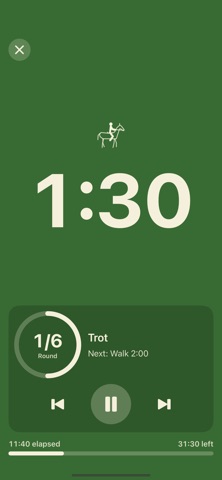
Set up work, rest, rounds and sets in seconds, then train right on your Apple Watch: a big countdown, a colored progress ring and noticeable haptics on your wrist – even with your wrist down. Or turn your iPhone or iPad sideways: the remaining time fills the screen and is easy to read from a few meters away.
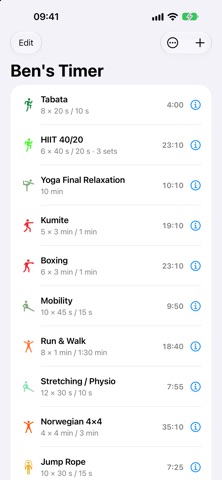
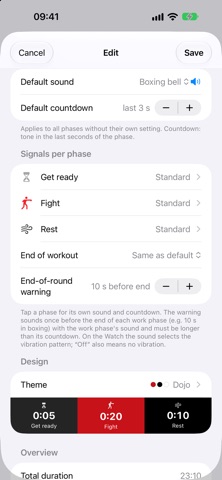
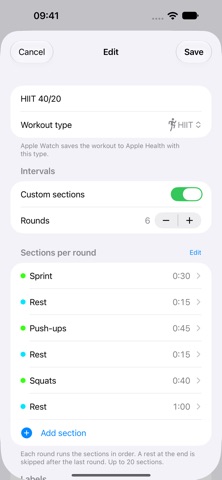
FEATURES • Fully adjustable: get ready, warm-up, work, rest, rounds, sets, set rest, cool-down • Custom sections: build each round from your own work and rest sections, each with its own duration and name, e.g. sprint 30 s, rest 15 s, push-ups 45 s • Choose the figure per phase and section: e.g. squat, burpee, running, walking or riding at a walk, trot and canter • Large round counter, countdown for the last seconds and an optional end-of-round warning (e.g. 10 s in boxing) • Elapsed and remaining total time at a glance • Signals per phase: sound and countdown adjustable for each phase • Phase names that match your sport (“Fight”, “Relaxation”, “Exercise” …) – or your own, like “Sparring” • Sounds: real recordings of a boxing bell, gong, wind chimes, singing bowl, tubular bells, hand bells, metallophone and kalimba, synthesized tones or vibration only • 22 themes, e.g. the flip clock with flipping digits (in color or all black, optionally with a soft flip sound), Zen, Dojo, Neon, Ocean, Retro, High Contrast or Night Vision (red on black) – per preset • Full screen: hide the controls – the remaining time fills the screen, tap to pause • Animated stick figure for your sport during the work phase – with a rope for jump rope, a bike for indoor cycling and a rowing machine for rowing and a horse at a rising trot for riding • Ready-made presets: Tabata-style intervals (20/10), HIIT 40/20, Yoga final relaxation, Kumite, Boxing, Mobility, Run & Walk, Stretching / Physio, Norwegian 4×4, Jump Rope, Indoor Cycling, Rowing, Riding intervals • Start now without the get-ready phase • iPad: presets and editor side by side, full-screen timer in any window size • Mac: its own app with the timer in a window or full screen and keyboard shortcuts • Apple Watch: runs on its own, shows phase, round and heart rate; tap the center to pause, end on a separate page to avoid accidental taps • iPhone and Apple Watch together: one workout, controllable on both devices • iCloud sync (optional): keep presets the same on iPhone, iPad and Mac • Apple Health: saves workouts with the matching workout type, e.g. jump rope, indoor cycling, rowing or equestrian sports (can be turned off) • English, German, Spanish and French
PRIVACY Your presets stay on your devices – and, if you turn on sync, in your own iCloud. Health data is only read from or written to Apple Health with your permission and is never sent to the developer.
Requires iOS or iPadOS 17, macOS 26 for the Mac app and – for the Watch app – watchOS 10 or later.
Slik vurderer folk den
Logg inn for å vurdere denne appen. Det ærlige svaret teller.
Ingen vurderinger ennå. Har du prøvd den? Vær den første til å vurdere.
Flere Helse og trening-apper
Ukens beste nye Helse og trening-apper Orbit: Self-Care Habit TrackerYour healthy choices deserve more than a checkmark
 Wellbeing: Digital WellbeingBillions of people spend more time scrolling than they want to
 Nuchronic: Energy & SymptomsTrack your energy and symptoms in seconds
 Drrreong - Sleep RecorderWhat did your night sound like?
 Galim - Mood DiaryGalim ("waves" in Hebrew) is a calm, simple daily mood diary built for people living…
 Kuida+ Rotina de SaúdeKuida+ helps you take care of your health and the health of the people you love…