
Cairnday: Habit Tracker
Ikke hentetCairn is a calm habit tracker
Av vuong cuong · Helse og treningHvorfor vi forventer det: Thoughtful habit tracking with real-life flexibility, Apple Health integration, and a clear, calm stone-based design.



Kort fortalt
Cairnday: Habit Tracker is a calm habit tracker where six habits appear as stones on a page, logged by pressing and holding. It suits people who want flexible goals, including timed and reduce-habits, and it works with Apple Health to complete some habits automatically. The standout is that Health data stays on the device and is never sent to the developer.
Sammendrag fra Debuts, basert på oppføringen i App Store.Om appen
Cairn is a calm habit tracker. Six habits sit on a page as stones: press and hold one to log it, and watch the ring close and the streak grow. One stone a day.
MADE FOR REAL DAYS - Daily, weekly or monthly goals, several times a day or a few days a week - Habits you want to do less of, with a limit you can stay under - Timed habits: meditate 10 minutes, read 20 - A late night still counts for the day before: choose when your day starts - Travel keeps your streak: a log counts for the day it was made - Pause a habit, or take a vacation from all of them, and streaks wait for you - Forgot to log last night? Log for yesterday, from the habit or from the morning reminder - Tap a stone for its streak and calendar; fix any past day
APPLE HEALTH Cairn works with Apple Health. Add a habit from the Apple Health section and it completes itself from your Health data: steps, workouts, exercise and stand minutes, distance, flights, active energy, sleep, mindful minutes, water, caffeine and nutrition, weight, heart rate, blood pressure, toothbrushing and handwashing. Every Apple Health habit is labeled Apple Health on its stone, and Settings lists what each one reads. Water, caffeine and mindful sessions you log in Cairn are recorded in Apple Health too. Cairn asks only for what a habit needs, when you save it. Your Health data stays on your device: it is never sent to us, never in analytics, never stored in iCloud by Cairn.
REMINDERS AND WIDGETS Smart reminders that learn when you usually do a habit, or reminders at the times you choose, that stop once it is done. Log one, Log for yesterday or Snooze straight from the notification. Widgets for the Home Screen and, with Cairn Unlock, the Lock Screen; on iOS 17 and later, tap a widget to log.
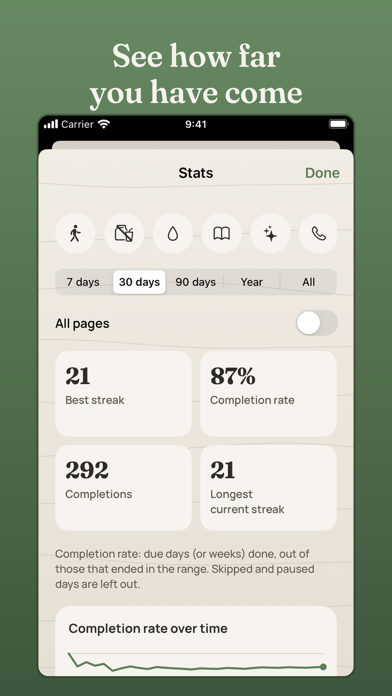
STATS Current and best streaks, completion rates, days by weekday and by hour, for one habit or the whole page.
YOURS No account and no ads. iCloud sync keeps your iPhone and iPad in step, and only ever adds: a device that was offline never overwrites anything, and a deleted habit stays deleted. A backup every day, JSON and CSV export, and import.
CAIRN UNLOCK Your first page of six habits has every kind of habit and every rule. Cairn Unlock is a single purchase, never a subscription, shared with your family: four pages for 24 habits, every widget including the Lock Screen, stats for 90 days, the year and all time, and every palette. Your data, sync and export are never locked.
iPhone and iPad, iOS 15 and later.
Slik vurderer folk den
Logg inn for å vurdere denne appen. Det ærlige svaret teller.
Ingen vurderinger ennå. Har du prøvd den? Vær den første til å vurdere.
Flere Helse og trening-apper
Ukens beste nye Helse og trening-apper Orbit: Self-Care Habit TrackerYour healthy choices deserve more than a checkmark
 Wellbeing: Digital WellbeingBillions of people spend more time scrolling than they want to
 Nuchronic: Energy & SymptomsTrack your energy and symptoms in seconds
 Drrreong - Sleep RecorderWhat did your night sound like?
 Galim - Mood DiaryGalim ("waves" in Hebrew) is a calm, simple daily mood diary built for people living…
 Kuida+ Rotina de SaúdeKuida+ helps you take care of your health and the health of the people you love…