
Camaroon
Ikke hentetCamaroon does not use user accounts
Av Zulfi Ismailov-Demiri · Spill


Om appen
Camaroon does not use user accounts. Parent mode is protected by a four-digit PIN stored on the device. The default PIN after initial installation is 1234 (entered in the password field; the username field is not used by the app).
To open Parent mode: Tap the lock icon in the top-right corner of Child mode ("My Cards") and enter 1234. Forgot PIN (if changed during testing): Select "Forgot PIN?" on the PIN screen and confirm using Face ID or the device passcode—the PIN will reset to 1234.
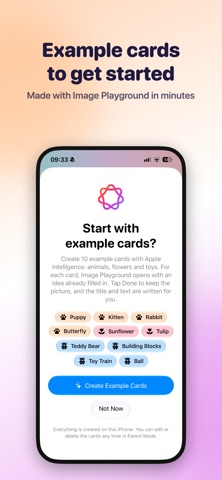
Parent mode: "Add card" (+) via camera or photo library; "Generate with Apple Intelligence" suggests titles and descriptions directly on the device; "Create sample cards" uses Image Playground (only on devices with Apple Intelligence); edit/delete cards; settings (gear icon) to change or reset the PIN; "Child mode" to return. Child mode: Tap a card to view it in full-screen mode; swipe or use the arrow buttons; the speaker button reads the content aloud. Access to the camera and photo library is requested only when a parent adds a photo. Face ID is used exclusively to reset a forgotten PIN. All data remains on the device; no servers, no analytics, no ads.
Simple and straightforward. No internet connection is required to use the app.
Slik vurderer folk den
Logg inn for å vurdere denne appen. Det ærlige svaret teller.
Ingen vurderinger ennå. Har du prøvd den? Vær den første til å vurdere.
Flere Spill-apper
Ukens beste nye Spill-apper Connect 2: Card Game 2 ConnectConnect 2 is the conversation card game that makes people honest on purpose
 Ballpoint ArmyRemember drawing army men in the back of your school book?
 Chess Master vs AIPlay chess against a strong computer opponent, completely offline, in a sleek neon design
 ClayChonkMash soft clay with your fingers
 Sudoku by IbexoI just want to play sudoku
 Aquarium AdventuresA family-friendly mixed-reality aquarium with over 40 species