
ClipLite - Video Compressor
Ikke hentetMake your videos lighter with ClipLite
Av Jeremiah Kiamco · Foto og videoHvorfor vi forventer det: Clear value and careful disclosures about originals and subscriptions make this a promising, trustworthy video compressor.


Kort fortalt
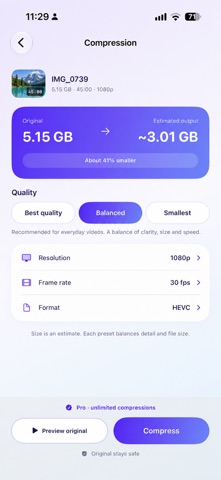
ClipLite - Video Compressor finds your largest videos in your library and creates smaller copies on your device using Best quality, Balanced or Smallest presets. It suits people who want to free up storage from big videos, including batches. It stands out for showing an estimated output size before compression and a side-by-side comparison with the original.
Sammendrag fra Debuts, basert på oppføringen i App Store.Om appen
Make your videos lighter with ClipLite. Find large videos, choose a quality preset, and create smaller copies directly on your device.
FIND YOUR BIGGEST VIDEOS Browse your video library, sort by size, and use smart groups for large files, 4K videos and high frame rates. Organize videos into your own collections.
CHOOSE YOUR QUALITY Select Best quality, Balanced or Smallest. See an estimated output size before compression, then compare the original and compressed video. File size and visual quality depend on the source and the selected settings; re-encoding can change detail.
COMPRESS ONE OR MANY Select a single video or a batch. Follow the progress while ClipLite processes your videos. Keep the app open until processing is complete.
YOUR ORIGINALS STAY SAFE Compression happens on your device. Save the smaller copy to Photos or share it. Originals are kept unless you choose to delete them. After saving a compressed copy to Photos, use Clean up originals to review eligible videos and confirm deletion through Apple Photos. Keeping both copies uses additional storage. With iCloud Photos, deletion also applies to synced devices. Deleted videos may remain in Recently Deleted before storage is recovered.
START WITH 3 FREE COMPRESSIONS Your first three successful compressions are free. Failed or unchanged results do not count. An optional ClipLite Pro annual subscription unlocks unlimited compressions, including batches and all three quality presets.
Subscriptions renew automatically unless canceled at least 24 hours before the current period ends. Payment is charged to your Apple Account at confirmation of purchase. Manage or cancel your subscription in your Apple Account settings. Pricing is shown in the app in your local currency.
Terms of Use: https://www.apple.com/legal/internet-services/itunes/dev/stdeula/
Slik vurderer folk den
Logg inn for å vurdere denne appen. Det ærlige svaret teller.
Ingen vurderinger ennå. Har du prøvd den? Vær den første til å vurdere.
Flere Foto og video-apper
Ukens beste nye Foto og video-apper Zoetrope ViewerWatch your zoetrope records and slipmats animate through your camera, or live on your…
 Migumento · QR photo albumOne album for every guest
- ScreenLux: Live Wallpapers 4KLive wallpapers for iPhone and 4K video wallpapers for Android
 Saint Studios - Video EditorSaint Studios is a professional video editor built for creators who want to get the most…
 Ashigrain: Film EmulationAshigrain gives your videos and photos the colour, grain and glow of motion picture and…
 AstrowetterIs tonight worth setting up for – and from when to when?