
Minimalist AI
Ikke hentetAn AI assistant on your own device, with a focused space for your questions, documents…
Av 涵钧 骆 · Produktivitet




Kort fortalt
Minimalist AI is an offline AI assistant for iPhone, iPad and Apple silicon Mac, where users chat about questions, documents and code. It works with models the user downloads or imports, and chat messages and files are processed on the device rather than sent to a cloud service. A standout detail is optional JavaScript and Python tools that run calculations locally, with the code and output visible to the user.
Sammendrag fra Debuts, basert på oppføringen i App Store.Om appen
An AI assistant on your own device, with a focused space for your questions, documents and code. Download or import a compatible model, then chat offline on iPhone, iPad or an Apple silicon Mac.
Bonsai 2 (27B), based on Qwen3.8 27B, brings a larger model into a smaller footprint. Explore it on compatible devices, following the memory guidance. Availability and performance vary by device.
Conversations stay local Chat messages and the files you add are processed locally, not sent to a cloud AI service. No Minimalist AI account is required. There are no ads or tracking.
Choose your model Download recommended models in Settings, with download sizes and memory guidance to help you choose. You can also import compatible GGUF models and matching vision files. Models are not included with the app.
Bring files into the conversation Ask about images, PDFs, documents and code. Supported formats include DOCX, XLSX, PPTX, IPYNB, Markdown and common text and image files. Preview and share supported attachments; on iPad and Mac, you can also drag files into the app. Image understanding requires a compatible vision model and matching vision file.
Formulas and code, clearly presented Read LaTeX formulas, Markdown, tables and syntax-highlighted code. Revisit, rename and organize local conversations. Included sample chats help you explore the app.
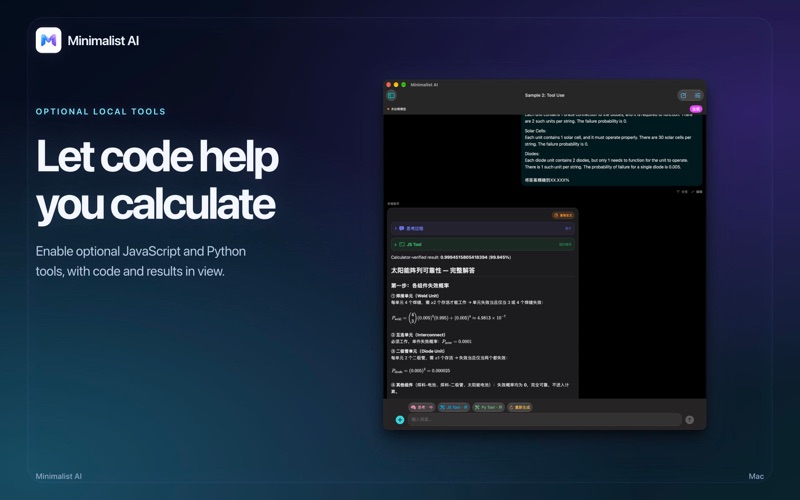
Let local tools help you calculate Enable optional JavaScript and Python tools for calculations and programming tasks, and inspect the code the model runs and its output. Python uses a lightweight built-in interpreter with limited Python compatibility, not a full CPython environment.
A space for everyday ideas Use a multilingual interface with light, dark or system appearance. All features are free. Optional one-time purchases support development; they do not unlock features or start a subscription.
Chat works offline once a compatible model is available locally. Model downloads, optional support purchases, external links, and sharing or email you choose to send use external services. The AI assistant does not search the web.
Model compatibility, answer quality and speed depend on the chosen model and your device, including available memory.
AI can make mistakes. Check important information.
Slik vurderer folk den
Logg inn for å vurdere denne appen. Det ærlige svaret teller.
Ingen vurderinger ennå. Har du prøvd den? Vær den første til å vurdere.
Flere Produktivitet-apper
Ukens beste nye Produktivitet-apper ChickMark: Habit TrackerChickMark is a simple habit tracker for routines, goals, and reminders
 Dayflint: One Thing a DayToo many priorities?
- BeginAnywayMorning alarm for hard tasks: set one task, prove you started, build a streak
 DHUDEDHUDE Analityxs es la herramienta de gestión diaria para grupos de restauración y ocio…
 Intent - Scroll by ChoiceTake back control of your screen time
 Whisperly DictationWhisperly turns your voice into clean text