
Replay Breakdown: Video Coach
Ikke hentetShoot the trick, open it, and see exactly what happened: every frame, measured
Av Pablo Miranda · Helse og treningHvorfor vi forventer det: Clear value for coaches and parents, with careful frame-by-frame detail and useful side-by-side comparison tools.




Kort fortalt
Replay Breakdown: Video Coach is a video review tool for coaches, riders and parents who film a move and need to show what went right or wrong. Users step through clips frame by frame, draw and measure on them, and link two clips to compare them side by side or overlaid. It stands out for opening the original file so high frame rate clips keep every frame.
Sammendrag fra Debuts, basert på oppføringen i App Store.Om appen
Shoot the trick, open it, and see exactly what happened: every frame, measured.
Replay Breakdown is for coaches, riders and parents who film the move and then need to show what went right and what didn't. Scrub the clip a frame at a time, draw on it, measure it, and send it back slowed down with the drawings on it.
EVERY FRAME, NOT PHOTOS' PLAYBACK COPY A slow-motion clip picked the usual way comes back as a 30 fps render with most of its frames gone. Replay Breakdown opens the original file, so a 240 fps clip keeps all 240 frames a second. The newest clip in your library is one tap from the home screen.
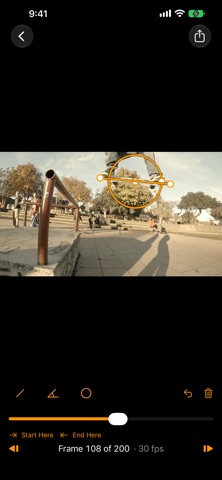
STEP THROUGH IT Drag through the clip with the picture keeping up under your finger, or step one frame at a time. Pinch to zoom in up to 8× on a foot or a hand; the frame on screen sharpens to the file's full resolution when you stop.
DRAW AND MEASURE • Lines and arrows that snap to level and plumb • Angles, read off the picture as it really is, not as the screen squashes it • Circles and a freehand pen • An airtime timer: start it on the take-off frame, stop it on the landing, and it counts up through the trick and holds the total • Five colours, and each drawing shows for one frame, half a second, or the rest of the clip Drawings stay with the clip, so they're there the next time you open it.
SIDE BY SIDE Put two clips on the same moment, the pop or the take-off, and link them there. From then on they move together, frame by frame, each at its own frame rate, side by side or one laid over the other. Nudge either one a frame to get the line-up exact. Last week's attempt against today's, or the student against the pro.
TALK IT THROUGH Press the microphone and talk while you scrub, draw and zoom, the way you'd explain it standing next to them. Play it back to check it, then send it as one video: your voice over every frame you stepped to, every line you drew and every zoom, in step.
SEND IT BACK Trim to the move, then export at real speed, half speed or quarter speed as an MP4 that plays in any messenger, with your drawings and the timer painted in. Or save the one frame that says it all as a full-size picture.
ON IPAD, WITH APPLE PENCIL The Pencil draws while your fingers scrub and zoom, and angles and lines snap level and plumb. Double-tap or squeeze for the tool you used before. Open two clips in two windows with Stage Manager. Turn a phone sideways and the tools sit beside the picture.
FREE, THEN ONE PAYMENT Everything above is free, at full quality, with no limit on clips or frames. Videos exported from the free version carry a small Replay Breakdown mark in the corner. One payment takes it off, and exports comparisons and voiceovers as one video. Shared with your family, no subscription, no account.
NOTHING LEAVES YOUR PHONE No analytics, no tracking, no server, no sign-up. Your clips are read where they are, and the only thing that goes anywhere is what you share yourself.
Slik vurderer folk den
Logg inn for å vurdere denne appen. Det ærlige svaret teller.
Ingen vurderinger ennå. Har du prøvd den? Vær den første til å vurdere.
Flere Helse og trening-apper
Ukens beste nye Helse og trening-apper Orbit: Self-Care Habit TrackerYour healthy choices deserve more than a checkmark
 Wellbeing: Digital WellbeingBillions of people spend more time scrolling than they want to
 Court OrderCourt Order sorts out who plays next, so nobody has to
 Finn: Baby TrackerFinn is the calm, quick way to track your baby's feeds, sleep, diapers and pumping — and…
 Padel Score Tracker: PacoKeep padel score on your Apple Watch without looking at it
 DeskFlow: Workday MovementYou don't need another workout app