
Spreadsheet: XLSX & CSV Editor
Ikke hentetSpreadsheet lets you open, edit and save spreadsheets on your phone
Av YOU SEUNGMIN · ProduktivitetHvorfor vi forventer det: Clear, practical value for a common need, with careful handling of original files, no account required, and a well-organized feature description.




Kort fortalt
Spreadsheet: XLSX & CSV Editor lets people open, edit and save XLSX, CSV and other spreadsheet files on a phone, with no account or sign-in. It offers more than 120 formulas, sorting, filtering and a card view for editing one row as a form. One notable point is that charts, pictures, pivot tables and macros stay in the file when it is saved.
Sammendrag fra Debuts, basert på oppføringen i App Store.Om appen
Spreadsheet lets you open, edit and save spreadsheets on your phone. Open XLSX and CSV files from the Files app or another app, change a cell and the change is saved right away. No account, no sign-in.
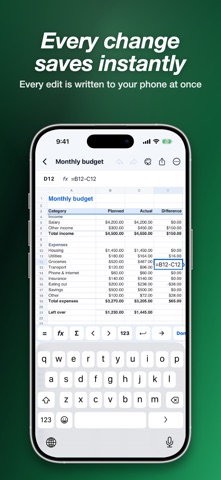
OPEN AND SAVE YOUR FILES • Open XLSX, XLSM, XLS, ODS, CSV and TSV files. • XLSX, XLSM and CSV files opened from the Files app are saved back to the same file when you leave. XLS and ODS files are saved as XLSX. • Parts this app does not show yet, such as charts, pictures, pivot tables, macros and comments, stay in the file when you save. • If saving would change something in the original, the app keeps your edits here and tells you what would change, instead of overwriting. • Every edit is written to your phone as you make it. Revert to the original file at any time.
FORMULAS • More than 120 functions: SUM, AVERAGE, IF, IFERROR, SUMIFS, COUNTIFS, VLOOKUP, XLOOKUP, INDEX, MATCH, dates, text and loan payments. • A key bar above the keyboard with =, functions, AutoSum and a Next cell key. • Function names are suggested as you type.
SORT, FILTER AND FIND • Sort A to Z or Z to A, and filter any column by its values. • Find and replace across one sheet or all sheets. • Freeze panes, merge cells, hide rows and columns, change widths and heights. • Add, rename, move and hide sheets.
MADE FOR A PHONE SCREEN • Card view: edit one row as a simple form, with the header row as labels. • Select cells to see their sum, average, count, minimum and maximum. Tap a value to copy it. • Pinch to zoom and scroll smoothly through large sheets.
FORMAT • Bold, italic, underline, text and fill colors, alignment, wrap text and borders. • Number formats: currency, percent, date, time and more.
TEMPLATES Start from a budget, expense tracker, invoice, inventory, to-do list or attendance sheet.
SHARE AND PRINT • Export as XLSX, CSV (choose the delimiter and encoding) or PDF. • Print from your phone.
FREE WITH ADS, OR PREMIUM Spreadsheet is free with ads, and there are no ads while you edit. Spreadsheet Premium removes all ads. Choose a monthly subscription or a one-time lifetime purchase.
Privacy Policy: https://dsm0829.github.io/spreadsheet-privacy/ Terms of Use: https://www.apple.com/legal/internet-services/itunes/dev/stdeula/
Slik vurderer folk den
Logg inn for å vurdere denne appen. Det ærlige svaret teller.
Ingen vurderinger ennå. Har du prøvd den? Vær den første til å vurdere.
Flere Produktivitet-apper
Ukens beste nye Produktivitet-apper ChickMark: Habit TrackerChickMark is a simple habit tracker for routines, goals, and reminders
 Dayflint: One Thing a DayToo many priorities?
 Snappy Do ItSix connected modes. One traceable journey.
 Fristo CAFMFristo is the app for Fristo CAFM, the facility management software
- BeginAnywayMorning alarm for hard tasks: set one task, prove you started, build a streak
 DHUDEDHUDE Analityxs es la herramienta de gestión diaria para grupos de restauración y ocio…