
Teleprompter - AI Voice Follow
Ikke hentetStruggling with forgotten lines and unnatural eye contact while recording videos?
Av 颖 杨 · Foto og video


Kort fortalt
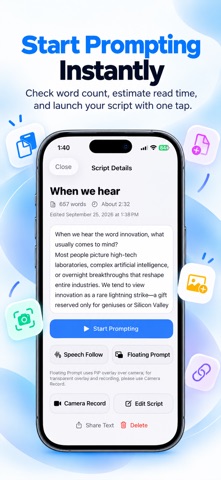
Teleprompter - AI Voice Follow is a photo and video app that scrolls a script in step with the user's speech, using an offline voice recognition engine. It is aimed at vloggers, creators, live streamers, educators, and business presenters who record or present on camera. It can also float over other apps such as the camera, TikTok, Zoom, and Teams in a Picture-in-Picture window, and it works without an account or cloud upload.
Sammendrag fra Debuts, basert på oppføringen i App Store.Om appen
Struggling with forgotten lines and unnatural eye contact while recording videos? Repeated takes drain your energy and ruin your natural delivery. Transform your video creation with our professional AI Voice-Follow Teleprompter. Speak naturally, maintain direct camera eye contact, and master one-take recordings!
[6 CORE FEATURES] 1. AI Voice-Follow (On-Device Speech Sync) Powered by an intelligent offline AI voice recognition engine, the prompter automatically tracks your voice in real time. It scrolls exactly at your speaking pace and highlights the current spoken word. Pause, improvise, or change tempo—the script stops and resumes seamlessly. 100% offline with zero latency.
2. Floating PiP Window (Cross-App Teleprompting) Utilize system Picture-in-Picture (PiP) to float your prompter over any app. Resize, adjust transparency, and overlay text directly on top of the native Camera, social apps (TikTok, Instagram Reels, YouTube Shorts), or video conferencing platforms (Zoom, Teams, Google Meet).
3. Built-in HD Camera Recording (Direct Eye Contact) Record high-definition video directly inside the app. Position the prompter text right beside the front or rear camera lens so your eyes look directly at your audience. Eliminate shifting gazes and deliver compelling, confident presentations every time.
4. 4 Flagship Themes & Professional Mirror Mode Choose from 4 carefully crafted studio visual themes: Midnight Studio, Pure Daylight, OLED Pro, and Titanium Warm. Built-in horizontal and vertical mirroring lets you use your iPhone or iPad with professional beam-splitter glass rigs.
5. Fast Script Import & Smart Formatting Import scripts effortlessly via OCR camera document scanning, TXT or Markdown file imports, or direct copy-paste. Features auto blank-line cleanup, word counting, and instant speaking time estimation to help you control your pacing.
6. 100% Offline & Absolute Privacy No account registration or login required. All your scripts, video recordings, and voice recognition processes stay strictly on your local device. Your private ideas, confidential briefings, and scripts are never uploaded to the cloud.
[TARGET USE CASES] • Vloggers & Content Creators: Shoot polished YouTube, TikTok, and Instagram videos smoothly in a single take. • Live Streamers & E-commerce Sellers: Keep talking points, discount codes, and product specs floating right in front of you. • Educators, Speakers & Business Pros: Record online lectures, keynotes, webinars, and virtual presentations without stumbling. • Film Crews & Video Studios: Pair with DSLR teleprompter rigs and beam splitters for broadcast-quality studio productions.
[AUTO-RENEWABLE SUBSCRIPTION TERMS] • Subscription Plans: Choose from Weekly, Monthly, or Yearly auto-renewable subscription plans. • Payment: Payment will be charged to your Apple iTunes Account upon confirmation of purchase. • Auto-Renewal: Subscription automatically renews unless auto-renew is turned off at least 24 hours before the end of the current billing period. Account will be charged for renewal within 24 hours prior to the end of the current period. • Manage & Cancel: You can manage or turn off auto-renewal at any time in your iOS Device Settings -> Apple ID -> Subscriptions after purchase. • Privacy Policy & Terms of Use: https://www.2best2.com/privacy/SavingDiary-en.html & Apple Standard EULA: https://www.apple.com/legal/internet-services/itunes/dev/stdeula/
Slik vurderer folk den
Logg inn for å vurdere denne appen. Det ærlige svaret teller.
Ingen vurderinger ennå. Har du prøvd den? Vær den første til å vurdere.
Flere Foto og video-apper
Ukens beste nye Foto og video-apper Zoetrope ViewerWatch your zoetrope records and slipmats animate through your camera, or live on your…
 Migumento · QR photo albumOne album for every guest
 SwipeshineSwipeshine turns photo cleanup into one gesture
 Pocket Film: Vintage CameraPocket Film turns your phone into the back of a real film camera
 PlanIt Earth: VR Photo PlannerFor landscape, travel, nature, cityscape, night, time-lapse, star-trail, Milky Way and…
 TonalierYour photos now have an editor