
P's Pocket
Niet geclaimdPlay familiar virtual pets on your iPhone and iPad
Door 宇华 伍 · GamesWaarom we dit verwachten: Detailed features, clear value, and thoughtful multiplayer and widget support make this a promising debut.



Kort samengevat
P's Pocket is a games app for iPhone and iPad that lets you import your own compatible P's firmware and play virtual pets on machines you keep in a cabinet. It suits people who want to play familiar pet-care games, with split-screen play for up to four machines and the option to lend a machine to a nearby friend face to face. One notable feature is the widget that updates the game's screen from your Home Screen.
Samenvatting door Debuts, gebaseerd op de vermelding in de App Store.Over deze app
Play familiar virtual pets on your iPhone and iPad.
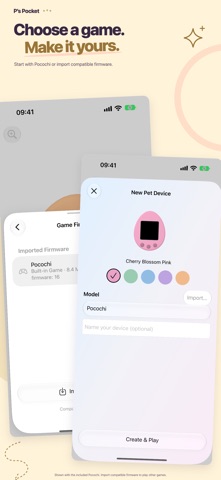
Import compatible original P’s firmware and create your own pet machine. The pixels, three buttons, and daily routines of pet care are all here. Each machine has its own progress: take it out to play, then put it back in your cabinet.
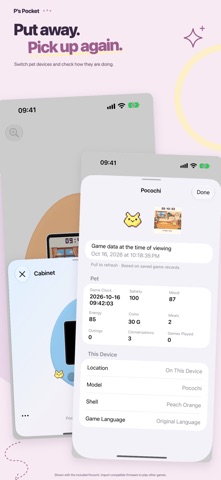
• A cabinet for your pet machines Choose a color, switch between machines, and touch and hold to arrange them. Progress saves automatically, so you can pick up where you left off.
• Up to four machines at once Play with two, three, or four split screens, each with separate controls. With two machines, flip one view for two people to play face to face on the same device. Choose multiplayer in the game and the app connects automatically.
• Lend a machine to a nearby friend Check the matching code and confirm a face-to-face handoff to lend or return a machine. Your copy stays locked while it is lent out. When it comes back, you receive your friend's latest progress.
• Browse your pet's details View your current pet, care stats, past generations, and saved friends. Read diaries with photos and browse pictures of items and collectibles. Available details depend on the game and its saved records.
• Make it look the way you like Choose a simple or detailed 3D appearance, switch between a full-machine view and a closer screen view, or enable the LCD filter. The interface follows your system's light or dark appearance.
• Add the game to your Home Screen Choose a screen widget in different sizes or a separate button widget. Widget buttons briefly wake the game and update its displayed screen after you play.
• Learn with Pocochi On first launch, use a practice pet to try importing firmware, creating a machine, and using the buttons. Separate tutorials cover the cabinet, pet details, organizing, split screens, and display options. Leave whenever you like. Machines and files added by the tutorial are cleaned up when it ends.
• Keep your pets and progress Enable automatic iCloud backups and full restore, or back up to a folder you choose, so you can continue after reinstalling or moving to a new device.
Commercial game firmware is not included. To play original games, import your own compatible complete firmware. The built-in practice pet teaches you how to use the app. This version pauses growth while the game is not running and resumes from saved progress when you return.
Zo beoordelen mensen de app
Log in om deze app te beoordelen. Eerlijk is wat telt.
Nog geen beoordelingen. Heb je de app geprobeerd? Beoordeel hem als eerste.
Meer apps in Games
Beste nieuwe apps in Games van deze week Connect 2: Card Game 2 ConnectConnect 2 is the conversation card game that makes people honest on purpose
 Ballpoint ArmyRemember drawing army men in the back of your school book?
 Chess Master vs AIPlay chess against a strong computer opponent, completely offline, in a sleek neon design
 ClayChonkMash soft clay with your fingers
 Sudoku by IbexoI just want to play sudoku
 Aquarium AdventuresA family-friendly mixed-reality aquarium with over 40 species