
PolarGrid
Niet geclaimdPolarGrid does what photographers keep needing: a clean border around a photo, several…
Door Frangell Vasquez · Foto en videoWaarom we dit verwachten: PolarGrid's clear, privacy-focused toolkit for borders, collages and carousels makes its value easy to grasp.



Kort samengevat
PolarGrid is a photo and video app for adding borders, building collages, and creating multi-post carousels, all processed on the device with no account or uploads. It suits people who post photos to social media and want quality preserved. What stands out is that everything runs offline, and the core edit tools and collage features are free, with a one-time Pro purchase for extras.
Samenvatting door Debuts, gebaseerd op de vermelding in de App Store.Over deze app
PolarGrid does what photographers keep needing: a clean border around a photo, several photos laid out into one image, and carousels that flow from one post into the next — in full quality, with nothing uploaded anywhere.
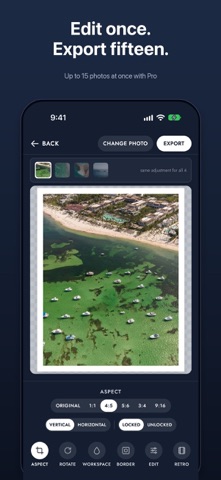
WHITE BORDER • Adjustable border, in white or any colour • Aspect ratios: Original, 1:1, 4:5, 5:6, 3:4, 9:16 — vertical or horizontal • Crop to fill, or show the whole photo uncropped • Rotate and flip, drag to reposition, pinch to zoom • Batch mode: set it once, export up to 5 photos together (15 with Pro) • Write a line of text under the photo, in the bottom border (Pro) • Export on a 9:16 background — a colour, or the photo itself, sharp or blurred — ready for Stories and Reels (Pro)
EDIT AND RETRO • Edit each photo, free: exposure, contrast, highlights, shadows, whites, blacks, saturation, vibrance, temperature and tint • Colour mix by hue, vignette and sharpness, free • Curves and film grain (Pro) • Healing brush: paint over a small distraction and it’s filled in from around it (Pro) • Retro: eleven original film looks with adjustable intensity (Pro) • Press and hold to compare with the original
CAROUSEL • A strip of 2 to 5 posts, with photos running across from one post into the next • Layouts built for the number of photos you pick, or place them freely, with a border or an instant-photo frame • Each post exports as its own photo, ready to upload in order — free • Your photo behind the whole carousel, sharp or blurred (Pro)
COLLAGE • 2 to 9 photos in one image • Template grids, including creative layouts • Resize cells by dragging their edges; rotate and flip each photo • Free mode: place, resize and rotate each photo by hand • Control outer border and spacing, square or rounded cells
PRIVATE BY DESIGN Every photo is processed on your device. No account, no uploads, no tracking. Works with no internet connection, on iPhone and iPad.
POLARGRID PRO Free to use, with no watermark. PolarGrid Pro is a one-time purchase — no subscription — that adds maximum-quality export, unlimited border colours (including any custom colour), curves, film grain, Retro, the Healing brush, text under the photo, the 9:16 background export, your photo behind carousels, and batches of up to 15 photos with one edit synced to all.
Zo beoordelen mensen de app
Log in om deze app te beoordelen. Eerlijk is wat telt.
Nog geen beoordelingen. Heb je de app geprobeerd? Beoordeel hem als eerste.
Meer apps in Foto en video
Beste nieuwe apps in Foto en video van deze week Zoetrope ViewerWatch your zoetrope records and slipmats animate through your camera, or live on your…
 Migumento · QR photo albumOne album for every guest
 SwipeshineSwipeshine turns photo cleanup into one gesture
 Pocket Film: Vintage CameraPocket Film turns your phone into the back of a real film camera
 PlanIt Earth: VR Photo PlannerFor landscape, travel, nature, cityscape, night, time-lapse, star-trail, Milky Way and…
 TonalierYour photos now have an editor