
Video Compressor, Scan & Vault
Niet geclaimdMake a big video smaller
Door Dinesh Kumar · Foto en videoWaarom we dit verwachten: Clear on-device privacy, a broad toolkit, and useful everyday features make this a promising pick for many iPhone users.




Over deze app
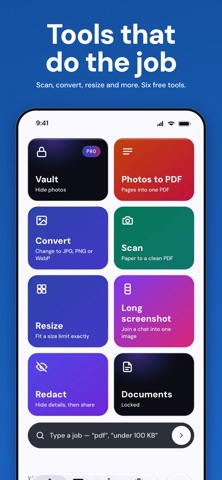
Make a big video smaller. Resize a photo to the size a form asks for. Convert, scan and free up space, all in one app. Your photos and videos stay on this phone. No account.
COMPRESS VIDEO • Turn a large video into a smaller copy that still looks good on a phone, so it sends and stores more easily. • Pick Lighter, 1080p or 720p and see the estimated size before you start. • Saved as a copy. Your original stays until you decide. • Your first 3 videos are free, then 3 more for each ad you choose to watch. After that it is Pro.
RESIZE AND CONVERT • Resize: fit a photo to a size limit such as 100 KB, 200 KB or 2 MB, or to a box in pixels. • Convert: JPG, PNG and WebP, always as a new copy.
PDF AND SCREENSHOT TOOLS • Scan to PDF: scan paper with the camera, one page or many. • Photos to PDF: pick photos, get one PDF. • Long screenshot: join screenshots into one tall picture. • Redact: cover names and numbers before you share.
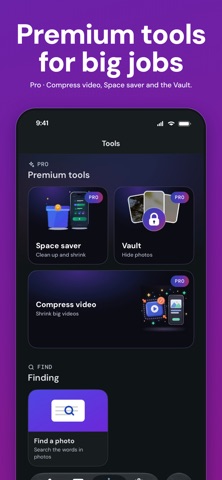
FREE UP SPACE • See duplicates and large videos on one screen before anything happens. • Every delete is iOS's own dialog, and removed photos wait in Recently Deleted for 30 days. • Space saver (Pro): pack a month of old photos into smaller copies, saved as a file in a folder you choose. Unpack puts the smaller copies back in Photos. Your first 3 packs are free.
VAULT (PRO) • Lock private photos and videos behind Face ID, Touch ID or your passcode. Put them back any time. Your first 25 items are free. • The Vault lives inside the app. Deleting the app deletes it, so put things back first.
FIND THINGS • Screenshots grouped by the app they came from, and photos in collections such as Trips, Food and Notes. • Search by the words in a picture: "boarding pass", "wifi password".
ON THIS PHONE Rollshelf never uploads a photo, or anything read from one. Text recognition, sorting and search run on the device. Usage counts and crash reports go to Google Firebase, never with a photo, and one switch in Settings turns them off. Our one server is the invite service, used only if you invite friends.
FREE AND PRO Free includes Resize, Convert, Scan to PDF, Photos to PDF, Long screenshot, Redact, your library and search, plus the free allowances above. Free shows ads. There are no ads on the paywall or inside the Vault.
Pro removes ads and gives unlimited Compress video, Space saver and the Vault. Choose a yearly plan or a one-time lifetime purchase; prices are shown in the app. Invite 3 friends and get a year of Pro, which renews at the yearly price unless you cancel.
The yearly plan renews automatically until cancelled. Manage it in Settings > your name > Subscriptions.
Terms: https://www.dinosdev.com/rollshelf/terms Privacy: https://www.dinosdev.com/rollshelf/privacy Support: https://www.dinosdev.com/rollshelf/support
Zo beoordelen mensen de app
Log in om deze app te beoordelen. Eerlijk is wat telt.
Nog geen beoordelingen. Heb je de app geprobeerd? Beoordeel hem als eerste.
Meer apps in Foto en video
Beste nieuwe apps in Foto en video van deze week Zoetrope ViewerWatch your zoetrope records and slipmats animate through your camera, or live on your…
 Migumento · QR photo albumOne album for every guest
 SwipeshineSwipeshine turns photo cleanup into one gesture
 Pocket Film: Vintage CameraPocket Film turns your phone into the back of a real film camera
 PlanIt Earth: VR Photo PlannerFor landscape, travel, nature, cityscape, night, time-lapse, star-trail, Milky Way and…
 TonalierYour photos now have an editor