
Photo to PDF Scanner: Docufolo
NieodebranaTurn photos and paper into clean PDFs in seconds
Twórca: Rohan De Silva · ProduktywnośćDlaczego tak przewidujemy: Clear value, a strong privacy promise and a generous free tier make this a compelling document scanner.



W skrócie
Photo to PDF Scanner: Docufolo turns photos, screenshots and paper scans into PDFs, with automatic edge detection, perspective correction and OCR text recognition. It suits people who handle receipts, contracts, forms or notes and want files kept on the device, since scanning and PDF creation happen locally and documents are never uploaded.
Podsumowanie Debuts na podstawie karty aplikacji w App Store.O aplikacji
Turn photos and paper into clean PDFs in seconds. Docufolo finds the page, straightens it and cleans it up, so every scan looks sharp. No ads. No watermark. No account.
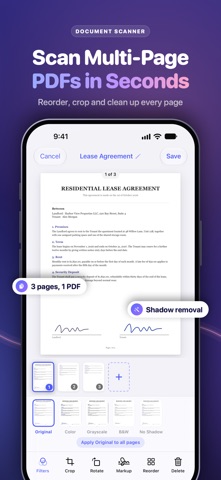
SCAN TO PDF • Automatic edge detection, perspective correction and auto-capture • Scan many pages into one PDF • Crop, rotate, reorder and delete pages any time • Filters: color, grayscale, black & white and shadow removal
PHOTO TO PDF CONVERTER • Turn photos, screenshots and JPG images into PDFs • Docufolo finds the document in each photo and crops it for you • Combine several images into one document • Export as PDF or JPG, in A4, Letter or fitted page size
COPY TEXT WITH OCR • Recognize the text in your scans, then select, copy or share it • Search your library by the words inside your documents • Export searchable PDFs you can search and copy text from
SIGN & MARK UP • Draw your signature once and place it on any page • Highlight and write on pages with your finger or Apple Pencil
ORGANIZE & SHARE • Folders, rename and search • Share with AirDrop, Mail, Messages, Files and more • Recently Deleted keeps removed documents for 30 days • Face ID lock keeps your documents private • Works on iPhone and iPad
PRIVATE BY DESIGN • Scanning, text recognition and PDF creation happen on your device • Your documents are never uploaded to us • No account, no ads, no tracking
FREE AND FAIR • Create up to 10 documents for free, with every scanning tool and no watermark • Docufolo Pro unlocks unlimited documents, OCR text search and copy, signatures and searchable PDFs • Choose monthly, yearly with a 7-day free trial, or a one-time lifetime purchase • Starting a trial? Docufolo reminds you before it ends
Great for receipts, contracts, forms, invoices, school notes, ID cards and whiteboards.
Subscriptions renew automatically unless cancelled at least 24 hours before the end of the current period. Payment is charged to your Apple ID. Manage or cancel anytime in your App Store account settings.
Terms of Use: https://docufolo.vercel.app/terms Privacy Policy: https://docufolo.vercel.app/privacy
Oceny użytkowników
Zaloguj się, aby ocenić tę aplikację. Liczy się szczerość.
Brak ocen. Znasz tę aplikację? Oceń ją jako pierwszy.
Więcej aplikacji z kategorii Produktywność
Najlepsze nowe aplikacje z kategorii Produktywność w tym tygodniu ChickMark: Habit TrackerChickMark is a simple habit tracker for routines, goals, and reminders
 Dayflint: One Thing a DayToo many priorities?
- BeginAnywayMorning alarm for hard tasks: set one task, prove you started, build a streak
 DHUDEDHUDE Analityxs es la herramienta de gestión diaria para grupos de restauración y ocio…
 Intent - Scroll by ChoiceTake back control of your screen time
 Whisperly DictationWhisperly turns your voice into clean text