
Conch Expense
Não reivindicadaConch Expense is an expense tracker for people who travel for work in mainland China and…
Por 强强 赵 · FinançasPorque esperamos isto: A focused niche with real pain-point value, on-device fapiao recognition, and thoughtful duplicate detection make this a strong debut for business travellers in China.




Sobre
Conch Expense is an expense tracker for people who travel for work in mainland China and claim the costs back from their company. Log each expense as it happens, attach the invoice (fapiao), and create the expense report in one tap when the trip is over.
LOG AN EXPENSE IN SECONDS • Flights, trains, hotels, meals and taxis each have their own form: frequent trips fill in with one tap, hotels work out the price per night, meals work out the cost per person, taxi rides take their start and end points from the map • Add an invoice from the camera, your photo library or Files, and the amount, date, invoice number and seller are filled in for you • Unfinished entries are saved as drafts; when you add a matching invoice later, the app offers to attach it to the draft instead of logging a duplicate
INVOICES, RECOGNIZED ON YOUR DEVICE • Reads China digital e-invoices (PDF, OFD and XML) as well as photos and scans of paper invoices • Recognition runs on your iPhone; invoice images are never uploaded • Optional Mailbox Sync connects straight from your phone to your mailbox over IMAP, only when you tap Sync, and picks up the invoices waiting there
STAY WITHIN YOUR COMPANY'S LIMITS • Set limits per invoice title for flights, trains, hotels and meals • An over-limit warning appears as soon as you enter the amount • Expenses that are still missing an invoice are flagged in the list and on the calendar
SEE THE WHOLE TRIP • Filter by type, status or tag, or combine them; search by hotel or merchant • Calendar view with hotel stays shown as bands, plus China's public holidays and make-up workdays • Totals by type for this month, this quarter, this year or any date range
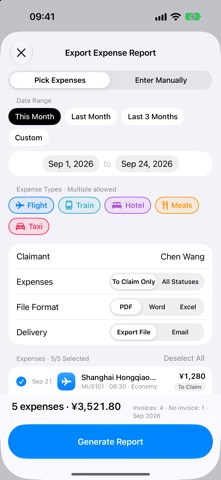
EXPENSE REPORTS IN ONE TAP • Pick the expenses and export a report as PDF, Word or Excel; PDF and Word reports include the invoices • Save the file to the Files app • Mark the expenses as Claiming, then Reimbursed, so you always know what is still owed to you
INVOICE TITLES • Keep your company's invoice title, tax ID, address and bank details in one place • Copy everything in one tap or share it as text when a merchant asks for it
YOUR DATA STAYS YOURS • No account needed; Sign in with Apple is optional • Everything is stored on your iPhone and, if you turn iCloud on, synced through your own iCloud account • No servers of our own, no ads, no analytics or tracking SDKs
CONCH EXPENSE PRO • Ten more built-in expense types: Transit, Vehicle, Per Diem, Entertainment, Meeting, Training, Phone Bill, Office, Courier and Subscription • Custom expense types with your own fields, and custom claim statuses such as "Finance Review" or "Paid" • Five icon styles, or upload your own image as a type icon • Voice Entry: say one sentence in Mandarin and the expense is logged • Sync invoices from more than one mailbox (the free version links one) • Invoice title QR code, and adding a title by taking a photo of a business license or invoice • Email expense reports to your finance team from the export screen • Export Data: all your expenses in one Excel sheet, with the columns you choose
Pro is available as a yearly subscription or a one-time lifetime purchase. Payment is charged to your Apple Account at confirmation of purchase. The subscription renews automatically unless it is cancelled at least 24 hours before the end of the current period. You can manage or cancel it in Settings > Apple Account > Subscriptions.
GOOD TO KNOW • Amounts are in Chinese yuan (¥) • Invoice recognition and Mailbox Sync are built for mainland China invoices; Voice Entry understands Mandarin • The app is available in English, Simplified Chinese and Traditional Chinese
Terms of Use: https://baoxiao.magicalconch.com/en/terms.html Privacy Policy: https://baoxiao.magicalconch.com/en/privacy.html
A avaliação das pessoas
Inicia sessão para avaliares esta aplicação. O que conta é seres sincero.
Ainda sem avaliações. Já a experimentaste? Sê o primeiro a avaliar.
Mais apps de Finanças
As melhores apps novas de Finanças desta semana NjukiYour rent should do more than pay for where you live
 Qwiky AIQuiky AI helps you understand and organise your everyday finances in one clear place
 Inflation WatchInflation Watch turns official price data into plain English
 Tellr: Budget & AITellr is the fastest way to know where your money goes
 Worthflow: Net Worth TrackerWorthflow is a quiet, private ledger for your net worth
 CashbellHear every sale