
Rolldrift: Photo Feed
Não reivindicadaYou take thousands of photos and almost never look at them again
Por Vadym Suprun · Fotografia e vídeoPorque esperamos isto: A thoughtfully written listing with a clear, relatable idea that makes browsing a camera roll feel genuinely fresh.



Sobre
You take thousands of photos and almost never look at them again. Apple Photos is built for finding a picture. Rolldrift is built for wandering through them, the way you already scroll everything else.
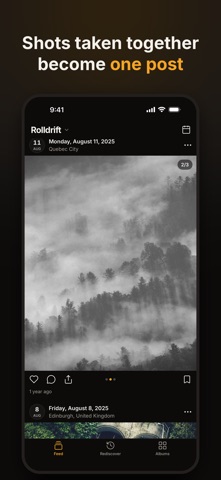
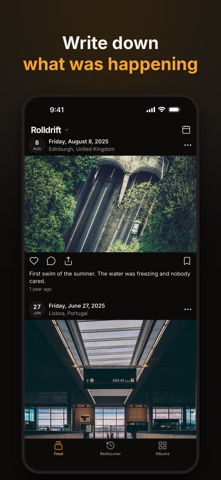
Rolldrift turns your camera roll into a feed: your photos and videos as posts, newest first, all the way back to the first one. Videos start, muted, the moment you reach them. The shots you took together become one post you swipe through. The date and the place sit on top, and what you wrote sits underneath.
VIDEOS YOU FORGOT YOU TOOK - Videos play as they scroll into view, one at a time, muted. - One tap for sound, and it stays on while you keep scrolling. A muted feed never stops your music. - Live Photos move once when you stop on them. Hold to play.
ONE POST PER MOMENT - Photos taken together become a single post you swipe through, so twelve shots of one sunset are one post, not twelve. - Date and place above every post, and "3 years ago" underneath. - Tap to open full screen, pinch or double-tap to zoom, swipe down to go back to the same spot.
KEEP WHAT MATTERS - Double-tap to heart. A heart is the photo's Favorite in Apple Photos. - Write a note under any post: what was happening, who was there. Export your notes any time. - Save a trip into an album from the feed, two taps per post. Albums are real Apple Photos albums.
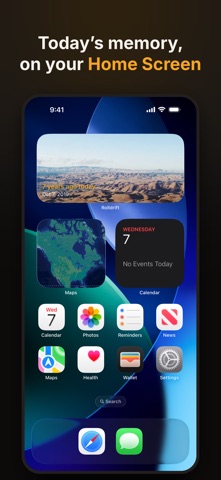
A MEMORY EACH MORNING - A widget for your Home Screen: a photo from this day in past years, new each morning. Tap it to open that photo. - A Lock Screen widget that says how many years ago today's memory is, in words only. - An optional daily reminder, only on days that have a memory, at the time you choose. Off until you turn it on.
FIND ANY MONTH - Tap the calendar for every month you have, with a cover and a count, or drag through the years. - Filters for Photos, Videos, Liked and With notes keep your place in time. - Screenshots are hidden from the feed unless you want them.
YOURS, ON YOUR IPHONE - No account, no upload, no ads, no tracking. Data Not Collected. - Rolldrift never deletes anything. - Works with iCloud Photos: photos in iCloud load as you reach them.
WHAT IS FREE, AND WHAT IS PRO Scrolling your whole library is free, for good: every gesture, hearts, notes, filters, jump to a month, albums, the On this day widget and the daily reminder. Rolldrift Pro is a single one-time purchase, never a subscription, that adds Rediscover (every year of today as a feed, and a daily Shuffle through your whole library) and widgets that show your hearts, any album or Shuffle.
Memory apps usually charge every month. Rolldrift Pro is one purchase.
Built for one person and one iPhone: Rolldrift has no followers, no comments and no sharing inside the app. To clean up your library, try its sibling, Photodrift.
A avaliação das pessoas
Inicia sessão para avaliares esta aplicação. O que conta é seres sincero.
Ainda sem avaliações. Já a experimentaste? Sê o primeiro a avaliar.
Mais apps de Fotografia e vídeo
As melhores apps novas de Fotografia e vídeo desta semana Zoetrope ViewerWatch your zoetrope records and slipmats animate through your camera, or live on your…
 Migumento · QR photo albumOne album for every guest
 SwipeshineSwipeshine turns photo cleanup into one gesture
 Pocket Film: Vintage CameraPocket Film turns your phone into the back of a real film camera
 PlanIt Earth: VR Photo PlannerFor landscape, travel, nature, cityscape, night, time-lapse, star-trail, Milky Way and…
 TonalierYour photos now have an editor