
Camaroon
Inget anspråk gjortCamaroon does not use user accounts
Av Zulfi Ismailov-Demiri · Spel


Om appen
Camaroon does not use user accounts. Parent mode is protected by a four-digit PIN stored on the device. The default PIN after initial installation is 1234 (entered in the password field; the username field is not used by the app).
To open Parent mode: Tap the lock icon in the top-right corner of Child mode ("My Cards") and enter 1234. Forgot PIN (if changed during testing): Select "Forgot PIN?" on the PIN screen and confirm using Face ID or the device passcode—the PIN will reset to 1234.
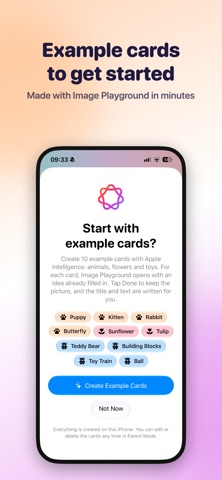
Parent mode: "Add card" (+) via camera or photo library; "Generate with Apple Intelligence" suggests titles and descriptions directly on the device; "Create sample cards" uses Image Playground (only on devices with Apple Intelligence); edit/delete cards; settings (gear icon) to change or reset the PIN; "Child mode" to return. Child mode: Tap a card to view it in full-screen mode; swipe or use the arrow buttons; the speaker button reads the content aloud. Access to the camera and photo library is requested only when a parent adds a photo. Face ID is used exclusively to reset a forgotten PIN. All data remains on the device; no servers, no analytics, no ads.
Simple and straightforward. No internet connection is required to use the app.
Så betygsätter folk den
Logga in för att betygsätta appen. Det ärliga betyget räknas.
Inga betyg ännu. Har du provat appen? Ge det första betyget.
Fler appar i kategorin Spel
Veckans bästa nya appar i kategorin Spel Connect 2: Card Game 2 ConnectConnect 2 is the conversation card game that makes people honest on purpose
 Ballpoint ArmyRemember drawing army men in the back of your school book?
 Chess Master vs AIPlay chess against a strong computer opponent, completely offline, in a sleek neon design
 ClayChonkMash soft clay with your fingers
 Sudoku by IbexoI just want to play sudoku
 Aquarium AdventuresA family-friendly mixed-reality aquarium with over 40 species