
Medication Reminder: Doses
Inget anspråk gjortYou're in pain, or you're on a treatment, and you take medicine several times a day
Av Marien Digital · Hälsa och träning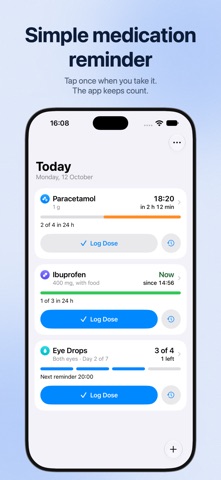



Kort sagt
Medication Reminder: Doses is a health-fitness app that lets you tap to log each medicine dose, tracks the time and daily count, and shows when the next dose is allowed. It is aimed at people in pain or on treatment who take medicine several times a day. It stands out for asking for confirmation before a dose that is too early or over your set daily maximum, without blocking it.
Sammanfattning från Debuts, baserad på appsidan i App Store.Om appen
You're in pain, or you're on a treatment, and you take medicine several times a day. The same questions keep coming back. What time did I take it? How many have I had today? Can I take another one yet?
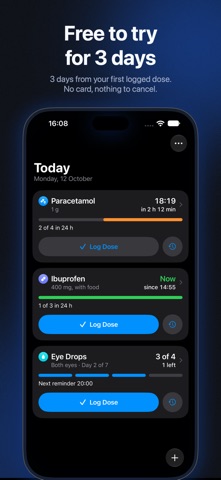
The Doses app answers them. Tap a button each time you take a medicine. The app keeps the time, counts what you've had, and shows when the next dose is allowed.
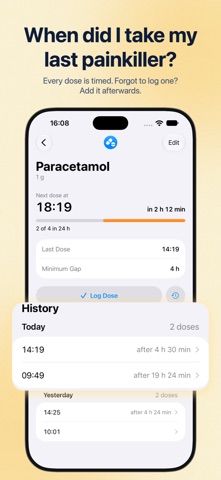
It's 3 a.m. and your tooth is throbbing: was the last painkiller at eleven, or at midnight? Your child's fever is back: has it been six hours yet? Eye drops after surgery, four times a day this week and three the next: where are you today? Open the app and the answer is on the screen.
NOTHING TO LEARN The Doses app looks and works like the apps that came with your iPhone. One screen, one big button per medicine, and a countdown you can read at arm's length. No account, no tutorial, no settings to hunt for. You add a medicine with its name and the limits from its leaflet, and that's it. It's as easy at 90 as it is at 19.
IT REMEMBERS FOR YOU Tap Log Dose when you take your medicine. Forgot? Add it afterwards, at the time you really took it. Tapped by mistake? Undo.
IT TELLS YOU WHEN Enter the minimum gap and the daily maximum from your leaflet. The app counts down to your next dose and sends a notification when the wait is over.
IT ASKS BEFORE YOU TAKE TOO MUCH Too early, or past the maximum you set? The app checks with you first. It never blocks you. You decide.
FOR COURSES THAT CHANGE Eye drops 4 times a day for 3 days, then 3, then 2? Set the steps once. The app spreads the reminders across your day and steps down on its own.
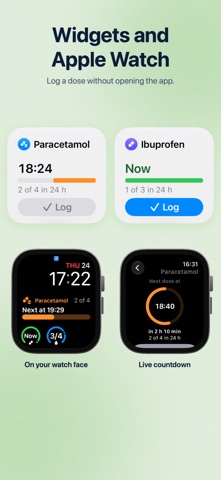
WHERE YOU'LL SEE IT • On your Lock Screen and in the Dynamic Island • In Home Screen and Lock Screen widgets • On your Apple Watch • With Siri and in Control Center
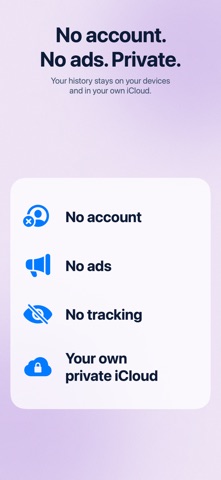
PRIVATE No account, no ads, no tracking. Your history stays on your devices and syncs through your own private iCloud.
FREE TO TRY Everything works for 3 days from the first dose you log: no card, nothing to cancel. After that, logging new doses takes a subscription (monthly or yearly) or a one-time lifetime purchase. Your medicines and your history stay readable either way.
The Doses app keeps track of what you take. It doesn't give medical advice. Always follow your doctor's or pharmacist's instructions and the leaflet that comes with your medicine.
Så betygsätter folk den
Logga in för att betygsätta appen. Det ärliga betyget räknas.
Inga betyg ännu. Har du provat appen? Ge det första betyget.
Fler appar i kategorin Hälsa och träning
Veckans bästa nya appar i kategorin Hälsa och träning Orbit: Self-Care Habit TrackerYour healthy choices deserve more than a checkmark
 Wellbeing: Digital WellbeingBillions of people spend more time scrolling than they want to
 Kuida+ Rotina de SaúdeKuida+ helps you take care of your health and the health of the people you love…
 Exhale — Quit NicotineOne dot for every day you don't smoke
 Focus App Blocker: ScrollburnScrollburn locks the apps you can't stop opening and gives them back only after real…
 Control de Mis BebésControl de Mis Bebés te dice cómo va creciendo tu bebé, qué le toca y te prepara el…