
AltCam: Folder Camera
Not claimedTired of your camera roll and Photos app becoming a cluttered mess?
By Zhare · Photo and video


In short
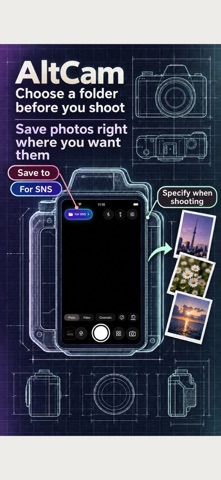
AltCam: Folder Camera is a photo and video app that lets you pick a destination folder before shooting, so captures are filed right away and kept out of the system camera roll and shared albums. It suits people who want an organized gallery, work receipts kept separate from personal shots, and manual camera controls. It stands out for its folder-first capture, with photos stored in a dedicated local library.
Summary by Debuts, based on the App Store listing.About
Tired of your camera roll and Photos app becoming a cluttered mess? Have you ever had private snapshots or notes accidentally show up in a shared family album or work stream?
"AltCam" is a revolutionary folder-first camera that lets you select a destination folder before shooting, organizing photos and videos instantly.
From business receipts and documents to recipe ideas, hobbies, travel, and video drafts—never waste time manually sorting messy albums again. Simply pick a folder before tapping the shutter, and your captures are cleanly filed from the start.
Keep your camera roll clean and prevent accidental leaks into shared albums. Export only the photos and videos you choose to your Photos app or Files whenever you want.
No account creation or sign-in required. Start shooting with smart folder organization immediately!
■ 5 Reasons to Choose AltCam
◆ 1. [Top Feature] Folder-First: Shoot Directly into Folders Switch destination folders with a single tap on the camera screen. Assign work, personal, hobby, or project folders before shooting. No more sorting through hundreds of mixed photos later.
◆ 2. Stop Accidental Sharing & Keep Photos Clean Captures go straight into AltCam's dedicated local library—never automatically added to your system camera roll or synced to shared family/cloud albums. Keep work captures separate and personal shots private.
◆ 3. Pro Manual Controls & Cinematic Video Full hardware control: ultra-wide to telephoto switching, smooth zoom, exposure compensation, manual focus, flash/torch, grids, and timers. Supports cinematic video, dual-camera capture, and professional profiles like HLG 10-bit HDR and Apple Log on supported devices.
◆ 4. Live Drawing & Annotations Sketch notes, arrows, highlights, or text directly on the camera preview before or during shooting. Ideal for site inspections, classroom whiteboards, creative sketches, or visual reminders in one tap.
◆ 5. Retro Live Filters & Reusable Presets Preview stylized effects in real time: Monochrome, Analog Film, Vintage VHS, Cinematic grades, Skin Smoothing, Soft Glow, Chromatic Aberration, and Scanlines. Save folders, camera settings, and filters as reusable presets to switch workflows instantly.
■ Perfect For ・ Anyone tired of a cluttered camera roll who wants an organized gallery ・ Preventing private photos from leaking into shared family albums ・ Users wanting to shoot directly into designated folders without manual sorting ・ Professionals separating work receipts and document photos from personal shots ・ Anyone wanting a private vault when friends browse photos on their phone ・ Photographers who love analog film, retro VHS aesthetics, and pro manual controls
People rate it
Sign in to rate this app. Honest is what counts.
No ratings yet. Tried it? Be the first to rate it.
More Photo and video apps
Best new Photo and video apps this week Zoetrope ViewerWatch your zoetrope records and slipmats animate through your camera, or live on your…
 PlanIt Earth: VR Photo PlannerFor landscape, travel, nature, cityscape, night, time-lapse, star-trail, Milky Way and…
 TonalierYour photos now have an editor
 Superblur: Mosaic & Blur FacesSuperblur hides faces, number plates, names and addresses in your photos and videos…
 SqizziKeep the memories
 Photo Widget: Crop & PositionShow your favorite photos on your Home Screen — exactly the way you want