
Bracketfuse: HDR Merge
Ikke gjort krav påMerge bracketed exposures into one natural-looking photo — with detail in both the…
Af Jhomar Maravillas · Foto og videoDerfor forventer vi det: A clear, well-explained tool that solves a real photography problem, with thoughtful details like ghosting reduction and on-device processing.


Kort fortalt
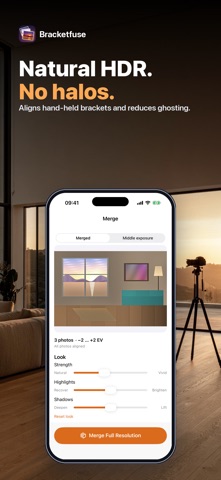
Bracketfuse: HDR Merge blends 3, 5 or 7 photos of the same scene taken at different exposures into one natural-looking image with detail in both bright and dark areas. It is for photographers who already shoot brackets, including raw files, and it processes everything on the device. It groups brackets automatically from exposure data and capture time, and it aligns hand-held frames before merging.
Resumé fra Debuts, baseret på app-siden i App Store.Om appen
Merge bracketed exposures into one natural-looking photo — with detail in both the bright window and the dark corner.
Pick 3, 5 or 7 photos of the same scene shot at different exposures (camera RAW, DNG, JPEG, HEIC or TIFF). Bracketfuse finds the brackets for you, lines the frames up and blends the best-exposed parts of each one into a single image. Everything happens on your device.
• AUTO-GROUPING — select a whole shoot at once. Brackets are grouped from each photo's exposure data and capture time, and back-to-back sets are split where the exposures repeat. Tick or untick frames to fix a set. • HAND-HELD ALIGNMENT — frames are registered to the middle exposure before merging, so hand-held brackets stay sharp. • EXPOSURE FUSION — a multi-scale blend that takes contrast, colour and good exposure from every frame. Natural by default, with no halo-heavy "HDR look". • REDUCE GHOSTING — people, leaves or water that moved between shots come from one frame instead of appearing see-through. • LOOK — Natural ↔ Vivid strength, Highlights and Shadows sliders, and white balance matched to the middle exposure. • CAMERA RAW — raw files are developed with identical neutral settings, so only the exposure differs between frames. • SEE IT FIRST — the full merged preview with every option, plus a compare view against the middle exposure. • EXPORT — HEIC, JPEG or 16-bit TIFF at full resolution, keeping the reference frame's EXIF (camera, lens, date, location).
Bracketfuse merges brackets you have already shot, with your camera's auto-exposure bracketing (AEB) or a bracketing camera app — it doesn't take photos. On devices with less memory, very large files are saved at the largest size the device can handle, and the result screen tells you when that happens.
Merging and the full preview are included; a one-time purchase unlocks exporting the full-resolution photo.
Questions: overlapmarr@gmail.com
Brugernes bedømmelse
Log ind for at bedømme appen. Det vigtigste er, at du er ærlig.
Ingen bedømmelser endnu. Har du prøvet den? Giv den første bedømmelse.
Flere apps i kategorien Foto og video
De bedste nye apps i kategorien Foto og video denne uge Zoetrope ViewerWatch your zoetrope records and slipmats animate through your camera, or live on your…
 Migumento · QR photo albumOne album for every guest
 Pocket Film: Vintage CameraPocket Film turns your phone into the back of a real film camera
 PlanIt Earth: VR Photo PlannerFor landscape, travel, nature, cityscape, night, time-lapse, star-trail, Milky Way and…
 TonalierYour photos now have an editor
 Superblur: Mosaic & Blur FacesSuperblur hides faces, number plates, names and addresses in your photos and videos…