
Handwriting Studio: SVG
Not claimedTurn typed text into realistic handwriting, entirely on your device
By Christian Deckert · Photo and videoWhy we expect it: Clear, privacy-focused utility with 13 styles, flexible paper layouts, and multiple export formats makes it a strong debut for its niche.

In short
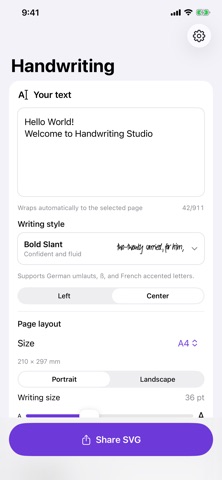
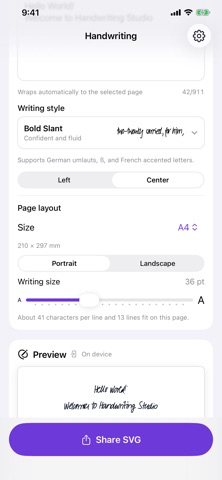
Handwriting Studio: SVG turns typed text into handwriting that is rendered on your device. It offers 13 writing styles, preset paper and screen sizes, and export as SVG, PDF, PNG, or JPG. The app needs no account or network connection, and it can capture a personal handwriting style with Apple Pencil on iPad.
Summary by Debuts, based on the App Store listing.About
Turn typed text into realistic handwriting, entirely on your device.
Choose from 13 writing styles, format your text for popular paper and screen sizes, and export the result as SVG, PDF, PNG, or JPG.
Features:
• 13 distinct handwriting styles • Live on-device preview • A5, A4, A3, Letter, Legal, phone, tablet, desktop HD, and square layouts • Portrait and landscape orientation • Adjustable writing size and alignment • Automatic word wrapping • German umlauts, ß, and French accented letters • Personal handwriting style capture with Apple Pencil on iPad • SVG, PDF, PNG, and JPG export through the native share sheet • No account, no ads, no tracking, and no network connection required
Your text and personal handwriting samples remain on your device.
People rate it
Sign in to rate this app. Honest is what counts.
No ratings yet. Tried it? Be the first to rate it.
More Photo and video apps
Best new Photo and video apps this week Zoetrope ViewerWatch your zoetrope records and slipmats animate through your camera, or live on your…
 PlanIt Earth: VR Photo PlannerFor landscape, travel, nature, cityscape, night, time-lapse, star-trail, Milky Way and…
 TonalierYour photos now have an editor
 Superblur: Mosaic & Blur FacesSuperblur hides faces, number plates, names and addresses in your photos and videos…
 SqizziKeep the memories
 Photo Widget: Crop & PositionShow your favorite photos on your Home Screen — exactly the way you want