
Planalta Artwork Rectifier
Not claimedPlanalta turns a photograph of a flat original into a clean rectangular image
By Gobling Company · Photo and videoWhy we expect it: Careful corner controls, clear ratio options and local-only processing make this a thoughtful, well-explained tool.


About
Planalta turns a photograph of a flat original into a clean rectangular image. Import your artwork, poster or print from Photos or Files, place its four corners, and set the original width-to-height ratio.
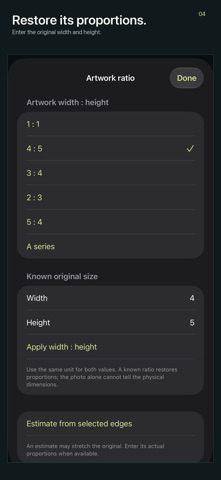
PRECISION AT THE EDGES Drag four numbered handles clockwise from the top left. A pixel loupe helps you place an edge; nudge each corner by a single working-source pixel. Invalid or crossed outlines are flagged. Choose a familiar ratio or enter the known width and height in the same unit. An optional edge estimate is labeled as an estimate.
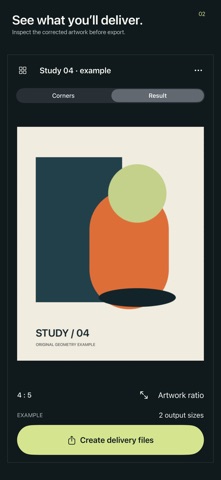
SEE THE RESULT Inspect the corrected image before exporting. Open the full-screen viewer and pinch up to 8x to check details. On iPhone, switch between corner editing and the result. On iPad, source and corrected image sit together beside compact delivery controls.
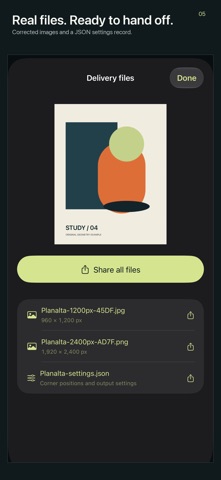
REAL DELIVERY FILES Prepare up to five output sizes, choosing PNG or JPEG for each. Create actual files from 320 to 4096 pixels on the longest edge, then share all or individual files through the system share sheet. A JSON record stores corner coordinates, source information and output settings.
KEEP EDITABLE WORK Named projects retain the oriented working source, corner positions, ratio and delivery sizes locally. Reopen, rename, duplicate and delete projects. Editing invalidates the current delivery list so you can regenerate matching files. A clearly labeled original geometry example is available on request; your library starts empty.
One upfront purchase. No subscription, ads, login, tracking, analytics or developer-server processing.
IMPORT AND OUTPUT LIMITS Supports still-image formats iOS can decode, up to 60 MB and 80 megapixels. The working copy is oriented and capped at 4096 pixels on its longest edge. Exporting a larger size can upscale the selected region. PNG is lossless; JPEG uses 95% quality. Original metadata is not embedded in output.
A projective correction is for flat subjects. Planalta does not remove lens distortion, flatten curved pages, perform OCR, reconstruct hidden detail or calibrate color. Enter a known ratio for faithful proportions; a photo alone cannot determine real dimensions. The JSON settings record is not a source-image backup. Save your exports separately before deleting projects or uninstalling.
People rate it
Sign in to rate this app. Honest is what counts.
No ratings yet. Tried it? Be the first to rate it.