
ReCam: Phone as Webcam
Not claimedYour phone shouldn't be stuck on a stand all day
By Travis Boatman · Photo and video


In short
ReCam: Phone as Webcam turns an old or spare iPhone or iPad into an always-on webcam for your Mac, connected over Wi-Fi or USB. It suits people who want a dedicated desk camera, and the camera device needs no ReCam or Apple Account sign-in to stream. Free covers 720p calls, while Pro adds 4K and 60 fps recording for apps like OBS.
Summary by Debuts, based on the App Store listing.About
Your phone shouldn't be stuck on a stand all day. ReCam turns an old or spare iPhone or iPad into a dedicated, always-on webcam for your Mac, so the phone you actually use stays with you. The camera device doesn't need your personal accounts signed in: no ReCam account, and no Apple Account sign-in needed to stream (buying or restoring Pro uses one). Just pair once and go. (Using your main iPhone for a quick call? Apple's Continuity Camera is great for that. ReCam is for the camera that never leaves your desk.)
Use the iPhone or iPad you already own as a high-definition webcam for your Mac. Good HD webcams are expensive. Your old iPhone already has a great camera. The ReCam desktop app brings it into your calls, wireless or wired.
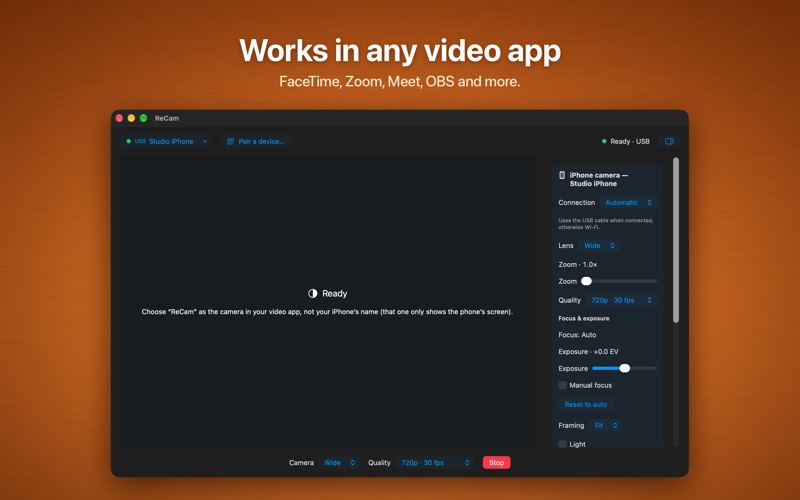
ReCam adds a camera to your Mac. Apps that use your Mac's camera, like Zoom, Google Meet, FaceTime and OBS, see it as a normal webcam. No account, no subscription, no ads.
MORE THAN CALLS Free covers everyday calls at 720p. ReCam is also a serious camera for recording and streaming. With Pro, shoot 4K at 30 or 60 fps, or 1080p at 60 fps, over a direct USB cable or Wi-Fi. While you're live, switch between your phone's cameras and lenses and set focus and exposure from your Mac. It works in Mac apps that use your camera, like OBS and QuickTime Player.
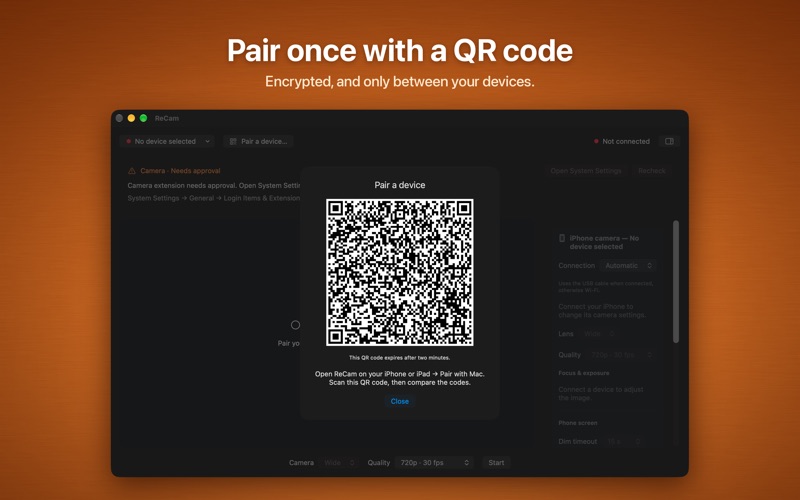
HOW IT WORKS 1. Open ReCam on your Mac and allow the ReCam camera extension in System Settings. 2. Install ReCam on your iPhone or iPad and pair once by scanning the QR code on your Mac. 3. Tap Start on your phone, then choose ReCam as the camera in your video app.
FEATURES • A real Mac camera: ReCam shows up in your apps' camera menus like a built-in webcam. • Control your phone from your Mac: switch lenses, change quality, zoom, focus, exposure, framing and the phone's Blackout mode without reaching for it, with live status dots. • Any lens: use the wide, ultra wide, telephoto or front camera, whichever your device has. • Your choice of quality: from 720p up to 4K. Pro adds smooth 60 fps at 1080p and 4K, which apps like OBS can use. • Encrypted pairing: a one-time QR code links your Mac and your phone. Video travels over an encrypted connection directly between them. • Wireless or wired: connect over Wi-Fi, or plug in your phone's USB cable for the most stable, lowest-delay connection. No extra setup. Choose Automatic, USB cable only or Wi-Fi only; the status shows USB or Wi-Fi. • Remembers your phone: ReCam reconnects to your paired device when it's available. Optional launch at login. • Clear status: see which device is connected, whether it's on USB or Wi-Fi, and the frame rate you're receiving. • Stays smooth: if the phone gets warm or the network gets busy, ReCam steps quality down to keep the picture moving.
FREE AND PRO ReCam is free at 720p and 30 fps, with every camera control, no watermark and no ads. The ReCam desktop app is free. ReCam Pro is a one-time in-app purchase made in the ReCam app on your iPhone or iPad. It unlocks 1080p, 1080p at 60 fps, 4K at 30 fps and 4K at 60 fps, for good. No subscription.
GOOD TO KNOW • Requires the free ReCam app on an iPhone or iPad with iOS or iPadOS 17 or later, and macOS 14 or later on your Mac. • ReCam sends video only. Pick your Mac's microphone, a headset or a USB mic in your video app. • Available resolutions and frame rates depend on your phone's camera and on conditions such as heat and network speed. • Your video goes from your phone straight to your Mac. ReCam doesn't record it, upload it or collect any data.
People rate it
Sign in to rate this app. Honest is what counts.
No ratings yet. Tried it? Be the first to rate it.
More Photo and video apps
Best new Photo and video apps this week Zoetrope ViewerWatch your zoetrope records and slipmats animate through your camera, or live on your…
 PlanIt Earth: VR Photo PlannerFor landscape, travel, nature, cityscape, night, time-lapse, star-trail, Milky Way and…
 TonalierYour photos now have an editor
 Superblur: Mosaic & Blur FacesSuperblur hides faces, number plates, names and addresses in your photos and videos…
 SqizziKeep the memories
 Photo Widget: Crop & PositionShow your favorite photos on your Home Screen — exactly the way you want