
Rollcall for Google Workspace
Not claimedRollcall puts your Google Workspace directory in the Mac menu bar, so the things you do…
By Dakabi LLC · ProductivityWhy we expect it: Clear, specific value and a thorough description make this a useful menu bar tool for Workspace admins.


About
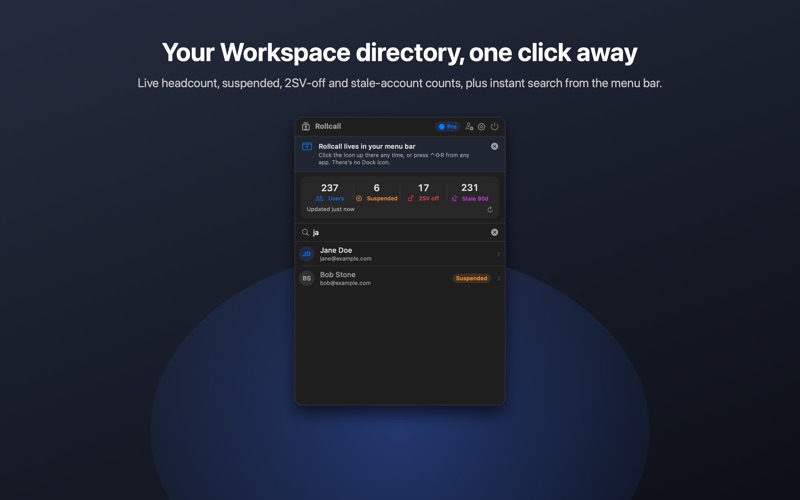
Rollcall puts your Google Workspace directory in the Mac menu bar, so the things you do fifty times a week don't need the Admin Console.
FIND ANYONE IN SECONDS Press the global hotkey or click the menu-bar icon and start typing. Results come straight from the Directory API as you type, by name or email. Pinned and recent users are one click away.
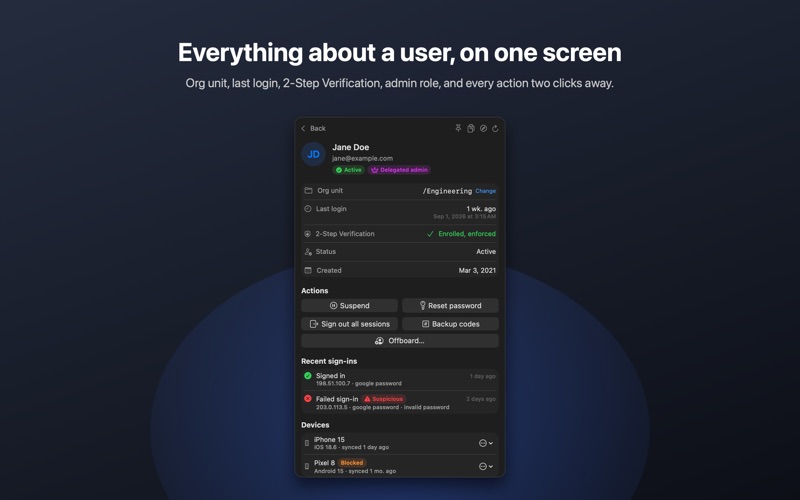
SEE WHAT MATTERS Open a user and you get the essentials on one screen: primary email, org unit, last login, 2-Step Verification status, suspension state, admin role, group memberships, recent sign-ins from the audit log (with failed and suspicious attempts flagged), and which third-party apps have access.
ACT IN TWO CLICKS • Suspend or restore an account • Reset a password: Rollcall generates a strong temporary password, copies it to your clipboard, and forces a change at next login • Sign the user out of every web and device session • Generate 2-Step Verification backup codes for a locked-out user • Revoke a third-party app's access • Move the user to another org unit • Add the user to a group or remove them from one • Block, approve, or wipe their managed mobile devices Every action asks for confirmation first, and every result is reported in a toast.
OFFBOARD IN ONE CLICK Reset the password, revoke app access, sign out everywhere, suspend, move to an offboarding org unit, and transfer Drive files and Calendar events to a colleague as one confirmed run, with a per-step result so you know exactly what happened.
ONBOARD JUST AS FAST Create a user with name, email, org unit and a generated temporary password in about twenty seconds.
KEEP AN EYE ON THE BASICS The dashboard shows total users, how many are suspended, how many still have 2-Step Verification off, and how many haven't signed in for 90 days. Click any number for the list.
YOUR OWN OAUTH CLIENT Rollcall signs in with an OAuth client that you create in your own Google Cloud project. Requests go directly from your Mac to Google's Admin SDK. There is no Rollcall server, no analytics, and nothing in between. Tokens live in the macOS Keychain. The in-app guide walks you through creating the client in about five minutes, and because the audience is Internal, no Google verification is required.
PRICING Search, user details, sign-in history, groups and the dashboard are free. The actions (suspend, restore, reset password, sign out, backup codes, revoke apps, groups, devices, move org unit, offboard with data transfer, create user) unlock with Rollcall Pro, a single one-time purchase after a 7-day free trial. No subscription.
REQUIREMENTS • macOS 14 or later • A Google Workspace account with admin privileges for the users you manage • An OAuth client ID from Google Cloud Console (guide included)
People rate it
Sign in to rate this app. Honest is what counts.
No ratings yet. Tried it? Be the first to rate it.