
Sequence Photos
Not claimedSequence is a tool for playing with photo sequences
By Salem Hilal · Photo and video


In short
Sequence Photos is a Mac app for arranging photos into sequences by spreading them out on a virtual desk, grouping them into spreads, and previewing the result as a book. Its main draw is that it works like laying prints on a table, and it can export a PDF or an InDesign file with every photo placed and linked. Photos stay on the user's Mac, with no account and no data collection.
Summary by Debuts, based on the App Store listing.About
Sequence is a tool for playing with photo sequences.
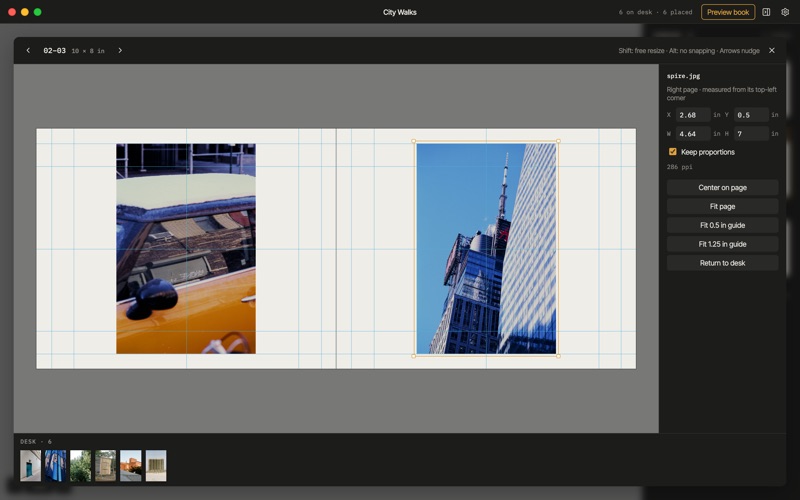
Drop in your photos and they land on the desk, where you can spread them out, pile them up, and move them around the way you would with prints on a table. When a pairing clicks, drag it onto a spread. Rearrange spreads by dragging them in the sidebar, and open any spread to place photos precisely, with margins, guides, and snapping.
Preview the book to turn its pages and see how the sequence reads. Press Space for Quick Look to see any photo full size.
When it's right, save a PDF to share, or export an InDesign file with every photo placed and linked, ready for refinement and final layout.
Your photos stay on your Mac. Sequence doesn't collect any data, has no account, and works entirely offline.
Also on the web at sequence.photos.
People rate it
Sign in to rate this app. Honest is what counts.
No ratings yet. Tried it? Be the first to rate it.
More Photo and video apps
Best new Photo and video apps this week Zoetrope ViewerWatch your zoetrope records and slipmats animate through your camera, or live on your…
 Migumento · QR photo albumOne album for every guest
 PlanIt Earth: VR Photo PlannerFor landscape, travel, nature, cityscape, night, time-lapse, star-trail, Milky Way and…
 TonalierYour photos now have an editor
 Superblur: Mosaic & Blur FacesSuperblur hides faces, number plates, names and addresses in your photos and videos…
 SqizziKeep the memories