
Taktava Click Track Maker
Not claimedTaktava makes a custom rehearsal click from your arrangement, then turns it into files…
By Gobling Company · Music and audio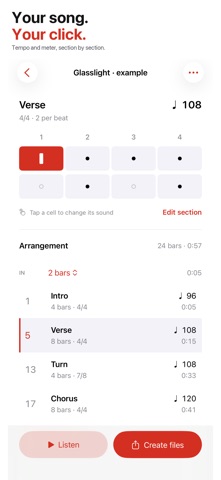


About
Taktava makes a custom rehearsal click from your arrangement, then turns it into files your band or recording session can use.
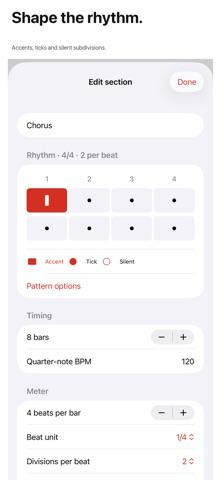
Set each section's name, bar count, quarter-note BPM and time signature. Tap the rhythm grid to make each subdivision silent, a regular tick or an accent. Add a count-in, reorder sections, duplicate a track and save a cue note. Start from a blank track or an editable template; the example arrangement is clearly labeled.
Listen to the rendered click, seek to a moment and follow its bar and beat. Create a 48 kHz, 16-bit mono WAV plus a standard MIDI file containing tempo and meter changes, named section markers and percussion notes. A CSV carries every section and rhythm state, and a printable PDF bar cue sheet carries the arrangement and notes. Share one file or all four through the system share sheet.
Your tracks and up to eight recent renders per track stay on this device. One purchase includes every editor, template and export. No subscription, ads, account, analytics, tracking or cloud service.
Up to 32 sections, 64 bars per section and 30 minutes per render. Quarter-note BPM is 30–240. Tempo changes occur at section boundaries. MIDI uses General MIDI woodblock notes on channel 10; the receiving instrument controls their sound, and MIDI tempos have whole-microsecond precision. The count-in precedes song bar 1. Playback pauses when the app leaves the foreground. Streaming-audio import, recording, MIDI hardware, DAW synchronization and continuous tempo ramps are not included.
People rate it
Sign in to rate this app. Honest is what counts.
No ratings yet. Tried it? Be the first to rate it.