
TKS Studio: Screenshot Maker
Ikke gjort krav påStop paying for screenshot websites and uploading images one by one
Af VEYSEL TEKES · Foto og video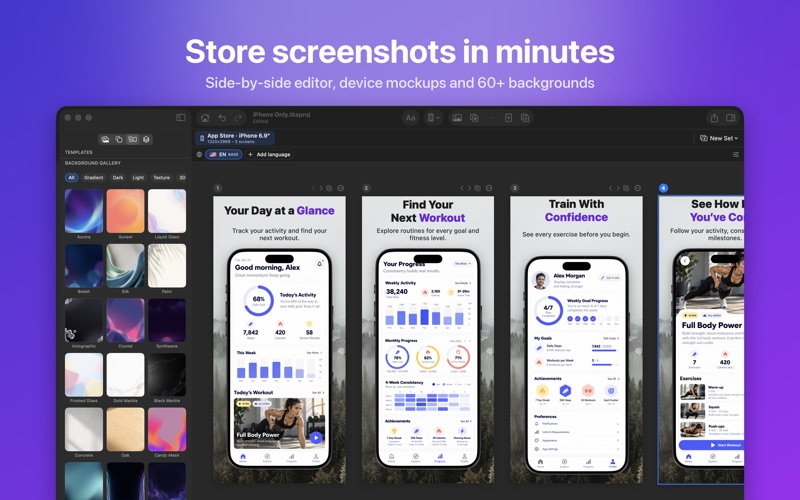



Kort fortalt
TKS Studio: Screenshot Maker is a native Mac app that turns simulator screenshots into store images, with auto-placed screens, device mockups, text styles, and exact export sizes for iPhone, iPad, Android, and Google Play. It is aimed at app developers who prepare store listings. It stands out for running entirely on the Mac, with no account, tracking, or uploads.
Resumé fra Debuts, baseret på app-siden i App Store.Om appen
Stop paying for screenshot websites and uploading images one by one. TKS Studio is a native Mac app that turns your simulator screenshots into polished store images in minutes.
DESIGN FAST • Drop in your simulator screenshots and auto-place them across all screens • Side-by-side screen editor: add, duplicate, reorder and copy elements between screens • Ready-made layouts: title top or bottom, 3D tilted, two devices, close-up, text focused and more • Panoramic backgrounds that flow seamlessly across screens • Convert a finished set to another size, for example from phone to tablet
DEVICE MOCKUPS • Realistic, clay, flat, outline and frameless device styles • Latest phones and tablets, portrait or landscape, with 3D perspective • Import your own device frame PNGs — the screen area is detected automatically
TEXT THAT STANDS OUT • Any Mac font, or load your own • Stroke, glow, 3D depth, label boxes, gradients and highlighter effects • 12 one-click text styles
BACKGROUNDS & EXTRAS • 60+ professionally made backgrounds for phone, tablet and landscape • Gradients, mesh gradients, images and color themes • Badges, ratings, speech bubbles, notification and review cards, arrows and magnifier callouts • One-click background removal for your images
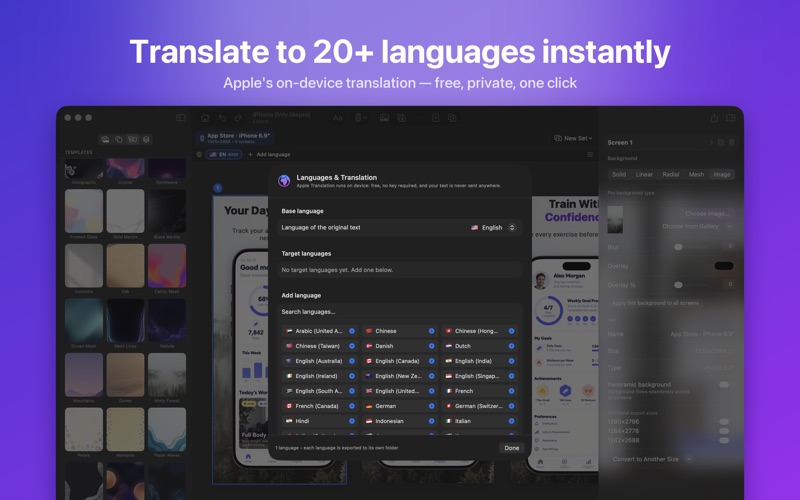
GO GLOBAL • Translate every text into 20+ languages with Apple's on-device translation — free and private • Language-specific screenshots • Long translations automatically fit their boxes
EXPORT READY FOR THE STORES • Exact sizes for iPhone 6.9" and 6.5", iPad 13" and 11", Android phones and tablets, the Google Play feature graphic and app icons — or any custom size • Batch export every set and language into neatly named folders • Opaque PNG or JPEG, ready to upload
PRIVATE BY DESIGN Everything runs on your Mac. No account, no tracking, no uploads.
TKS STUDIO PRO Try TKS Studio for free. Upgrade to Pro for unlimited projects, sets, screens and languages, batch export and watermark-free images. Choose a monthly or yearly subscription, or a one-time lifetime purchase.
Payment is charged to your Apple ID at confirmation. Subscriptions renew automatically unless cancelled at least 24 hours before the end of the current period. Manage or cancel anytime in your App Store account settings.
Terms of Use: https://tksapps.com/tksstudios/terms/ License Agreement (EULA): https://www.apple.com/legal/internet-services/itunes/dev/stdeula/ Privacy Policy: https://tksapps.com/tksstudios/privacy/
Brugernes bedømmelse
Log ind for at bedømme appen. Det vigtigste er, at du er ærlig.
Ingen bedømmelser endnu. Har du prøvet den? Giv den første bedømmelse.
Flere apps i kategorien Foto og video
De bedste nye apps i kategorien Foto og video denne uge Zoetrope ViewerWatch your zoetrope records and slipmats animate through your camera, or live on your…
 PlanIt Earth: VR Photo PlannerFor landscape, travel, nature, cityscape, night, time-lapse, star-trail, Milky Way and…
 TonalierYour photos now have an editor
 Superblur: Mosaic & Blur FacesSuperblur hides faces, number plates, names and addresses in your photos and videos…
 SqizziKeep the memories
 Photo Widget: Crop & PositionShow your favorite photos on your Home Screen — exactly the way you want