
PicFerry: ZIP to Photos
Nicht beanspruchtGet photos and videos out of ZIP files and into your iPhone's Photos library
Von 永涛 马 · Foto und Video



Kurz gesagt
PicFerry: ZIP to Photos moves photos and videos from ZIP archives or folders into an iPhone's Photos library, saving original files to a named album without re-encoding them. It is aimed at people who keep media in ZIP files and want to pause, resume, and retry imports with progress shown for each file. Processing happens on the device, and the app notes that Live Photo pairs are not reassembled automatically.
Zusammenfassung von Debuts, basierend auf dem Eintrag im App Store.Info
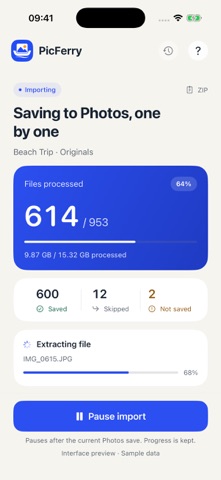
Get photos and videos out of ZIP files and into your iPhone's Photos library. PicFerry imports from ZIP archives or folders, shows clear progress, and saves original files to a named album without re-encoding them.
See which files were saved, skipped or couldn't be imported. Pause a batch and continue later, retry failed files, and skip duplicates already recorded by PicFerry. Files are processed on your device, one at a time.
IMPORT YOUR COLLECTIONS Choose a standard ZIP, a ZIP64 archive or a folder in Files. Name the destination album before importing, then follow the progress for the batch and the current file.
CONTINUE WITH CONFIDENCE Completed imports are recorded. If you pause or leave the app, return to continue the batch. If storage is low, PicFerry pauses so you can free space. Previously saved files are retained, and failed files can be retried separately.
KEEP THE ORIGINAL FILES PicFerry imports the original photo and video files without re-encoding. Readable capture dates are used when available. Your source ZIP or folder is retained.
PROCESS ON YOUR DEVICE No PicFerry account is required. PicFerry itself does not upload your media. Your device's iCloud Photos settings still apply, and cloud-based source files may need to download first.
BEFORE YOU IMPORT Keep PicFerry open while importing and leave enough storage for the Photos copies and the current temporary file. If an unfinished file is interrupted, that file starts again when you resume; completed files are not imported again.
Encrypted and multipart archives, RAR and 7z are not supported. Photo and video compatibility depends on iOS Photos. Live Photo pairs are not automatically assembled. Duplicate detection covers files imported through PicFerry and does not scan your entire photo library.
Nutzer bewerten sie
Melde dich an, um diese App zu bewerten. Ehrlichkeit zählt.
Noch keine Bewertungen. Hast du die App ausprobiert? Gib die erste Bewertung ab.
Mehr Foto und Video-Apps
Die besten neuen Foto und Video-Apps dieser Woche Zoetrope ViewerWatch your zoetrope records and slipmats animate through your camera, or live on your…
 Migumento · QR photo albumOne album for every guest
 PlanIt Earth: VR Photo PlannerFor landscape, travel, nature, cityscape, night, time-lapse, star-trail, Milky Way and…
 TonalierYour photos now have an editor
 Superblur: Mosaic & Blur FacesSuperblur hides faces, number plates, names and addresses in your photos and videos…
 SqizziKeep the memories