
Road Order: Multi Stop Planner
Nicht beanspruchtBefore you load the van, put today's pile of parcels in an order you can drive without…
Von RAINBOW TREE LLC · ReisenWarum wir das erwarten: Clear value for van drivers, with careful road-checked routing, honest flags for doubtful addresses, and a free tier.




Kurz gesagt
Road Order: Multi Stop Planner sorts a day's delivery stops by road travel times checked on Apple Maps, so the route avoids doubling back. Parcels for one address become a single stop, and the app marks doubtful addresses yellow for review. It is aimed at drivers handling multi-stop deliveries, and it stands out for reading recipient addresses from a photo of a shipping label.
Zusammenfassung von Debuts, basierend auf dem Eintrag im App Store.Info
Before you load the van, put today's pile of parcels in an order you can drive without looping back. Add addresses and Road Order arranges your stops by real road travel times checked on Apple Maps. Arranging is free, with no limit on the number of stops.
NO LOOPING BACK Parcels for the same address become one stop ("2 parcels"). Stops that are very close together (within 80 m / 260 ft) are walked instead of driven. The time it takes to park, get out and come back (parking time per stop) is part of the calculation, so you are far less likely to get an order that leaves an apartment building and comes back to it later for the second parcel.
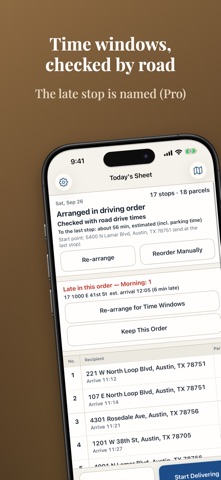
BY ROAD, NOT STRAIGHT LINES Ordering by straight-line distance sends you the long way around one-way streets, rivers and railways. Road Order checks each leg's travel time on Apple Maps and shows how many legs are checked, e.g. "Road-checked legs 38/41". Once every leg is checked, the order becomes the "Road-checked order". Legs that haven't been checked are never called checked (they're dotted on the map). In our estimate, a 30-stop delivery round came out about 5 minutes shorter than the straight-line order (results vary by area and number of stops).
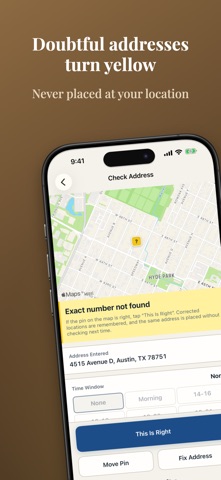
DOUBTFUL ADDRESSES TURN YELLOW Addresses that aren't found down to the house number, that match a different street or ZIP code, that land on the same spot as another address, or that are far from the other stops are flagged yellow with a one-line reason. An address that can't be found is never dropped at your current location. Fix a pin on the map once and it's remembered: the same address is placed correctly from then on.
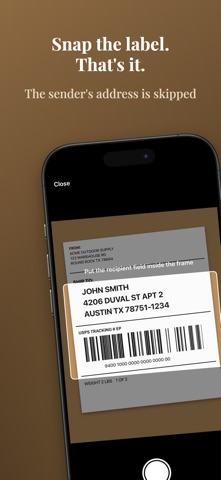
SNAP THE LABEL Put the SHIP TO section of a shipping label in the frame and take a photo: the recipient's address is offered as a candidate. The sender's address, phone numbers and tracking numbers are skipped. Photos are read on your iPhone and are never saved or sent. You can also type addresses or dictate them with the keyboard's microphone.
ON THE ROAD The next stop is shown large and handed to Apple Maps or Google Maps one stop at a time (turn-by-turn directions happen in those apps). Mark each stop Done, Not Home, Returned or Skip, and move on. If you go off route, re-arrange the rest from where you are.
PRO (ONE-TIME PURCHASE) - Time windows: add a window such as Morning or 2–4 PM, get arrival estimates from road travel times, and see which stop will be late. Choose to re-arrange for time windows or keep your order. - Continuous label scanning: keep shooting, then review the list and add them all at once. - Paste a list: paste a list of addresses to add them. - Saved routes: save your regular customers by day of the week. Legs checked on earlier runs carry over, so the route is arranged as soon as you open it. Just switch off anyone you're not visiting today. - Records: daily counts of Done, Not Home and Returned, CSV export, and a password-protected backup. Arranging stays free. There is no subscription and no per-stop or per-use charge.
WHO IT'S FOR - Couriers and delivery drivers covering an unfamiliar area (gig, relief and new drivers) - Anyone visiting regular customers by day: route sales, service calls, inspections, collections and route deliveries
PLEASE NOTE - Travel times are Apple Maps estimates and change with road conditions. - Don't use the app while driving. Operate it only after you've stopped. - Turn-by-turn navigation is provided by Apple Maps or Google Maps. - The order is built by keeping only improvements checked on the road; it is not guaranteed to be the shortest possible. - Addresses, recipient names and your delivery sheet are stored only on your iPhone (address text and locations are sent to Apple Maps to look up places and travel times).
Privacy Policy: https://rainbowtree.work/privacy/haitatsu-route-en.html
Nutzer bewerten sie
Melde dich an, um diese App zu bewerten. Ehrlichkeit zählt.
Noch keine Bewertungen. Hast du die App ausprobiert? Gib die erste Bewertung ab.
Mehr Reisen-Apps
Die besten neuen Reisen-Apps dieser Woche ItineroKeep your itinerary and travel details together before, during and after your trip
 HissiFür alle, die auf Aufzüge angewiesen sind: Rollstuhlfahrer:innen, Eltern mit…
 FjellFjell answers one question: how long would it take to walk there?
 Leave the ResortLeave the Resort is the travel app that stops you getting ripped off
 Schengen Days: 90/180 PlannerJust enter your entry and exit dates
 Trova Treasure HuntsTurn a walk through the city into a treasure hunt