
Saint Studios - Video Editor
Nicht beanspruchtSaint Studios is a professional video editor built for creators who want to get the most…
Von Luis Loyola · Foto und Video



Info
Saint Studios is a professional video editor built for creators who want to get the most out of their cameras, not out of a chatbot. It is free, it asks for no account, and all processing happens on your iPhone or iPad: rendering, color, effects, captions and export run on the device itself, with no cloud service and no third-party processing. Your footage never leaves your device.
MADE FOR YOUR CAMERA • Built-in log conversions for Apple Log (iPhone), Sony FX3 and A7S III (S-Log3) and the Insta360 Luna, in Rec.709 and HLG • For everything else, Get Camera LUT opens your maker’s official download (DJI D-Log, Insta360 I-Log, Sony S-Log3, Panasonic V-Log, Fujifilm F-Log) and Saint Studios applies the .cube before or after your grade • A full HDR pipeline (HLG and PQ) with tone mapping to SDR • 4K, 60 fps, ProRes and 10-bit sources; hardware HEVC, H.264 and ProRes export
PRIVATE BY DESIGN • No account, no sign-up, no subscription, no watermark • All processing on device: rendering, grading, effects, captions and export are done by your iPhone or iPad, never by a cloud or third-party service • No servers: nothing is uploaded, analyzed remotely or tracked • No generative AI. The on-device tools that help (captions, stabilization, tracking) are conventional computer vision running on your device
EDIT • Multi-track timeline with video, audio and title lanes • Trim, ripple, roll, slip and slide; blade tool with a pointer on iPad • Magnetic snapping, markers, to-dos, in/out ranges, groups, compound clips • Sequences as clips, undo history, versions, project templates
COLOR • LUTs, white balance, tone and color sliders • Lift, gamma and gain as wheels or per-channel bars, plus offset • Curves, secondary color, and a chroma warper that plots your footage’s colors so you can drag them • Scopes: histogram, waveform, RGB parade, vectorscope
TITLES AND GRAPHICS • Titles with animation, styled words, text on a path and templates • Shapes, stickers, drawing on video, overlays • Generators: countdown, stopwatch, timecode, date stamp, progress bar, audio visualizer
AUDIO • Real waveforms, per-track mixer, keyframed volume and pan • EQ, compressor, de-esser, noise reduction, echo, reverb, limiter • Ducking, loudness normalization, beat detection, sync audio to video • Voiceover recording and text to speech
SPEED AND MOTION • Speed ramps, reverse, freeze frames, optical-flow slow motion • Keyframes on every parameter with easing and curved paths • Stabilization, motion tracking, auto reframe, background removal
CAPTIONS • On-device captions with word highlighting, transcript editing, subtitle import and export
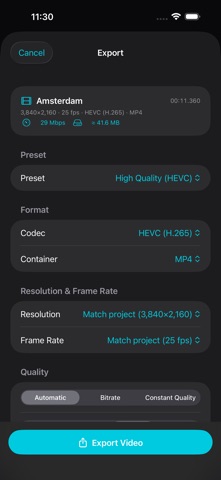
EXPORT • Presets for YouTube, Instagram, TikTok and X, or your own, up to 4K with MetalFX upscaling • Still frames, GIFs, audio-only, chapter markers, FCPXML for finishing elsewhere • An export queue with progress on the Lock Screen
Designed for iPhone and iPad, with keyboard, trackpad and Apple Pencil support, multiple windows and an external-display feed.
Everything is included. Nothing is charged. Nothing is collected.
Nutzer bewerten sie
Melde dich an, um diese App zu bewerten. Ehrlichkeit zählt.
Noch keine Bewertungen. Hast du die App ausprobiert? Gib die erste Bewertung ab.
Mehr Foto und Video-Apps
Die besten neuen Foto und Video-Apps dieser Woche Zoetrope ViewerWatch your zoetrope records and slipmats animate through your camera, or live on your…
 Migumento · QR photo albumOne album for every guest
- ScreenLux: Live Wallpapers 4KLive wallpapers for iPhone and 4K video wallpapers for Android
 ChromaSolChromaSol looks at a photo, isolates the people in it, leaves skin out and reduces the…
 Vinette: Sticker JournalFor the person who finds rest in decorating
 IROZOUIROZOU is a color workspace made for designers: fashion, textile, graphic and product…