
Rawpick: RAW Photo Culling
Sin reclamarRawpick is a fast photo browser for the Mac, made for going through a shoot and keeping…
De BEK Service LTD · Foto y vídeo



En resumen
Rawpick: RAW Photo Culling is a Mac photo browser for sorting a shoot and keeping the best frames without importing or copying files. It reads RAW files from many camera brands and saves star ratings, labels and rejects as XMP sidecars that Lightroom Classic, Bridge and Capture One can read. A standout detail is that every decision is made from the keyboard, with the view moving to the next photo after each one.
Resumen de Debuts, basado en la ficha de la App Store.Acerca de
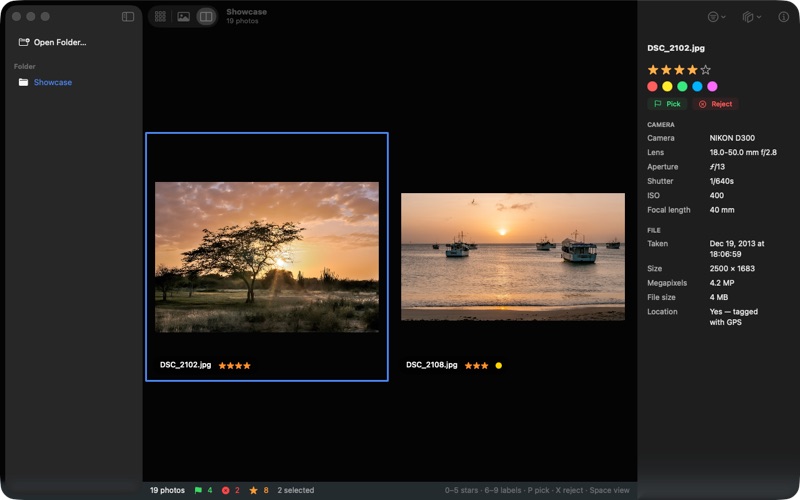
Rawpick is a fast photo browser for the Mac, made for going through a shoot and keeping the best frames.
OPEN A FOLDER, START LOOKING Point Rawpick at a memory card, an external drive or any folder. Nothing is imported, copied or converted, and there is no library to build. Your photos stay exactly where they are.
INSTANT, EVEN FOR RAW Rawpick shows the preview your camera already stored inside each RAW file, so photos appear as fast as you can press the arrow keys. It reads RAW files from Canon, Nikon, Sony, Fujifilm, Olympus/OM, Panasonic, Pentax, Leica and more, plus DNG, JPEG, HEIC, PNG and TIFF. A RAW and its JPEG twin show as one photo.
CULL WITH THE KEYBOARD • 1–5 for stars, 0 to clear • 6–9 for red, yellow, green and blue labels • P to pick, X to reject, U to clear the flag • Space for a big view, C to compare two to four photos side by side Rawpick moves to the next photo after each decision, so you never leave the keyboard.
YOUR DECISIONS TRAVEL WITH THE PHOTOS Stars, labels and rejects are saved in a standard XMP sidecar beside each photo, the format Lightroom Classic, Bridge and Capture One read. Anything already in a sidecar, such as develop settings, is kept. Your photos themselves are never changed.
FILTER, THEN ACT Show only 4 stars and up, only picks, or only one colour. Then: • Rename a whole shoot from a pattern like date_001, keeping RAW, JPEG and sidecar together • Convert to JPEG, HEIC, PNG or TIFF at any size, with location data removed if you like • Copy or move your picks to another folder • Send every rejected photo to the Trash in one step
CAMERA DATA AT A GLANCE Camera, lens, aperture, shutter speed, ISO, focal length, capture time, size and location, for the photo in front of you.
RAWPICK PRO The free version does everything above, with batch jobs of up to 25 photos at a time. Pro is a single purchase — no subscription — and adds: • Batch jobs of any size • Similar Shots: groups bursts and repeated frames, marks the sharpest one, and rejects the rest in one click. It runs entirely on your Mac.
PRIVATE No account, no ads, no tracking. Rawpick never uploads your photos anywhere.
Terms of Use: https://www.apple.com/legal/internet-services/itunes/dev/stdeula/ Privacy Policy: https://bekservice.uk/rawpick/privacy/
Así la valora la gente
Inicia sesión para valorar esta app. Lo que cuenta es ser sincero.
Aún no hay valoraciones. ¿La has probado? Sé el primero en valorarla.
Más apps de Foto y vídeo
Las mejores apps nuevas de Foto y vídeo esta semana Zoetrope ViewerWatch your zoetrope records and slipmats animate through your camera, or live on your…
 Migumento · QR photo albumOne album for every guest
 PlanIt Earth: VR Photo PlannerFor landscape, travel, nature, cityscape, night, time-lapse, star-trail, Milky Way and…
 TonalierYour photos now have an editor
 Superblur: Mosaic & Blur FacesSuperblur hides faces, number plates, names and addresses in your photos and videos…
 SqizziKeep the memories