
Waku - Photo Frames
Sin reclamarWaku puts your photo inside a clean frame at the exact size you need, and adds captions…
De Alvaro Martin · Foto y vídeoPor qué la esperamos: Clear, specific value for Instagram creators, careful description with precise sizes, a fair free tier, and a strong privacy stance make it a promising debut.


En resumen
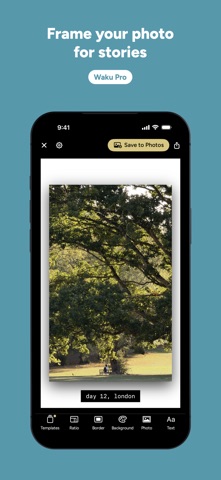
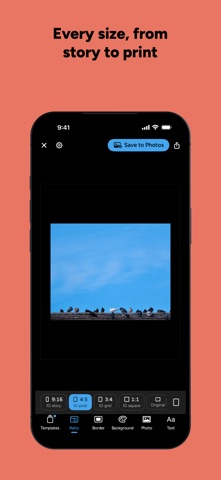
Waku - Photo Frames places a photo inside an even border at fixed social media sizes, such as Instagram story, post, grid and square, plus print sizes, and adds captions. Templates keep the size, border, background and captions, so repeat posts take little setup. Photos stay on the iPhone and saved images carry no location data.
Resumen de Debuts, basado en la ficha de la App Store.Acerca de
Waku puts your photo inside a clean frame at the exact size you need, and adds captions the way you'd write them in a story. Pick a photo, tap Save to Photos, and you're done.
Sizes IG story (9:16), IG post (4:5), IG grid (3:4), IG square (1:1), 10×15 and 13×18 prints, a tall 3:5, or the photo's own shape. Rectangular sizes also work in landscape.
The same result every time The border is even and measured on the canvas, so it doesn't change from one photo to the next. A caption stays one border below the photo, whether the photo is vertical or horizontal. A story always comes out at 1080×1920 pixels, exactly as you see it.
Templates A template keeps the size, border, background, photo style and captions. Tap it and it applies to the photo you have open. Every time you save, it remembers your text, so for a daily story you only change what's new.
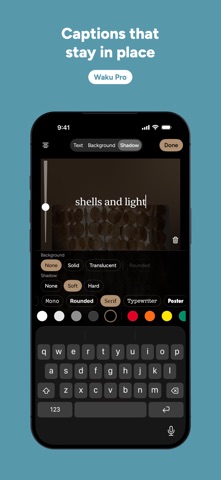
Style Solid colors, gradients, colors taken from the photo itself, or the photo blurred. Shadow, glow, rounded corners, line and mat for the photo. For captions: built-in typefaces, any font on your iPhone or imported from Files, solid or translucent backgrounds, shadows, and your own text styles.
From Photos to your story Share a photo from the Photos app to Waku to frame it with your template. From Waku, save it or send it straight to your Instagram story.
Free and Pro Free: every size, the border, fit or fill, and a black frame, saved at Instagram size. Waku Pro is a one-time purchase, not a subscription: every color and gradient, photo colors and blur, captions, photo styles, all fonts and text styles, your own templates, and full-size export. Try anything first; Waku only asks when you save something that uses Pro.
Privacy Waku collects no data. No accounts, no ads, no servers. Your photos stay on your iPhone, and the images you save carry no EXIF data or GPS location.
Accessibility Works with VoiceOver, Voice Control and larger text. The interface is dark and respects Reduce Motion.
Así la valora la gente
Inicia sesión para valorar esta app. Lo que cuenta es ser sincero.
Aún no hay valoraciones. ¿La has probado? Sé el primero en valorarla.
Más apps de Foto y vídeo
Las mejores apps nuevas de Foto y vídeo esta semana Zoetrope ViewerWatch your zoetrope records and slipmats animate through your camera, or live on your…
 PlanIt Earth: VR Photo PlannerFor landscape, travel, nature, cityscape, night, time-lapse, star-trail, Milky Way and…
 TonalierYour photos now have an editor
 Superblur: Mosaic & Blur FacesSuperblur hides faces, number plates, names and addresses in your photos and videos…
 SqizziKeep the memories
 Photo Widget: Crop & PositionShow your favorite photos on your Home Screen — exactly the way you want