
KUMU - Photo Layout
Ei lunastettuKUMU is a photo layout app made for composing photos, not just arranging them
Tekijä: AKIRA SANO · Valokuva ja video

Lyhyesti
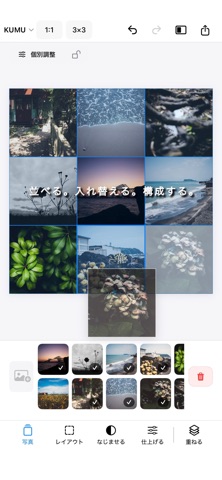
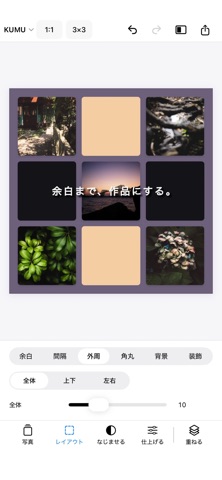
KUMU - Photo Layout is a photo layout app for composing collages on a grid, combining photos with negative space, text, and overlays. It is aimed at people who want hands-on control over their composition, with an option to harmonize brightness and color across several photos. A notable detail is that grid guides are left out of exported images.
Debutsin tekemä tiivistelmä App Store -listauksen pohjalta.Tietoa
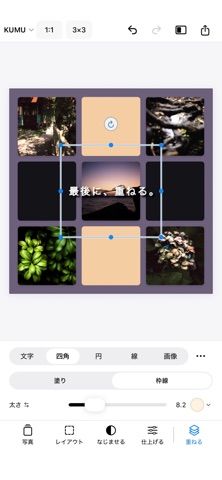
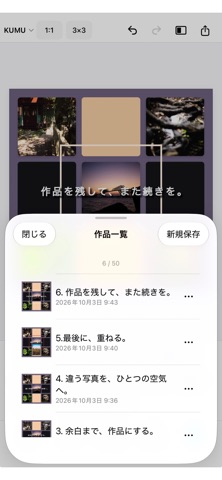
KUMU is a photo layout app made for composing photos, not just arranging them. Combine photos, negative space, text, and graphic elements within a grid, and decide the composition with your own hands. KUMU stays out of the way and helps you shape everything into place. ■ Compose photos freely Place photos on a grid, move and swap them, adjust their scale, position, and crop. You can use the same photo more than once, or let a single photo span multiple grid cells. ■ Combine photos, space, text, and overlays Create layouts using photos, empty space, and color cells. Text can be placed freely over your composition, with support for moving, scaling, and rotation. Adjust horizontal or vertical writing, fonts, colors, character spacing, and line spacing. With Overlays, you can also add rectangles, circles, lines, and images on top of your composition. ■ Harmonize different photos Use Harmonize to balance differences in brightness and color when several photos are combined into a single work. You can let KUMU adjust them naturally, or choose one photo as a reference for the others. Individual photo adjustments and finishing adjustments for the entire composition are also available. ■ Fine-tune your layout Adjust cell spacing, outer margins, backgrounds, corner radius, borders, shadows, feathering, and blending. Editing grid guides are never included in the exported image, so you can work with structure while keeping the final result clean. ■ Save your works and continue later Your current editing state is automatically saved on your device, so you can continue where you left off the next time you open KUMU. You can also save multiple named works and return to them later for further editing. ■ Made for iPhone and iPad KUMU provides the same core editing experience on both iPhone and iPad. On iPad, the larger workspace and grids up to 10×10 give you even more room to build detailed compositions. ■ KUMU Pro The Free version includes KUMU’s core editing features. KUMU Pro is a one-time purchase that unlocks: ・Up to 50 photos ・Grids up to 7×7 on iPhone and 10×10 on iPad ・All aspect ratios ・Up to 50 saved works ・High-resolution collage export up to 6000 px ・Export of original source photos used in a work ・Individual export of placed photos You decide the composition. KUMU helps bring it together. Make your photos your own with KUMU.
Ihmisten arvio
Kirjaudu sisään arvioidaksesi tämän sovelluksen. Rehellisyys on tärkeintä.
Ei vielä arvioita. Oletko kokeillut sitä? Anna ensimmäinen arvio.
Lisää Valokuva ja video-sovelluksia
Viikon parhaat uudet Valokuva ja video-sovellukset Zoetrope ViewerWatch your zoetrope records and slipmats animate through your camera, or live on your…
 Migumento · QR photo albumOne album for every guest
 PlanIt Earth: VR Photo PlannerFor landscape, travel, nature, cityscape, night, time-lapse, star-trail, Milky Way and…
 TonalierYour photos now have an editor
 Superblur: Mosaic & Blur FacesSuperblur hides faces, number plates, names and addresses in your photos and videos…
 SqizziKeep the memories