
sDashCam - Dash Cam & Body Cam
Ei lunastettusDashCam turns your iPhone into a dash cam, black box or body cam — for cars, motorbikes…
Tekijä: WELLPEACH · Matkailu



Lyhyesti
sDashCam - Dash Cam & Body Cam turns an iPhone into a dash cam, black box or body cam for cars, motorbikes, scooters, cycling and walking. It loops recordings within a storage limit the user sets and keeps impact clips and manually saved clips from being deleted. Recording pauses when the app leaves the screen or the phone locks, and resumes if the user returns within 30 minutes.
Debutsin tekemä tiivistelmä App Store -listauksen pohjalta.Tietoa
sDashCam turns your iPhone into a dash cam, black box or body cam — for cars, motorbikes and scooters, delivery riders, cycling and walking.
LOOP RECORDING • Records continuously within a storage limit you set. When it is full, the oldest normal clips are deleted first. • Saves 1-, 3- or 5-minute files back to back, with no gaps between them. • If the app stops or the phone powers off mid-recording, the footage up to that point stays playable.
IMPACT DETECTION AND SAVED CLIPS (G-SENSOR) • When the G-sensor detects an impact or a fall, the clip is kept separately as an impact clip. • Press the Save button, or a volume button, to save the moment yourself — saved clips are never deleted automatically, and you don't need to touch the screen while riding. • Loop recording never deletes saved clips.
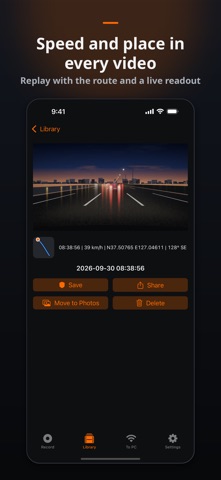
TIME, SPEED AND GPS STAMP • Burns the date and time into the video. Speed, GPS coordinates, direction and your own text (such as a number plate) are optional. • A 1-second log keeps position and speed next to each video. Download it as subtitles (.srt) or a route (.gpx). • Shows a GPS speedometer on the recording screen.
CAMERA AND QUALITY • Rear or front camera, ultra-wide lens on supported phones • 720p, 1080p, 1440p or 4K (on supported devices), 30 or 60 fps, HEVC or H.264 • Black-screen mode: the display goes dark while recording continues. • Heat care: quality steps down before the phone overheats and recording resumes when it cools.
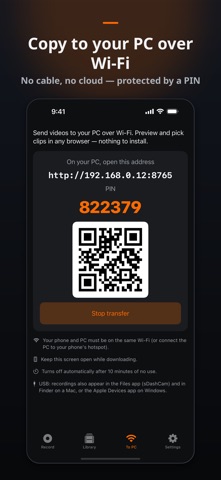
TRANSFER TO YOUR PC • USB: recordings also appear in the Files app and in Finder on a Mac. • Wi-Fi: turn on Transfer to PC, open the address shown on your phone in any PC browser, enter the PIN, preview clips and download only the ones you need. Nothing to install.
TWO PHONES: FRONT AND REAR • Mount one phone at the front and one at the rear. Each records on its own; set one as the front unit and one as the rear unit so the files are labelled.
PRIVATE BY DESIGN • No account, no cloud. Video and GPS location data stay on your phone unless you share or transfer them. • The microphone is off by default. Turn it on only when you need sound.
Do not operate the app while driving. GPS speed is for reference and may differ from your vehicle's speedometer.
HOW RECORDING WORKS ON IPHONE • sDashCam records while it is open on screen. iOS does not allow camera use in the background, so switching to another app or locking the screen pauses recording — you get a notification, and recording continues when you come back within 30 minutes. • The screen does not auto-lock while recording. Use black-screen mode to keep the display dark. • On long journeys, keep the phone plugged in.
■ App permissions • Required: Camera — used for recording • Optional: Microphone (off by default — records sound only when you turn it on), Location (speed and position on videos, and trip routes), Photo Library (save to the Photos app when you want — add-only), Local Network (transfer clips to a PC on the same Wi-Fi), Notifications (a reminder if recording pauses) • You can use the app without granting the optional permissions
■ Paid features and payment • The app shows ads, but never while recording. Premium (ad removal) is a one-time purchase (not a subscription); the displayed price includes VAT where applicable • After purchase, you can request a refund (withdrawal) via the App Store refund process or by contacting support • Terms of Use sdashcam.com/terms · Privacy Policy sdashcam.com/privacy
Ihmisten arvio
Kirjaudu sisään arvioidaksesi tämän sovelluksen. Rehellisyys on tärkeintä.
Ei vielä arvioita. Oletko kokeillut sitä? Anna ensimmäinen arvio.
Lisää Matkailu-sovelluksia
Viikon parhaat uudet Matkailu-sovellukset HissiFür alle, die auf Aufzüge angewiesen sind: Rollstuhlfahrer:innen, Eltern mit…
 Leave the ResortLeave the Resort is the travel app that stops you getting ripped off
 Schengen Days: 90/180 PlannerJust enter your entry and exit dates
 Trova Treasure HuntsTurn a walk through the city into a treasure hunt
 LeaveTime — When to LeaveLeaveTime answers one question: what time do I need to leave to make my flight?
 MapTogether: Group TravelStop juggling one app for the plan, another for splitting costs, another for photos, and…