
Form Studio: Scan & Sign
Non revendiquéeTurn a paper form into a finished PDF, right on your iPhone or iPad
Par Utility Forces LLC · ProductivitéPourquoi nous l'attendons : Clear, privacy-focused value for filling paper forms on iPhone and iPad, with a thorough description that sets accurate expectations.

En bref
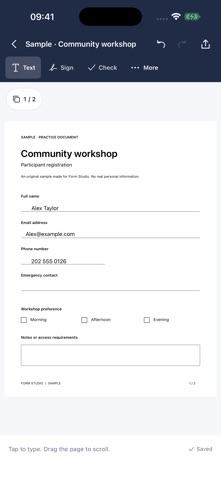
Form Studio: Scan & Sign turns a paper form into a finished PDF on iPhone or iPad, using a camera scan, a photo, or an imported PDF. Users can type, add signatures, check boxes, and place text fields, with local field suggestions to help find blank lines. Everything runs on the device with no account, and the standout feature is that scanning, editing, and PDF creation happen without any server upload.
Résumé par Debuts, d'après la fiche de l'App Store.À propos
Turn a paper form into a finished PDF, right on your iPhone or iPad.
Scan with your camera, choose a photo, or import a PDF. Check the corners, clean up the paper, then tap anywhere to type. Add a signature, check a box, or draw a text box exactly where you need it.
FILL THE FORM IN FRONT OF YOU Keep the original page layout while adding your answers. Local field suggestions can help you find blank lines and boxes; you can always place and adjust a field yourself.
MAKE IT FIT Move and resize your text and signatures. Adjust their angle, straighten a page, or turn a filled page while keeping its answers aligned. Undo changes as you work.
KEEP YOUR WORK Save editable drafts on your device, organize them in folders, and reuse saved signatures. Recently Deleted lets you restore a form or permanently remove it. Deleting a folder keeps its forms.
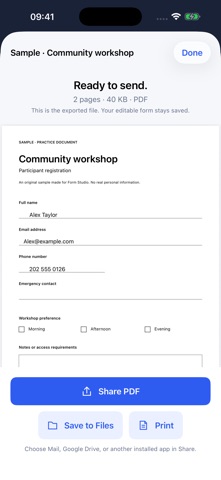
SEND A FINISHED PDF Preview the actual exported file before you share it. Save to Files, send it with Mail, or use a compatible app in the system share sheet, including cloud storage apps you have installed.
PRIVATE BY DESIGN Scanning, page cleanup, field suggestions, editing, and PDF creation run on your device. No account, ads, tracking, subscription, or server upload is required. Sharing uses the destination you choose. Your device backup settings may also include app data.
One purchase includes the complete app for iPhone and iPad. Camera scanning requires a supported device; photo and PDF import provide another way to get started. Up to 50 pages per form.
Made by JimDoes.it. Privacy: https://formstudio.jimdoes.it/privacy/ Terms: https://jimdoes.it/terms
Les notes des utilisateurs
Connecte-toi pour noter cette appli. Ce qui compte, c'est d'être honnête.
Pas encore de notes. Tu l'as essayée ? Sois le premier à la noter.
Plus d'apps Productivité
Les meilleures nouvelles apps Productivité de la semaine ChickMark: Habit TrackerChickMark is a simple habit tracker for routines, goals, and reminders
 Dayflint: One Thing a DayToo many priorities?
 DHUDEDHUDE Analityxs es la herramienta de gestión diaria para grupos de restauración y ocio…
 Intent - Scroll by ChoiceTake back control of your screen time
 Whisperly DictationWhisperly turns your voice into clean text
 Densha - Focus TimerEvery focus session is a train ride across Japan