
Glamirror – Beauty Mirror
Non revendiquéeGlamirror turns your phone's camera into a smart mirror
Par HaSenso · Photo et vidéoPourquoi nous l'attendons : A focused, privacy-respecting mirror app with clear value, a polished feature set, and a broad beauty-conscious audience make it promising.

En bref
Glamirror, Beauty Mirror turns a phone's front or back camera into a live mirror with adjustable lighting, a real-time beauty filter, and photo capture that matches the on-screen view. It is aimed at people who want to check their look before taking a picture. One detail that stands out is that photos stay on the device unless the user chooses to share them, and the app has no account and no ads.
Résumé par Debuts, d'après la fiche de l'App Store.À propos
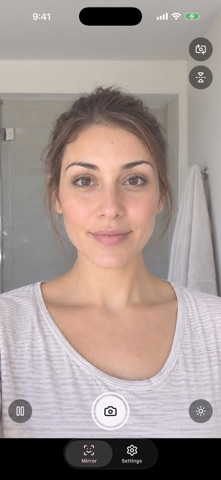
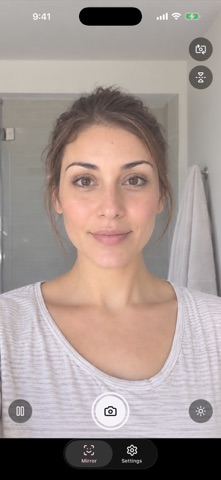
Glamirror turns your phone's camera into a smart mirror. Open the app, look at yourself, adjust the light and the beauty filter, then take a photo that looks exactly like what you see.
LIVE MIRROR • Full-screen front camera, flipped like a real mirror • Switch between front and back cameras in one tap • Portrait or landscape: the mirror automatically follows your phone's orientation • Pinch with two fingers to zoom • Your screen stays on while you get ready
YOUR POCKET MIRROR • Freeze your reflection for a closer look: zoom up to 5× and drag to explore • Mirror view or true view: see yourself as in a mirror, or as others see you • Light frame: the edge of the screen lights up your face, with adjustable brightness and width • Controls sit on the screen's edges, so your face stays clear
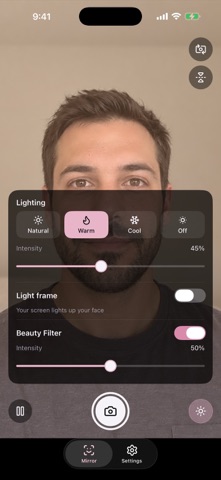
REAL-TIME BEAUTY FILTER • Skin smoothing that keeps the details: eyes, lashes, lips and hair stay sharp • A soft rosy glow for a radiant complexion • Turn it on and set its intensity right from the lighting panel
THE LIGHT YOU WANT • Three moods: natural, warm or cool, with adjustable intensity • With the back camera, your phone's flashlight turns on to light you up
PHOTOS TRUE TO WHAT YOU SEE • Photos keep exactly the framing and filters shown on screen • Full resolution from your device's camera • Double tap anywhere on the screen to take a photo, or use the shutter button • Save to your photos or share in one tap
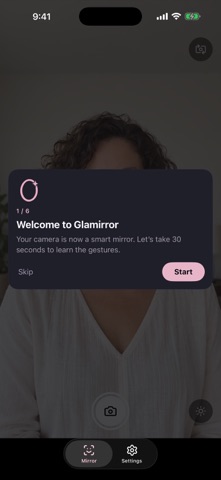
EASY FROM THE FIRST LAUNCH • A 30-second interactive tutorial shows you the gestures, right on the mirror • In English or French, following your phone's language
YOUR PRIVACY FIRST • No account, no ads • Your photos stay on your device: no image is uploaded unless you choose to share it • Anonymous usage statistics (Google Analytics): no photos, no name or email, and you can turn them off anytime in Settings • Glamirror only asks for camera access, and permission to add photos to your library when you save
Les notes des utilisateurs
Connecte-toi pour noter cette appli. Ce qui compte, c'est d'être honnête.
Pas encore de notes. Tu l'as essayée ? Sois le premier à la noter.
Plus d'apps Photo et vidéo
Les meilleures nouvelles apps Photo et vidéo de la semaine Zoetrope ViewerWatch your zoetrope records and slipmats animate through your camera, or live on your…
 Migumento · QR photo albumOne album for every guest
 PlanIt Earth: VR Photo PlannerFor landscape, travel, nature, cityscape, night, time-lapse, star-trail, Milky Way and…
 TonalierYour photos now have an editor
 Superblur: Mosaic & Blur FacesSuperblur hides faces, number plates, names and addresses in your photos and videos…
 SqizziKeep the memories