
Print & Doc Scanner: PDF It!
Non revendiquéeSchool handouts, meeting notes, receipts — even books
Par nakagawa kenta · ProductivitéPourquoi nous l'attendons : Clear value and thoughtful book-scanning features make this a promising pick for students and professionals.



En bref
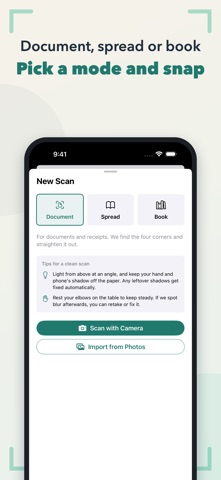
Print & Doc Scanner: PDF It. turns phone photos of handouts, meeting notes, receipts, and books into PDFs. It finds page corners, straightens shots, evens out lighting, and splits open book spreads at the spine. Its standout feature is that all processing and text recognition run on the device, with no account required.
Résumé par Debuts, d'après la fiche de l'App Store.À propos
School handouts, meeting notes, receipts — even books. Snap a photo and PDF it. This scanner does the tidying up for you.
■ Fixes things after you shoot • Finds the four corners and straightens crooked shots • Spots shadows and uneven lighting and evens out the paper • Notices camera shake or blur and says "a retake might be worth it" — retake on the spot or apply the blur fix
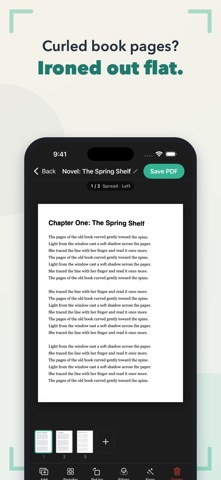
■ Great with books • Shoot an open book as a spread and it's split at the spine automatically • Text lines that curve toward the spine get ironed out flat • Orders pages for left-bound or right-bound books • Mix single-page covers and two-page spreads in one go
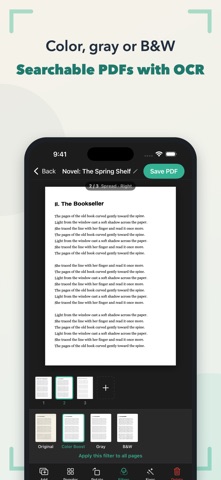
■ Finish as a PDF • Text recognition (OCR) for searchable, copyable PDFs • Four looks: Original, Color Boost, Gray, B&W • Reorder, rotate and delete pages • Share PDFs anywhere via the Files app or the share sheet
■ Private by design • No account, no ads • All image processing and text recognition happen on your device. Your scans never leave it.
Les notes des utilisateurs
Connecte-toi pour noter cette appli. Ce qui compte, c'est d'être honnête.
Pas encore de notes. Tu l'as essayée ? Sois le premier à la noter.
Plus d'apps Productivité
Les meilleures nouvelles apps Productivité de la semaine ChickMark: Habit TrackerChickMark is a simple habit tracker for routines, goals, and reminders
 Dayflint: One Thing a DayToo many priorities?
 DHUDEDHUDE Analityxs es la herramienta de gestión diaria para grupos de restauración y ocio…
 Intent - Scroll by ChoiceTake back control of your screen time
 Whisperly DictationWhisperly turns your voice into clean text
 Densha - Focus TimerEvery focus session is a train ride across Japan