
SartorX
Non revendiquéeUpload forms are picky
Par Cem Cakmakci · Photo et vidéoPourquoi nous l'attendons : A clearly useful, privacy-first utility that solves a real everyday frustration with thorough, honest descriptions and a focused audience.



En bref
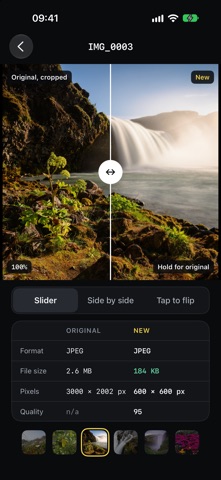
SartorX converts a photo to the format, pixel size and file size that an upload form requires, working from typed text, a scanned page, a screenshot or a preset. It is aimed at people who need to meet a form's photo rules, such as visa, passport or application images. One point stands out: all processing happens on the iPhone, and photos are never uploaded.
Résumé par Debuts, d'après la fiche de l'App Store.À propos
Upload forms are picky. "JPG only. Max 300 KB. 600 × 600 pixels." SartorX converts your photo to what the form asks for: the format, the pixel size and the file size.
TELL IT THE RULE • Type or paste the requirement as the form words it. SartorX reads the format, the pixel size and the size limit out of it. • Or scan it: point the camera at the page, or pick a screenshot or a PDF. • Or start from a preset, such as a visa or passport photo, an application photo, a signature scan, a product image or an email-friendly size. Presets are starting points, not guarantees: official rules change, so check the official source before you submit.
SEE IF IT FITS BEFORE YOU CONVERT • A forecast shows which photos fit cleanly and about how large the result will be. • When a photo can't meet the size limit and the pixel size together, SartorX shows you the options and you choose. • A photo that already meets the rule is not compressed again.
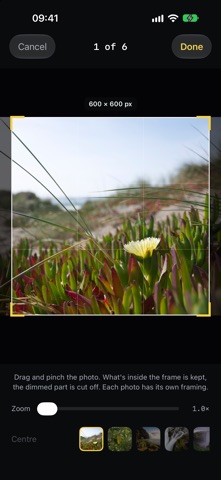
GET THE NUMBER RIGHT • JPEG, PNG or HEIC. • A file size limit in KB or MB, or a range such as 20–50 KB. • Exact pixel dimensions, with a crop frame you position per photo. • A white background, when the form wants one. • Removal of location data from the file.
CHECK THE RESULT • Compare the original and the new file with a slider, side by side, or tap to flip. • See format, file size, pixels and quality for both. • Save to Photos or share. Your originals are not changed.
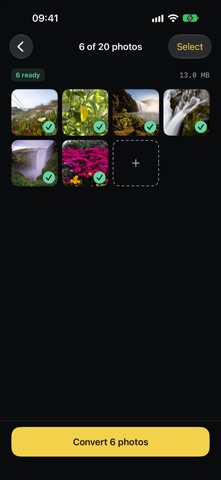
UP TO 20 PHOTOS AT ONCE Convert a batch to the same target, and use the share sheet to send photos to SartorX from Photos or any other app.
PRIVATE BY DESIGN • Everything is done on your iPhone. Photos are not uploaded. • No account, no ads, no analytics, no tracking. • SartorX keeps only your settings, your own presets and a history of targets, not your photos.
Les notes des utilisateurs
Connecte-toi pour noter cette appli. Ce qui compte, c'est d'être honnête.
Pas encore de notes. Tu l'as essayée ? Sois le premier à la noter.
Plus d'apps Photo et vidéo
Les meilleures nouvelles apps Photo et vidéo de la semaine Zoetrope ViewerWatch your zoetrope records and slipmats animate through your camera, or live on your…
 PlanIt Earth: VR Photo PlannerFor landscape, travel, nature, cityscape, night, time-lapse, star-trail, Milky Way and…
 TonalierYour photos now have an editor
 Superblur: Mosaic & Blur FacesSuperblur hides faces, number plates, names and addresses in your photos and videos…
 SqizziKeep the memories
 Photo Widget: Crop & PositionShow your favorite photos on your Home Screen — exactly the way you want