
VCompressor
Non revendiquéeSmaller videos and photos
Par ilya kudravets · Photo et vidéoPourquoi nous l'attendons : Clear value, careful on-device privacy notes, and honest storage caveats make this compressor a promising pick for app explorers.





En bref
VCompressor shrinks videos and photos in your Photos library by saving separate compressed copies, which you can compare with the originals before deciding what to delete. It is aimed at people who want more storage room and prefer to check results first. It runs on the device with no account, and the originals stay in Photos until you confirm deletion.
Résumé par Debuts, d'après la fiche de l'App Store.À propos
Smaller videos and photos. More room for what comes next. VCompressor creates separate copies of files in Photos, so you can check the result and decide whether to keep the originals.
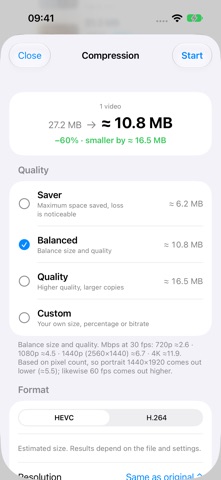
COMPARE BEFORE SAVING Watch the same short clip from the original and compressed video, play them together and zoom in to check details.
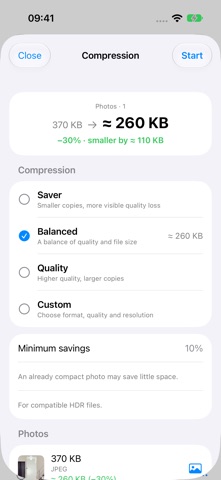
CHOOSE SIZE AND QUALITY Use a preset or set a target in MB, percent or Mbps. For video, choose HEVC or H.264, audio quality and a frame-rate limit.
COMPRESS PHOTOS AND SAVE STILL COPIES OF LIVE PHOTOS Supported photos can be saved as HEIC or JPEG with quality and dimension settings. Source PNG files can be optimized losslessly while keeping their dimensions and transparency. A Live Photo becomes a separate still photo without motion or sound. The live original is unchanged.
WORK THROUGH MULTIPLE FILES Browse by date, album and filters. Copies go to the VCompressor album. Resume unfinished queues without creating completed copies again.
YOU DECIDE WHAT TO DELETE Originals stay in Photos until you confirm deletion. Saving a copy alone does not free storage: both files remain in your library. Deleted originals move to Recently Deleted. With iCloud Photos enabled, deletion syncs to your other devices. Check the saved copy first.
Processing takes place on your device. No account is needed, and files are not uploaded to a developer-operated server for compression. Originals stored only in iCloud need an internet connection. On iPhone and iPad, video compression pauses in the background and resumes when you return.
Supported metadata, including capture date and location, is preserved. Savings depend on the source file and settings; already compact photos may save little space. Re-encoding can reduce quality. Supported HDR video can be kept in HEVC; HDR photos require a compatible gain map and HEIC output. RAW, slow-motion and spatial video, and unsupported HDR or transparency conversions are skipped.
Les notes des utilisateurs
Connecte-toi pour noter cette appli. Ce qui compte, c'est d'être honnête.
Pas encore de notes. Tu l'as essayée ? Sois le premier à la noter.
Plus d'apps Photo et vidéo
Les meilleures nouvelles apps Photo et vidéo de la semaine Zoetrope ViewerWatch your zoetrope records and slipmats animate through your camera, or live on your…
 PlanIt Earth: VR Photo PlannerFor landscape, travel, nature, cityscape, night, time-lapse, star-trail, Milky Way and…
 TonalierYour photos now have an editor
 Superblur: Mosaic & Blur FacesSuperblur hides faces, number plates, names and addresses in your photos and videos…
 SqizziKeep the memories
 Photo Widget: Crop & PositionShow your favorite photos on your Home Screen — exactly the way you want