
Video Editor & Maker: Kleivo
Non revendiquéeTurn your clips into finished videos with music, captions and the framing you want
Par Decods LLC · Photo et vidéoPourquoi nous l'attendons : Clear value, a careful description and privacy-friendly on-device editing make this a strong debut for video creators.


En bref
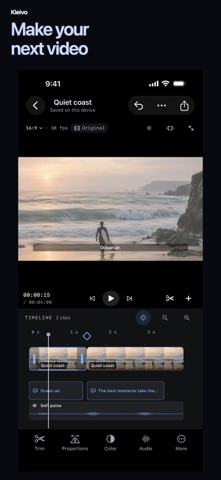
Video Editor & Maker is an iPhone and iPad app for trimming clips, arranging them with photos on one timeline, and adding music, voiceover and captions. It stands out for its on-device caption creation from speech, which runs locally and can be reviewed before it is added.
Résumé par Debuts, d'après la fiche de l'App Store.À propos
Turn your clips into finished videos with music, captions and the framing you want. Kleivo gives you a practical editing workspace on your iPhone or iPad, with no account, ads or added watermark.
MAKE THE CUT Trim, split and arrange your video clips. Bring photos into the same timeline, adjust their duration and build a film from the moments you want to keep. Start with your own media or learn the basics in a short guided edit.
GIVE EVERY FRAME ITS SHAPE Crop, position and rotate your footage. Adjust width and height independently, or keep them linked. Refine color, add transitions and use picture motion to bring a still image to life.
ADD MUSIC AND YOUR VOICE Import your own music from Files and record a voiceover. Adjust timing, volume and fades, and lower a music track while other audio tracks, such as a recorded voiceover, play.
CAPTIONS YOU CAN EDIT Write captions, import SRT or WebVTT files, or create captions from speech with on-device recognition. Review the words and timing before adding them to your film. Automatic recognition depends on the languages supported by your device; manual captions and subtitle import remain available.
KEEP CREATING Add text and picture layers, change clip speed, reverse a moment or hold it with a freeze frame. Keep your project editable and export a separate MP4 or MOV to share or save to Photos.
ON YOUR DEVICE Editing, rendering and speech recognition run locally. Media selected from iCloud or another file provider may need to download before you can edit it. Sharing uses the destination you choose.
Choose a light, black or system appearance, and change the interface language in Settings. Your original media stays untouched.
Les notes des utilisateurs
Connecte-toi pour noter cette appli. Ce qui compte, c'est d'être honnête.
Pas encore de notes. Tu l'as essayée ? Sois le premier à la noter.
Plus d'apps Photo et vidéo
Les meilleures nouvelles apps Photo et vidéo de la semaine Zoetrope ViewerWatch your zoetrope records and slipmats animate through your camera, or live on your…
 PlanIt Earth: VR Photo PlannerFor landscape, travel, nature, cityscape, night, time-lapse, star-trail, Milky Way and…
 TonalierYour photos now have an editor
 Superblur: Mosaic & Blur FacesSuperblur hides faces, number plates, names and addresses in your photos and videos…
 SqizziKeep the memories
 Photo Widget: Crop & PositionShow your favorite photos on your Home Screen — exactly the way you want