Graycard: RAW Photo Converter
Non rivendicataGraycard turns a folder of camera photos into JPEGs ready to share
Di SIDESWIPE LABS PRIVATE LIMITED · Foto e videoPerché ce lo aspettiamo: A clear, useful photo workflow with strong privacy and sharing features, though it has no ratings yet and a single language.


In breve
Graycard: RAW Photo Converter is a Mac app that flags blurry, closed-eye, and duplicate frames in a folder of RAW or JPEG photos, then grades and exports the keepers as share-ready JPEGs. It is aimed at photographers and anyone handing over a shoot, and nothing is uploaded. One detail that stands out is that the app keeps the sharing JPEGs free of location data while leaving shot date and camera in the file.
Riepilogo di Debuts, basato sulla scheda dell'App Store.Informazioni
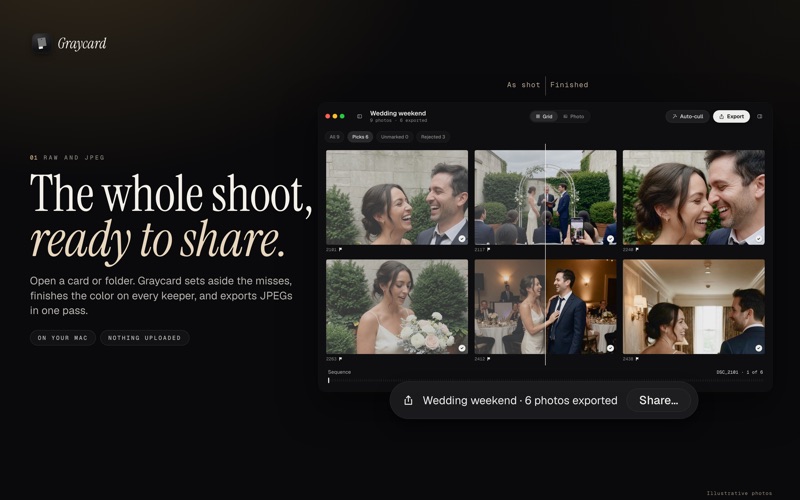
Graycard turns a folder of camera photos into JPEGs ready to share. Open RAW or JPEG straight from the card or a drive. Graycard sets aside the blurry and eyes-closed frames, finishes the color on every keeper, and exports the whole shoot in one pass. Nothing is uploaded.
A wedding, a trip, a match day, a portrait session, or every photo your photographer handed over: open the folder and go.
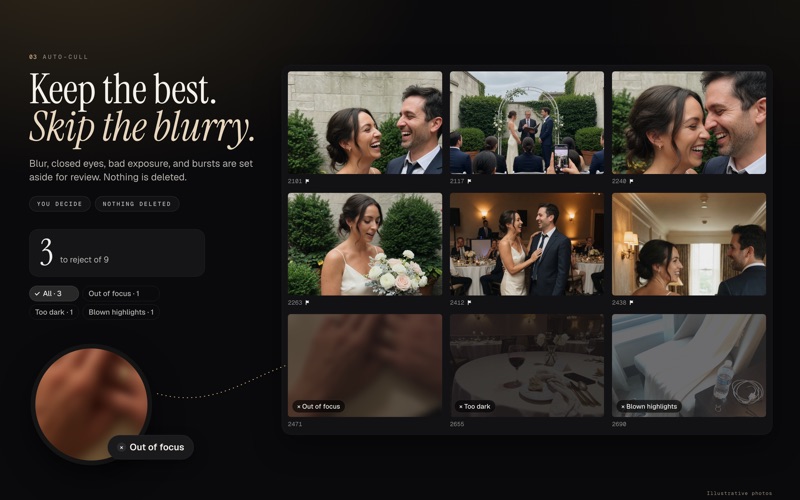
KEEP THE BEST • Auto-cull flags blur, closed eyes, bad exposure, and burst duplicates on this Mac. You review every flag. Nothing is deleted. • Rate, pick, and reject from the keyboard. The grid reads the camera's own previews, so a big folder opens without an import.
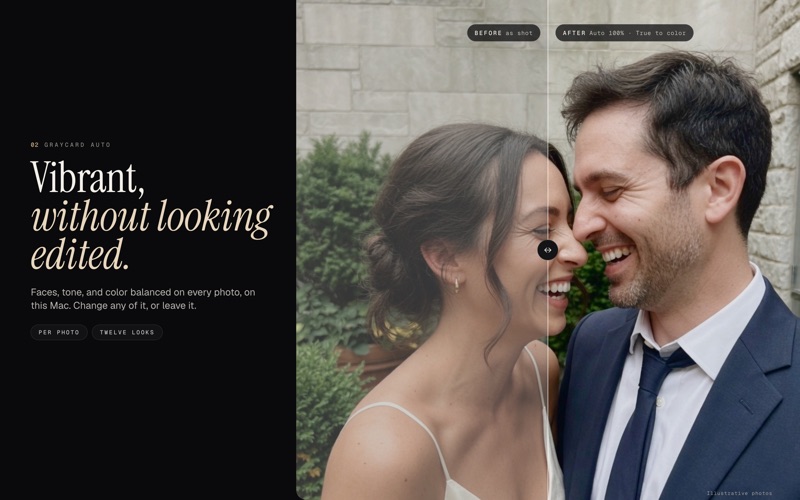
FINISH THE COLOR • Graycard Auto, Graycard's own color engine, balances faces, tone, and color on each photo, on your Mac. The result stays natural. • Twelve looks, from true to color to film and black and white, each with an intensity slider. Every look previews on your own photo. • Lock one white balance across mixed light, or copy a look onto every photo you kept, so the whole day matches.
READY FOR WHEREVER IT GOES • Export for sharing, full size, or print. Sharing JPEGs are 2048 px, tagged sRGB, with location removed. Then share straight to AirDrop, Messages, Mail, or Photos. • Every JPEG carries an sRGB or Display P3 color profile, so color holds up on phones and the web. • Shot date and camera stay in the file. Location stays or goes, your choice. • A RAW and its JPEG count as one photo. Originals are never changed.
FOR PHOTOGRAPHERS • Hand over every photo graded, not only the selects. Add your studio logo, write XMP sidecars with ratings and white balance, keep IPTC credit, and export 16-bit TIFF when you need it.
PRIVATE BY DESIGN Photos stay on this Mac. There is no account and no library to import into. Analytics is off until you turn it on in Settings › Privacy. When it's on, anonymized events go to PostHog in the EU. Photos, folder names, and client names are never included.
FREE AND PRO Your first 80 photos are free to export, with every tool included. Exporting those photos again stays free. Graycard Pro removes the limit, monthly, yearly, or once as a lifetime purchase. Prices are shown in the App Store before you buy. Every plan supports Family Sharing.
REQUIREMENTS macOS 26 or later.
GOOD TO KNOW • Color changes apply to the whole photo. There are no masks or retouching brushes. • Auto-cull reads the camera's embedded previews, not the full RAW. • Mac only.
Subscriptions renew automatically unless turned off at least 24 hours before the end of the period. Manage or cancel in the App Store under Account Settings.
Privacy Policy: https://graycard.io/privacy Terms of Use (EULA): https://www.apple.com/legal/internet-services/itunes/dev/stdeula/ Graycard Terms: https://graycard.io/terms
Le valutazioni delle persone
Accedi per valutare questa app. Conta essere sinceri.
Ancora nessuna valutazione. L'hai provata? Sii il primo a valutarla.
Altre app di Foto e video
Le migliori nuove app di Foto e video di questa settimana Zoetrope ViewerWatch your zoetrope records and slipmats animate through your camera, or live on your…
 PlanIt Earth: VR Photo PlannerFor landscape, travel, nature, cityscape, night, time-lapse, star-trail, Milky Way and…
 TonalierYour photos now have an editor
 Superblur: Mosaic & Blur FacesSuperblur hides faces, number plates, names and addresses in your photos and videos…
 SqizziKeep the memories
 Photo Widget: Crop & PositionShow your favorite photos on your Home Screen — exactly the way you want