
ToVue: Virtual Drone Travel
Non rivendicataExplore 3D maps with a virtual drone camera on iPhone and iPad
Di Kazuki Kuraya · ViaggiPerché ce lo aspettiamo: The detailed description and clear controls make the virtual drone idea easy to understand and appealing.



In breve
ToVue: Virtual Drone Travel is a free iPhone and iPad app for exploring 3D Apple Maps with a virtual drone camera. Flight uses on-screen sticks or a single One-Hand stick, and the shutter captures the map without the controls. Ads are shown unless a one-time purchase is made, and the app never uses GPS.
Riepilogo di Debuts, basato sulla scheda dell'App Store.Informazioni
Explore 3D maps with a virtual drone camera on iPhone and iPad. Move through cities with on-screen sticks, or with one hand, and capture the map without the controls.
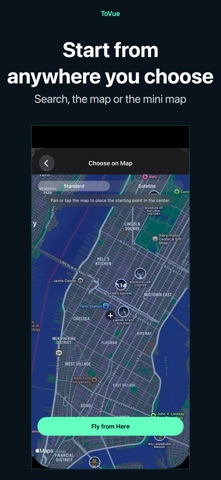
CHOOSE A PLACE • ToVue opens above a well-known station or capital chosen from your device's Region setting. It never uses GPS and never asks for your location. • Search for places, or pick a spot on a standard or satellite map, and start flying from there.
FLIGHT CONTROLS • Two on-screen sticks in a fixed Mode 2 layout: the left stick climbs, descends and turns; the right stick moves forward, back and sideways. • One-Hand Mode in the menu: a single stick. Touch it to fly forward, push up or down to climb or descend, and left or right to turn. • Pan, pinch, rotate and tilt the map directly. • A 3D tilt slider on the right edge tilts the view from straight down toward the horizon. You can hide it in the menu. • Adjust flight, climb and turn speeds in the menu. • Show or hide place and building labels.
CAPTURE AND SHARE • The shutter captures the map itself, without the controls. • Photos can show the place name, coordinates and altitude, or you can hide them for a cleaner image. • Share or save your photo from the preview right after capture. Apple Maps attribution always stays on the photo.
VIDEO AND MINI MAP • Switch between Photo and Video like the Camera app and record your flight as it happens. • Recordings show the map itself, without the controls. You can choose to include the sticks or the mini map. • Pick the frame rate and resolution in the menu. • A mini map in the top corner shows where you are and which way you face. Choose standard or satellite, and tap it to pick a new place on the map.
FREE, WITH A ONE-TIME UPGRADE ToVue is free and shows ads: a banner, plus an occasional full-screen ad right after you move to a new place (never while you are flying). A one-time in-app purchase removes all ads and the ToVue logo on photos and videos. It is not a subscription, and you can restore it on your other devices signed in with the same Apple Account.
GOOD TO KNOW • ToVue is a virtual viewer for fun and exploration. It does not control a real drone and is not a navigation or flight-planning tool. • Altitude is the height of the virtual camera, not a measured height above the ground. • 3D buildings and terrain come from Apple Maps and vary by area; some places are shown in less detail. • An internet connection is required. No account or sign-up needed.
Le valutazioni delle persone
Accedi per valutare questa app. Conta essere sinceri.
Ancora nessuna valutazione. L'hai provata? Sii il primo a valutarla.
Altre app di Viaggi
Le migliori nuove app di Viaggi di questa settimana ItineroKeep your itinerary and travel details together before, during and after your trip
 HissiFür alle, die auf Aufzüge angewiesen sind: Rollstuhlfahrer:innen, Eltern mit…
 Leave the ResortLeave the Resort is the travel app that stops you getting ripped off
 Schengen Days: 90/180 PlannerJust enter your entry and exit dates
 Trova Treasure HuntsTurn a walk through the city into a treasure hunt
 LeaveTime — When to LeaveLeaveTime answers one question: what time do I need to leave to make my flight?