
Filmlume: Negative to Positive
Ikke hentetYour 35mm and 120mm film negatives, turned into photos with the colour of a classic lab…
Av MARIUSZ MALISZEWSKI · Foto og videoHvorfor vi forventer det: A thoughtful, well-described app with clear value for film photographers, detailed controls, and broad device support across iPhone, iPad and Mac.



Kort fortalt
Filmlume: Negative to Positive turns photos of 35mm and 120mm film negatives or slides into finished positives at full resolution. It is aimed at people who scan film from a light source with any camera or an iPhone, and it uses a default lab-style colour setting. One feature that stands out is a dust tool that shows what it will remove before applying it and tries to leave long thin objects like wires untouched.
Sammendrag fra Debuts, basert på oppføringen i App Store.Om appen
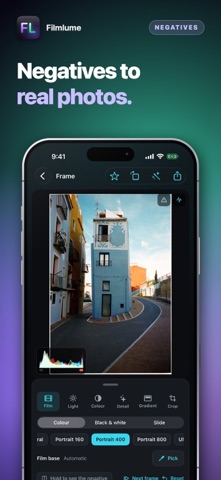
Your 35mm and 120mm film negatives, turned into photos with the colour of a classic lab scan. Photograph a roll on a light with any camera — a mirrorless on a copy stand, or your iPhone over an iPad showing white — bring the pictures in from Photos or Files, and every frame becomes a finished positive at full resolution.
CLASSIC LAB COLOUR • On by default: every frame balanced on its own, with dense blacks, warm skin and greens that lean teal — the look of the minilab scanners of the film years. Slides get the same lab look. Switch to Neutral for a flat scan to grade elsewhere.
READ LIKE A LAB SCANNER • The orange mask of colour negative divided out using the film's own base, each dye layer balanced between the frame's darkest and brightest detail. • RAW of any make, DNG, ProRAW, 16-bit TIFF, HEIC, JPEG and PNG at full size and bit depth; a 500 MB TIFF opens in a moment.
37 FILM LOOKS • Starting points in the spirit of colour, black-and-white and slide stocks, each our own model.
A TONE CURVE YOU DRAW, WITH POINTS • Touch the line to add a point, drag to bend the curve, double-tap to take it away. One curve for the whole picture and one each for red, green and blue.
DUST, TAKEN OUT WITH CARE • Small specks and dust disappear; long thin things — wires, railings, aerials, branches — stay where they are. See exactly what it removes first, and lower Size or Sensitivity if it takes too much.
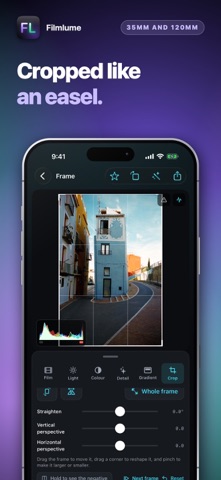
A PRINTER'S CONTROLS • Exposure, contrast, highlights, shadows, whites, blacks, warmth, tint, saturation and grain, live under your finger; a double tap returns a slider to zero. • Graduated and radial filters with their own light and colour, up to six on a frame. • C-41 colour balance like an enlarger's head, and a colour mixer (HSL) for eight colours. • Take the film base from the rebate, or tap something grey to balance exactly. • Crop to 3:2, 6×6, 6×7, 4:3, 16:9 or freely; rotate, mirror, straighten and square the perspective. Nothing is destroyed.
KEEP IT • Full resolution, always: 10-bit HEIF to Photos, a JPEG to share, or a 16-bit TIFF. • Rolls kept with their film; star the keepers and save them in one go. • Your photos, on film: print any picture in one of the film looks or in six CCD sensor looks. • Light table: a second device shows an even white light for the negative.
ANALOG, WHEN YOU WANT IT • Halation, light leaks from either edge, a print or film border on export; Pushed, Pulled, Expired and Cross Process presets. Nothing analog is added unless you add it.
SIRI AND SHORTCUTS • “New roll in Filmlume” and “Import negatives into Filmlume”, by voice or in Shortcuts.
A WORKSPACE THAT FILLS THE WINDOW • A dark workspace where colour is easy to judge, laid out for whatever window it is given: iPhone, iPad and iPhone Duo — folded, unfolded or on one half of the large screen. Fold the tools away to give the picture the whole window. Requires iOS 17 or later.
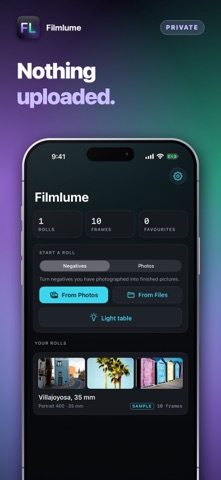
PRIVACY • No account and nothing uploaded: scans stay on your device until you save or share them.
Slik vurderer folk den
Logg inn for å vurdere denne appen. Det ærlige svaret teller.
Ingen vurderinger ennå. Har du prøvd den? Vær den første til å vurdere.
Flere Foto og video-apper
Ukens beste nye Foto og video-apper Zoetrope ViewerWatch your zoetrope records and slipmats animate through your camera, or live on your…
 PlanIt Earth: VR Photo PlannerFor landscape, travel, nature, cityscape, night, time-lapse, star-trail, Milky Way and…
 TonalierYour photos now have an editor
 Superblur: Mosaic & Blur FacesSuperblur hides faces, number plates, names and addresses in your photos and videos…
 SqizziKeep the memories
 Photo Widget: Crop & PositionShow your favorite photos on your Home Screen — exactly the way you want