
grospeed
Ikke hentetgrospeed brings your GPS speed and favorite routes together
Av Adrian Grochla · ReiseHvorfor vi forventer det: The listing is thorough and honest about its limits, with clear value for GPX route and speed tracking.


Om appen
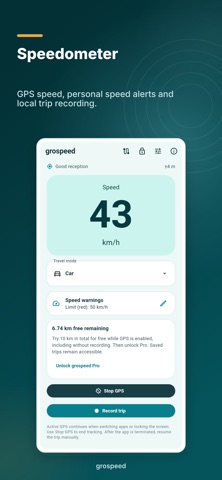
grospeed brings your GPS speed and favorite routes together. See your speed in km/h, mph or m/s. Switch speed alerts off, set one red limit, or add a yellow early warning. Sound and vibration depend on your device and settings. Unavailable or unreliable readings remain unknown.
Rename your routes and revisit them: a regular run, a hike, a mountain bike ride, a city tour or a woodland walk. Import GPX tracks or routes, preview them and save them locally. Share a named course with friends as a grospeed track; this file leaves out your recording dates and performance data. Friends can save the file and import it from the route library.
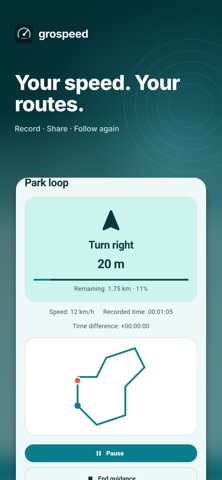
Start following a saved route and go to its start point. Offline guidance uses the recorded geometry for left, right and turn-around hints, progress and off-route warnings. It does not provide street maps, road-aware routing, roundabout exit numbers or automatic rerouting. Compare completed attempts locally; time differences require a timed reference. Distance and average speed appear in the app; no extra statistics are added to GPX.
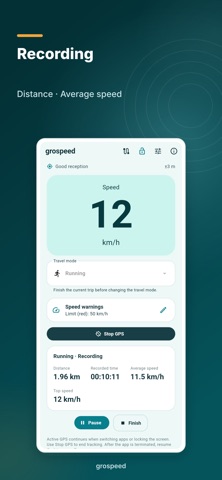
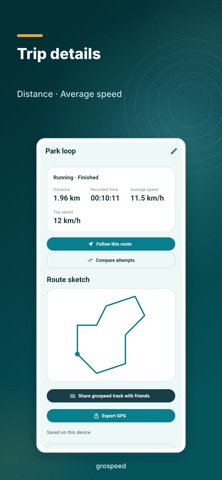
Choose car, bicycle, walking, running, train or boat before recording. Start, pause, resume and finish a trip yourself. Review distance, recorded time, maximum speed and a local track sketch. Pauses and signal gaps remain separate track segments.
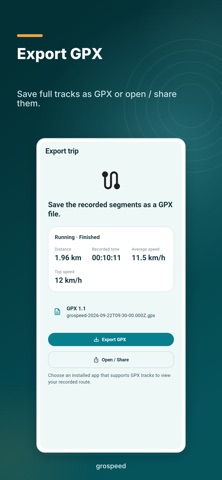
Save the full recording as a GPX file, or use Open / Share to pass it to a compatible installed app. The receiving app decides whether and how it imports the file. Saved trips remain available for viewing, exporting, sharing and deleting after the free distance is used up.
Active GPS continues when switching apps or locking the screen. Use Stop GPS to end tracking. After the app is terminated, resume the trip manually.
In Settings, choose whether GPS turns on when the app starts and whether the display stays awake while GPS is active in the foreground. Recording still starts separately; recovered recordings remain paused.
Apple Watch works as an iPhone companion: see your speed and recording status, start or resume recording, and stop to save. GPS and recordings come from the connected iPhone. The watch does not record independently.
Try 10 km in total for free while GPS is enabled, including without recording. Then unlock Pro. Saved trips remain accessible.
Tap the lock at the top to purchase Pro or restore a purchase. Once unlocked, the remaining-distance card disappears; the open lock shows your Pro status. Pro removes the distance limit with a one-time purchase, without a subscription. The purchase screen shows the current store price. Buying Pro does not switch GPS on.
The free allowance is used whenever GPS is active, including without recording and in the background. Deleting trips does not reset it. Trip data stays on this device; no account is required. GPS reception and device hardware affect the available measurements.
Slik vurderer folk den
Logg inn for å vurdere denne appen. Det ærlige svaret teller.
Ingen vurderinger ennå. Har du prøvd den? Vær den første til å vurdere.
Flere Reise-apper
Ukens beste nye Reise-apper ItineroKeep your itinerary and travel details together before, during and after your trip
 HissiFür alle, die auf Aufzüge angewiesen sind: Rollstuhlfahrer:innen, Eltern mit…
 FjellFjell answers one question: how long would it take to walk there?
 Leave the ResortLeave the Resort is the travel app that stops you getting ripped off
 Schengen Days: 90/180 PlannerJust enter your entry and exit dates
 Trova Treasure HuntsTurn a walk through the city into a treasure hunt