
All Document Reader: Viewer
Niet geclaimdAll Document Reader: Viewer is the all-in-one document app for reading, editing…
Door Kruti Italiya · ProductiviteitWaarom we dit verwachten: Its privacy-first, offline design and broad file format support make it a useful all-in-one document companion.



Kort samengevat
All Document Reader: Viewer is a productivity app for opening, scanning, editing, and organizing PDFs, Word files, text, Markdown, and images directly on an iPhone or iPad. It runs locally with no account, cloud upload, or internet connection required. One notable feature is that multi-page camera scans are automatically combined into a single PDF.
Samenvatting door Debuts, gebaseerd op de vermelding in de App Store.Over deze app
All Document Reader: Viewer is the all-in-one document app for reading, editing, scanning, and organizing your files — PDFs, Word documents, text files, and images — entirely on your iPhone and iPad, with no account, no cloud upload, and no internet required.
Whether you need to quickly open a PDF, scan a paper document, jot down notes in rich text, or keep your files organized and easy to find, this app handles it all in one clean, fast, privacy-first package.
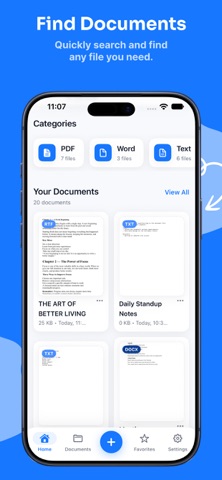
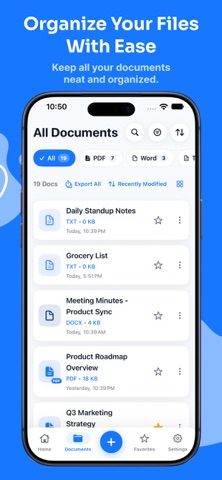
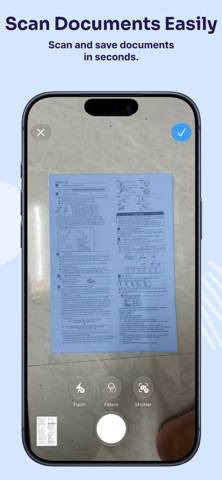
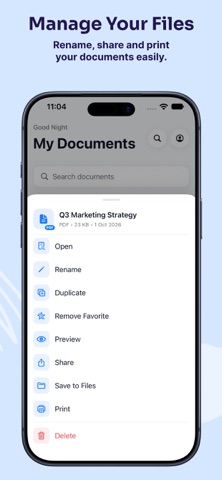
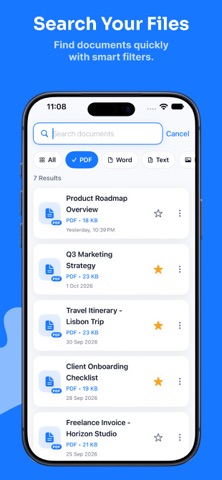
POWERFUL DOCUMENT MANAGEMENT • Import files directly from the Files app — PDF, Word (.doc/.docx), Pages, plain text, Markdown, CSV, JSON, RTF/RTFD, and common image formats • Create new plain text or rich text documents right inside the app • Scan paper documents to PDF using your camera — multi-page scans are automatically combined into a single file • Rename, duplicate, and delete documents with ease • Star your most-used files as Favorites for instant access • Recently opened documents are tracked automatically • Documents are auto-sorted into categories: PDF, Word, Text, Images, and Other • Sort and filter by name, date, size, or type • Browse in grid or list view — whichever you prefer • Fast local search by file name, type, size, and date
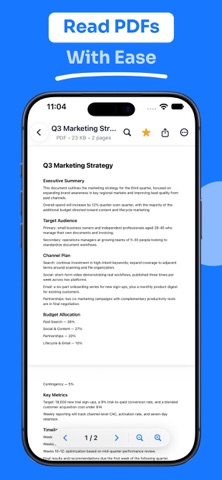
BUILT-IN READER • Smooth PDF viewing with continuous or page-by-page scrolling, pinch-to-zoom, and a "Go to Page" jumper • Dedicated viewers for text, Markdown, and rich text files • Full-featured image viewer with pinch and pan • In-document search with highlighted matches and next/previous navigation • See file size, type, page count, and dates at a glance • Customize default zoom, page numbers, and scrolling style
EDIT ON THE GO • Full rich text editor for .rtf and plain text files • Complete formatting toolbar: bold, italic, underline, strikethrough, text color, highlighting, font size, alignment, lists, indents, and undo/redo • Convert plain text into rich text whenever you need more formatting • Autosave keeps your work safe, with manual save and unsaved-changes warnings • Live preview before you close the editor
SHARE & EXPORT ANYWHERE • Share via AirDrop, Messages, Mail, or any installed app • Export directly to the Files app • Print documents and formatted text straight from the app • Convert text documents to PDF • Share this app with friends and colleagues
STAY ORGANIZED • Dedicated Favorites and Recent Documents views • Visual storage breakdown by document category • Clear cached thumbnails and temporary files anytime — without touching your actual documents
MADE YOUR WAY • Clean, light interface designed for comfortable reading • Customizable default sort order and file info display • Adjustable reader and layout preferences
ACCESSIBLE TO EVERYONE • Full VoiceOver support with clear labels and hints • Dynamic Type for comfortable reading at any text size • Visual indicators that don't rely on color alone
YOUR PRIVACY, PROTECTED All your documents stay stored locally on your device, inside the app's private storage. Nothing is ever uploaded to a server unless you choose to share or export a file yourself. No accounts, no tracking, no surprises.
Download today and keep every document — PDF, Word, text, and images — organized, readable, and editable, all in one secure app.
Privacy : https://alldocumentreaderviewerios.blogspot.com/2026/10/privacy-policy.html Terms of use : https://alldocumentreaderviewerios.blogspot.com/2026/10/terms-of-use.html EULA : https://alldocumentreaderviewerios.blogspot.com/2026/10/end-user-license-agreement-eula.html
Zo beoordelen mensen de app
Log in om deze app te beoordelen. Eerlijk is wat telt.
Nog geen beoordelingen. Heb je de app geprobeerd? Beoordeel hem als eerste.
Meer apps in Productiviteit
Beste nieuwe apps in Productiviteit van deze week ChickMark: Habit TrackerChickMark is a simple habit tracker for routines, goals, and reminders
 Dayflint: One Thing a DayToo many priorities?
 DHUDEDHUDE Analityxs es la herramienta de gestión diaria para grupos de restauración y ocio…
 Intent - Scroll by ChoiceTake back control of your screen time
 Whisperly DictationWhisperly turns your voice into clean text
 Densha - Focus TimerEvery focus session is a train ride across Japan